“Human-in-the-loop” is often a vague reassurance. This guide looks for the actual mechanism: what the AI proposes, what a person can inspect, which action is blocked, and whether the team can trace what happened.
Lavender is the clearest low-risk choice because it coaches a seller instead of taking control. Reply.io Jason has the most explicit approval queue for a higher-autonomy AI SDR. Outreach offers the strongest documented admin governance. Regie.ai keeps social actions visible as rep tasks. Claygent gives builders test and permission controls, while Common Room grounds recommendations in consolidated buyer context.
Inline coachingLavender
Approval queueReply.io Jason
Enterprise control planeOutreach
Seller task controlRegie.ai
Builder testingClaygent
Evidence-rich contextCommon Room
Human-in-the-loop is a control, not a slogan
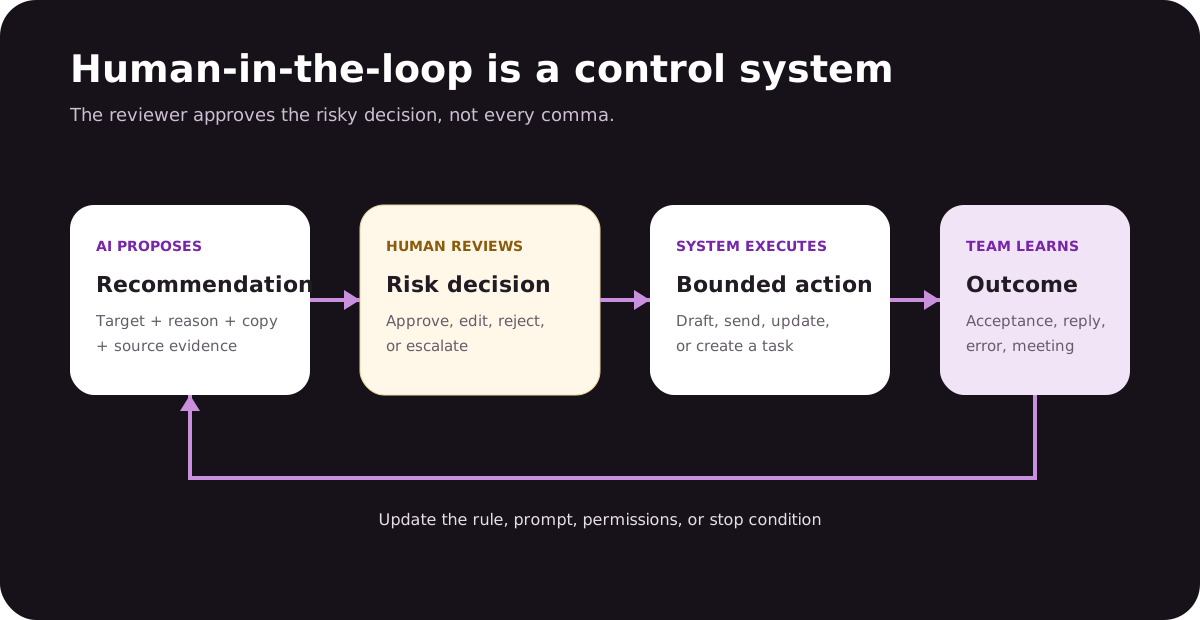
A person is meaningfully “in the loop” only when the workflow exposes enough context to make a decision and gives that person authority to approve, edit, reject, or escalate before a risky action. A dashboard that shows what the AI already sent is monitoring, not approval.
ProposeAI prepares a bounded output
ExplainSources, reason, uncertainty
ReviewApprove, edit, reject
ExecuteOnly within permission
LearnRecord outcome and correction
The right approval point depends on risk. A rep can safely accept or ignore an email-coaching suggestion. A system that selects an account, mentions a sensitive signal, sends through a named LinkedIn profile, or writes to CRM needs a stronger gate and audit trail.
How we evaluated control
We reviewed official product pages, documentation, help centers, and public plan pages on Aug. 20, 2026. We looked for a documented proposal, reviewer, action boundary, rejection path, and administrative control. The products span different jobs because this is a control-pattern guide, not a claim that every vendor competes head-to-head.
Preview is not enough: the reviewer must be able to change or stop the action.
Permissions matter: read, draft, write, enroll, send, and reply are separate powers.
Evidence matters: a reviewer cannot assess a recommendation without its context and source.
No performance ranking: we did not treat vendor case studies as comparable evidence.
Related-party disclosure: Overloop and YourMax.ai are operated by Sortlist SA. They are kept outside the six-product ItemList and discussed only as adjacent layers.
The reviewer should own the risky decision; routine formatting and data gathering can remain automated.
Human-in-the-loop AI sales tools compared
Tool
AI prepares
Human controls
Blocked action
Best fit
Lavender
Email draft, score, and coaching
Accepts, edits, or ignores
Seller still sends
Individual and team email quality
Reply.io Jason
Research, sequence, and replies
Copilot mode and approval queue
Pending agent action
Governed AI SDR
Outreach
Research, personalization, and recommendations
Admin access plus rep review
Feature, profile, or suggestion
Enterprise sales organizations
Regie.ai
Prioritized work, messages, and social tasks
Seller executes visible tasks
Identity-bound social action
Agent + rep prospecting
Claygent
Research, classification, scoring, and copy fields
Builder tests and publishes
Workflow deployment
GTM engineering
Common Room
Buyer context, research, priority, and drafts
Rep verifies and acts
Seller adoption layer
Signal-rich GTM teams
1. Lavender
Inline email coach
Lavender is the simplest example of a genuine human-in-the-loop sales tool. It analyzes an email or template, suggests a draft, adds recipient context, scores the message, and recommends edits. The seller remains the author and sender. There is no ambiguity about who owns the final communication.
That narrow scope is a strength when the primary risk is poor email quality rather than targeting or workflow automation. Lavender works inside common inbox and sales-engagement environments, so the feedback arrives where the seller writes. Team plans add aggregate analytics and coaching visibility, but the core loop remains suggestion → human edit → human send.
Best forReps and managers improving individual sales emails.
Review surfaceInline score, recommendation, personalization, and draft.
Human authorityThe seller accepts, changes, ignores, and sends.
Watchout: Lavender does not solve account selection, signal validity, contact data, or sequence governance. It improves a message inside a larger process.
Reply.io Jason covers a much larger risk surface than Lavender: prospecting, research, multichannel sequence creation, autopilot actions, conversations, and meeting workflows. The reason it ranks highly for this topic is not its autonomy; it is the explicit control surface. Reply's official AI SDR API documents an approval queue alongside knowledge bases, offers, playbooks, and autopilot sequences.
That design lets a team supervise an agent at the level of pending work rather than inspecting a report after the send. Reply also offers copilot and autopilot modes. A responsible rollout should begin with copilot or targeted approvals, use real negative cases, and expand only after reviewers understand the system's failure patterns.
Best forTeams delegating SDR work while keeping approval gates.
Review surfaceApproval queue plus copilot workflows.
Human authoritySupervise pending actions and agent configuration.
Watchout: approval fatigue is real. Gate high-risk actions and sample lower-risk output rather than forcing a manager to click through an unprioritized queue.
Reply.io public homepage capture presenting its sales AI platform. This is not the authenticated Jason approval queue or a hands-on product test.
Outreach documents the most comprehensive administrative layer in this group. Its AI Control Hub lets an organization see eligible AI features, set org-wide access, turn individual capabilities on or off, and restrict some features to teams. Research Agents also have profile-level create, run, read, update, and delete permissions.
At the user level, Personalization Agents draft email, call, and LinkedIn content; the vendor recommends preview testing prompts and limiting prompt creation to administrators, content committees, or enablement owners. Deal Agent suggestions can be accepted, edited, or configured for automatic updates. Together, those controls support different review models instead of one global “AI on” switch.
Best forEnterprises that need role-based AI governance.
Review surfaceAdmin control hub, profile permissions, previews, and suggestions.
Human authorityEnable, restrict, review, edit, accept, or disable.
Watchout: governance features can create a false sense of safety if nobody owns configuration review. Assign an accountable operator and audit both permissions and outcomes.
Outreach public website capture. It is not the AI Control Hub, a product-interface capture, or proof of hands-on testing.
RegieGO’s control point is operational. Agents can source and enrich prospects, monitor why-now signals, draft messages, prepare calls, and organize follow-up, while the rep works from one queue. Its current product page states that LinkedIn touches come to the seller as tasks and are never sent as bot messages.
This is useful for identity-bound channels. The system reduces list preparation and context switching, but the seller still owns the LinkedIn action and can inspect the prospect and evidence before acting. It is not a hands-off autonomous SDR; for teams protecting personal accounts and brand, that can be the better design.
Best forProspecting teams that want agents to prepare rep work.
Review surfaceOne queue for email, calls, and seller-sent LinkedIn tasks.
Human authorityThe seller retains identity-bound social actions.
Watchout: ask which email steps can run after setup, which always require a person, and how skipped or edited recommendations affect later agent work.
Claygent places the human loop with the workflow builder. Editors can create and modify agents, viewers can use approved agents, and builders can test inputs before deploying an agent into a table. That makes Clay a good fit when the organization wants to encode its own research, scoring, classification, or copy rules rather than buy a prepackaged SDR behavior.
The reviewer should focus on the prompt, source use, test cases, and downstream action. Row-by-row review is helpful during development but does not scale as the primary control. Version history and permissions support governance, yet the team must still define what a failed answer looks like and what happens when a source is missing.
Best forGTM engineering teams that own workflow design.
Review surfaceBuilder tests, version history, editor and viewer permissions.
Human authorityDesign, test, approve, deploy, and revise the agent.
Watchout: a test on easy examples is not a control. Include missing data, contradictory sources, deceptive fits, and outputs the workflow must refuse to generate.
Common Room's human loop starts with better context. RoomieAI Spark can combine segment qualification, recent activity, fit, account information, and recommended next actions, then surface the result in Common Room, Slack, or email. The rep receives a packet that is easier to judge than a raw intent alert.
RoomieAI also supports message generation and more automated activation. Common Room's own guidance acknowledges that complex prompting can increase hallucination risk and recommends reviewing output. That makes the quality of the evidence and the chosen action boundary central to the rollout.
Best forTeams with rich first-party and ecosystem buyer signals.
Review surfaceContextual alert, source activity, fit, and suggested action.
Human authorityRep verifies context and decides how to act.
Watchout: an AI summary can make weak identity resolution look authoritative. Keep the underlying activity and account match available to the reviewer.
Name the decision. “Manager approval” is vague. “Approve whether this account belongs in the campaign” is auditable.
Show the evidence. Include source links, observation dates, confidence, contradictory data, and the rule that triggered the recommendation.
Give the reviewer real choices. Approve, edit, reject, defer, and escalate should change the workflow state.
Keep the audit trail. Record the AI output, reviewer, change, final action, and outcome.
Learn from corrections. A rejection should update a prompt, rule, source, or permission. It should not disappear into an activity log.
Review the smallest risky unit. If the account and claim are high risk but the email grammar is not, approve targeting and factual content while letting the tool handle routine phrasing. That keeps the loop usable without surrendering control.
Related guides: compare full execution workflows in AI outbound tools, then use the AI sales-agent job map to decide which bounded job should receive autonomy.
Where YourMax.ai and Overloop fit
YourMax.ai
Max creates a reviewable lead recommendation from supported public signals: ICP match, enrichment, source evidence, and an accept-or-reject step before routing.
Boundary: Max is a lead-sourcing layer, not a sender or general-purpose human-in-the-loop sales platform.
Disclosure: Sortlist SA operates both products and publishes this site. They are not included in the ranked ItemList.
Frequently asked questions
What does human-in-the-loop mean in sales AI?
It means a person retains authority over a defined high-risk decision while AI prepares research, recommendations, drafts, or bounded actions.
Which sales AI decisions should require human approval?
At minimum, review account selection, sensitive signals, factual claims, first-touch message angles, permission changes, and replies involving objections, pricing, legal issues, or opt-outs.
Is a draft preview enough to count as human-in-the-loop?
No. A useful control must let a person understand the context, approve, edit, reject, or escalate, and prevent the action from continuing when approval is absent.
Can human review be removed later?
Some low-risk review can be reduced after the workflow is measured on representative cases, but stop conditions, audit trails, and escalation paths should remain.
Are Overloop and YourMax.ai ranked here?
No. They are related products operated by Sortlist SA and are discussed separately as adjacent execution and lead-sourcing layers.
Publisher note
Related-party disclosure: Max and Overloop are distinct products operated by Sortlist SA. We keep both outside the independent ranking, use current vendor-controlled sources, and label website captures honestly. Controls and plan entitlements can change; verify them in the proposed configuration before purchase.


 Lavender
 Reply.io Jason
 Outreach
 Regie.ai
 Claygent
 Common Room

 YourMax.ai
 Overloop