

Sales appointment setting books more qualified meetings when four levers click together: a tight ICP filter, a single-channel cadence run daily, scripts that lead with one trigger and one binary ask, and follow-up that runs 8-12 touches over 14-21 days. Top setters convert 25% of conversations to booked, with 70%+ held rates. We break down the daily workflow, qualification framework (BANT or MEDDIC-lite), and the metrics that prove the system is working. Full playbook follows.
If your appointment setting feels busy but your calendar stays empty, you don’t have a lead problem, you have a system problem. You can send 100 emails, make 50 calls, and still end the week with “circling back” instead of booked meetings.
Appointment setting matters more now because buyers reply later, compare options faster, and punish vague outreach with silence. Your reps’ time is also more expensive, so every unqualified meeting steals focus from deals that could close.
This article gives you a practical playbook to book more meetings fast: quick setup, tighter qualification, scripts that sound human, follow-up that doesn’t slip, process-driven execution, and the metrics that tell you what to fix. You’ll also see when it makes sense to hire, outsource, or use AI tools like Overloop for B2B lead generation and email automation.
The 30-minute sales appointment setting playbook
Are you trying to “book a meeting,” or are you trying to book one specific next step that your buyer will actually say yes to? [HBR]
You set more meetings when you pick one clear offer, one clear audience, and one repeatable workflow before you send a single message. When those three are fuzzy, your outreach turns into random acts of prospecting, and even good replies stall out.
Think of this as the minimum viable system: a tight meeting ask, a narrow list, one channel, and frictionless scheduling. Tools like Overloop fit neatly here because they help you keep targeting, sequencing, and follow-up consistent when your day gets busy.
Pick the meeting you’re actually trying to book (and why it’s worth 15–30 minutes)
Book a “diagnosis” meeting, not a “demo,” unless your product is truly self-evident in 5 minutes. A 15–30 minute slot works because it feels low-risk for the prospect and forces you to keep the scope tight.
Make the value exchange explicit: “In 20 minutes, we’ll confirm whether X is happening, map the decision path, and share two options.” That’s more concrete than “learn about our platform,” and it sets up a clean handoff to a longer meeting only if there’s signal.
Define your ICP and trigger list so you stop chasing bad-fit leads
Your ICP is a filter, not a slogan. Write it so a new SDR can tell in 30 seconds whether a company belongs on the list.
Add a trigger list so you contact people when timing is on your side. Examples include a new VP hire, a team hitting a growth milestone, a tool change, or a new compliance requirement that creates urgency.
Choose one primary channel and a simple cadence you can run daily
One channel beats three half-run channels. Pick the place where your buyers reliably respond (often email for B2B, sometimes phone for high-ACV, sometimes LinkedIn for niche roles) and run a cadence you can execute every day without heroics.
Day 1: Primary message with the 15–30 minute ask and one trigger-based reason.
Day 3: Follow-up with a specific micro-question (e.g., “Who owns X?” or “Is Y a priority this quarter?”).
Day 6: Add a second angle (risk, cost, or time saved) and offer two time options.
Day 10: Breakup-style close that preserves goodwill and asks for the right owner.
If you use Overloop, you can keep this cadence consistent with email automation while still personalizing the first line and the trigger reason, which is where most of the lift comes from.
Set up scheduling and routing so every “yes” becomes a booked slot
A “yes” isn’t a meeting until it’s on a calendar. Remove friction by sending one scheduling option (not five) and pre-filling the meeting title and agenda so the invite is easy to accept internally.
Route correctly the first time by deciding in advance who takes which meetings (by segment, territory, or use case). Overloop can help here too by keeping prospect data, campaign context, and next-step tasks in one place, so handoffs don’t turn into “Can you resend what you sent them?”
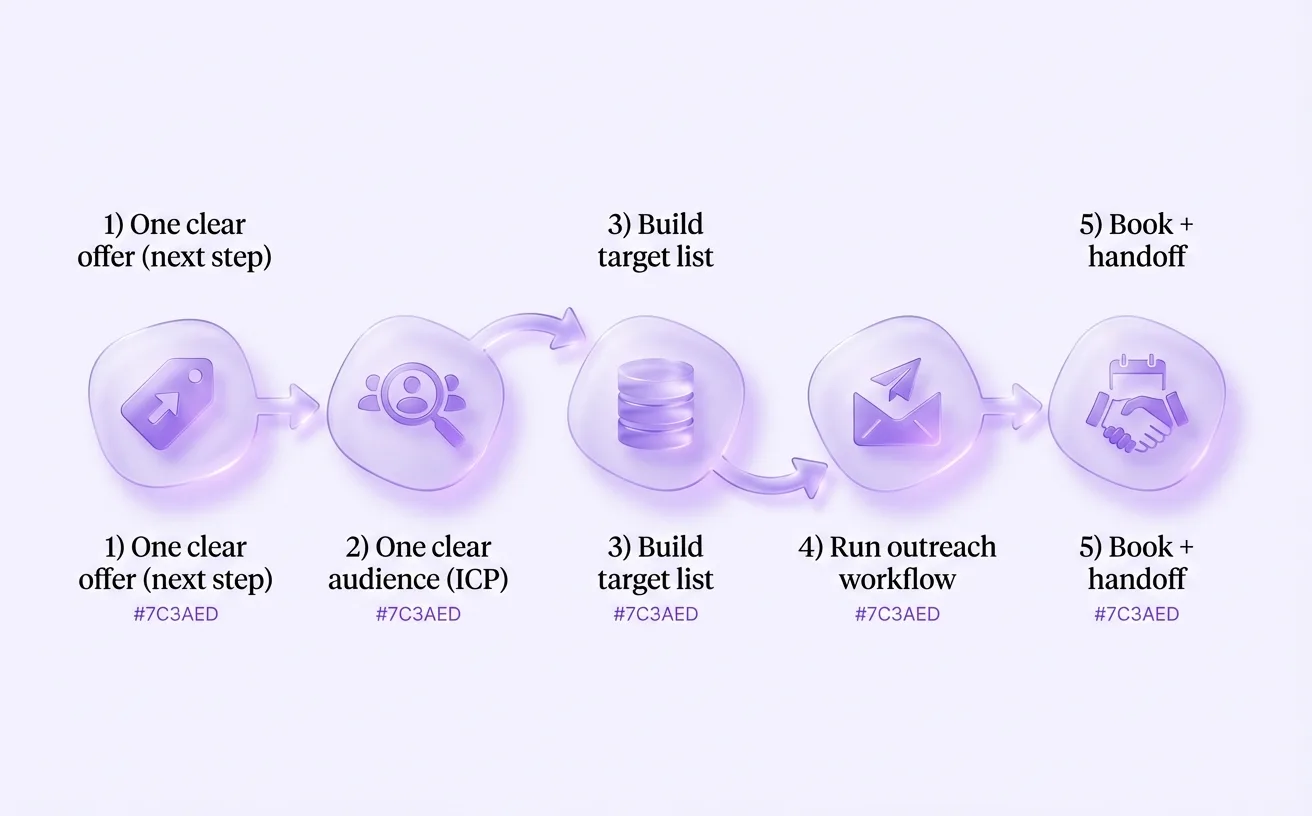
A repeatable workflow turns appointment setting into a system, not a one-off push.
Qualification that protects your reps’ calendars
Appointment setting fails the moment you optimize for “booked” instead of “qualified.” You don’t need longer calls or more rapport to fix that, you need a consistent way to confirm fit and intent before a rep’s calendar gets touched. If your outbound or inbound flow already lives in a system like Overloop, capture qualification answers as you go so the “yes” comes with context, not confusion. [HBR]
Use a lightweight framework (BANT, MEDDIC-lite, or your own) and keep it consistent
Consistency beats complexity because it makes your team comparable week to week and rep to rep. Pick BANT if you sell simply, MEDDIC-lite if deals involve process, or a custom 4–6 field checklist if your motion is unique. Map those fields directly to your pipeline qualification stages so “book a meeting” only happens after the same minimum bar is met, every time.
Tools like Overloop help when your framework becomes part of the workflow: required fields, dropdowns, and notes prompts prevent “I think they’re interested” from being the only data point. Your goal is a fast, repeatable filter, not an interrogation.
Ask 6 questions that surface pain, urgency, decision path, and constraints
Six targeted questions beat twenty generic ones because they reveal whether there’s a real project behind the curiosity. Use them conversationally, and ask follow-ups only when an answer is vague.
Pain: “What’s currently happening that you want to change?”
Impact: “What does that problem cost you, time, pipeline, risk, or revenue?”
Urgency: “Why now instead of later this quarter?”
Decision path: “Who else needs to weigh in before anything can move?”
Constraints: “Are there budget, security, or procurement steps we should plan for?”
Success criteria: “What would make you say this was worth switching or adding?”
Disqualify fast and professionally so you preserve focus and credibility
Fast disqualification is a service because it protects your reps and respects the prospect’s time. When there’s no clear pain, no timeline, or no access to the decision process, say it plainly: “It sounds like this isn’t a priority right now, want me to follow up in 60–90 days?” Log the reason and next date in Overloop so “not now” becomes a future touch, not a dead end.
Lock in the meeting outcome, agenda, and attendees before you hang up
A booked slot isn’t a qualified appointment until the outcome is defined. Confirm what the meeting is for (“diagnose X and decide Y”), what you’ll cover (2–3 agenda bullets), and who must attend (economic buyer, technical reviewer, or process owner). If you can’t get the right attendees, change the meeting type to a shorter discovery or don’t book it yet, calendar integrity beats calendar volume.
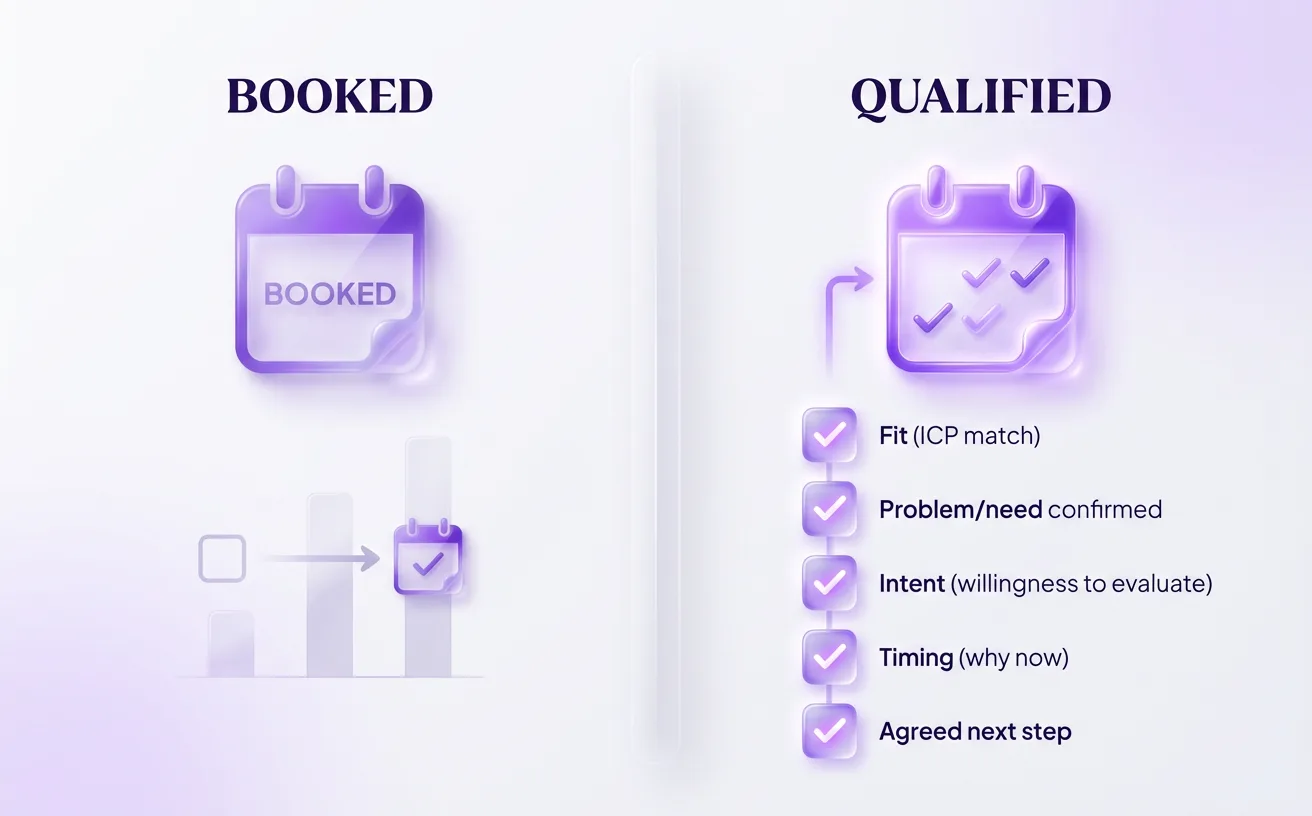
Booked isn’t the goal, qualified is.
Scripts and messages that earn a yes (without sounding scripted)
A CFO once cut me off at second 12: “If this is a pitch, I’m out.” When I restarted with one relevant observation, “I saw you’re hiring two rev ops roles, so pipeline hygiene is probably a priority”, and asked for a tiny next step, they gave me 15 minutes. [HBR]
Your best scripts are a diagnosis plus a low-friction next step, because people accept help faster than they accept a product tour. If you did the work in the previous step (right meeting type, right attendees), your job here is to sound like you belong in their week, not their inbox trash.
Cold call structure that respects time and earns permission
Start by earning the right to continue, because attention is the scarce resource on a cold call. Use a permission opener like: “Did I catch you at an okay time for 20 seconds to explain why I called, and you can tell me if it’s irrelevant?”
Follow with one specific trigger and one question, not a company bio. Example: “I noticed your team just rolled out a new outbound motion, are you trying to increase meetings per rep without spamming prospects?” If they say “maybe,” you’ve earned a short discovery and can propose a 15–30 minute slot.
Email and LinkedIn messaging that gets replies from busy people
Write messages that can be answered in one line, because “quick question” only works when it’s actually quick. Keep the body to: relevance (trigger), hypothesis (what might be happening), and a binary ask (“Worth a 15-min chat next week, or not a priority?”).
Cut vague, self-focused phrases that read like templates; the fastest fix is removing common filler from your library using email lines to avoid while you rewrite around the prospect’s context. If you’re running volume, tools like Overloop help you keep personalization tokens tied to real triggers so your “observation” stays believable at scale.
Objection handling for the 5 classics (time, interest, already have, send info, not my job)
Handle objections by naming the concern and offering a smaller step, because pushing harder creates resistance. Use tight replies like:
Time: “Totally, should we do 10 minutes now, or a 15-minute slot Tuesday?”
Not interested: “Fair, what are you focused on instead so I can sanity-check fit?”
Already have: “Great, what do you like about it, and what’s still annoying?”
Send info: “Happy to, what should I include so it’s useful: pricing, process, or examples?”
Not my job: “Who owns this, and would you be open to a quick intro if it’s relevant?”
How to close for a specific time without cornering the prospect
Close with two concrete options and an easy “no”, because choice reduces friction and “no” builds trust. Try: “If it’s worth exploring, I have Wednesday 11:00 or Thursday 2:30, either work, or should we park this?”
Make the next step operational immediately so momentum doesn’t leak: confirm the outcome (“leave with a go/no-go”), attendees, and prep. Overloop can automate the follow-up and meeting confirmation so the “yes” turns into a booked slot without extra back-and-forth.
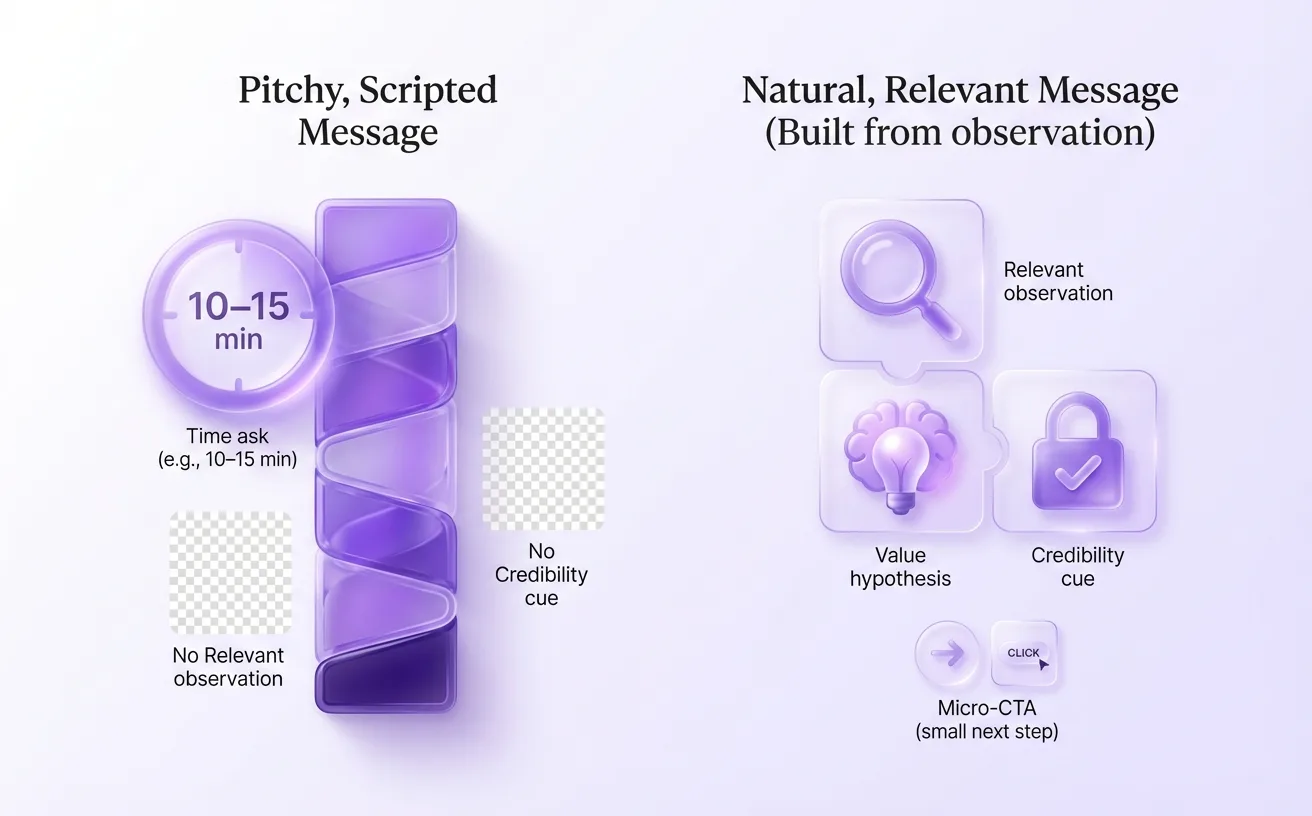
Replace “scripted pitch” with “relevant observation + micro-ask.”
Follow-up systems that prevent leads from going cold
Build your follow-up system before you send your first outreach, then run it every day without negotiating with yourself. Most “no response” leads aren’t a “no,” they’re a “not now,” and a consistent sequence is what turns that into a booked meeting. Treat follow-up as part of qualification: you’re testing urgency, timing, and whether the problem is real. Tools like Overloop help you keep this consistent by automating touches and tracking replies so nothing silently drops. [HBR]
Build a multichannel follow-up sequence you can run on autopilot
Choose a simple cadence you can execute even on busy weeks, then spread touches across email, phone, and LinkedIn so you’re not betting on one inbox. A practical default is 8–12 touches over 14–21 days, with faster spacing early (when intent is hottest) and slower spacing later (when you’re resurfacing). If you need a ready-made pattern, borrow a proven approach to multi-channel follow-up and adapt it to one CTA: “15 minutes to confirm fit?” Overloop can automate the native email and LinkedIn steps while still letting you jump in manually; teams using Aircall can add Call Tasks through the integration.
Personalize without overinvesting: 3 angles that scale
Personalization works when it’s specific enough to feel earned, but fast enough to repeat 30 times a day. Use angles that don’t require deep research, yet still connect to a business reality.
Trigger-based: reference a job change, new funding, hiring spree, or a product launch, then tie it to one risk or goal.
Role-based: speak to what that function owns (pipeline for Sales, response time for Support, compliance for Security) and ask one qualifying question.
Proof-based: mention a relevant outcome or use case (“teams use us to cut back-and-forth scheduling and speed up handoffs”) without dumping a case study.
With Overloop, you can templatize these angles as snippets and swap in one real detail, which keeps messages human without turning your day into research-only work.
Spending too much time prospecting?
Overloop handles list-building, outreach, and follow-ups so you can focus on the calls that close.
Book a demo →See featuresUse micro-commitments to keep conversations alive between touches
Ask for small yeses that move the deal forward even when they won’t book yet. Try “Should I reach out this month or next?” when timing is unclear, or “Are you the right owner for this, or is it someone in RevOps?” when the org chart is fuzzy. When they say “send info,” reply with one question like, “What’s the one metric you’d want this to improve?” so your next touch is anchored to their answer.
Reduce no-shows with confirmation, reminders, and pre-meeting value
Confirm the meeting like you’re protecting both calendars: restate the outcome, attendees, and what “success” looks like in one sentence. Send two reminders (one the day before, one 15–30 minutes before) and include one piece of pre-meeting value, like a 3-bullet agenda or a quick teardown of what you noticed about their current process. If no-shows are recurring, add a pre-call micro-task (“Reply with your top two priorities”) so the prospect invests before the time slot arrives.
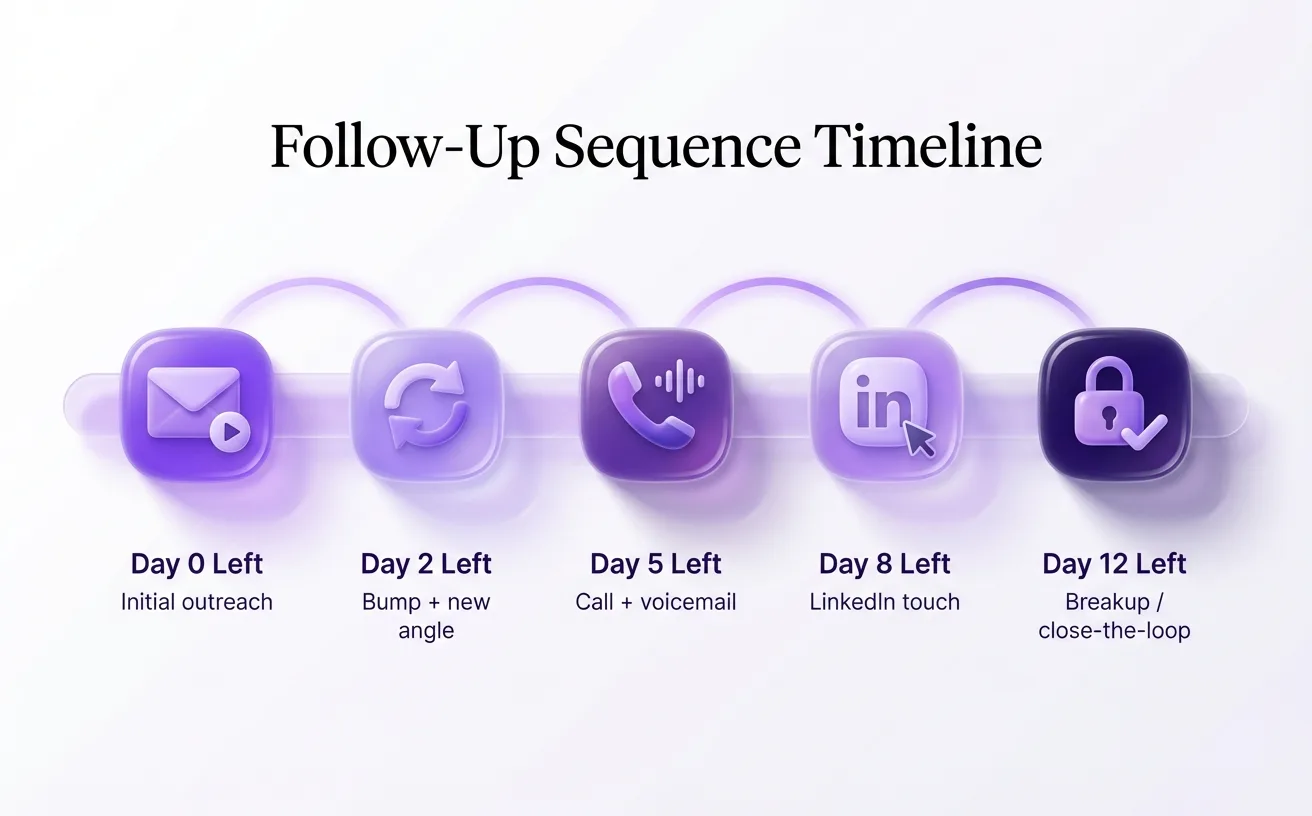
Most “no response” is “not now”, a cadence converts it.
How to run appointment setting like a process (not a hustle)
Do your booked meetings drop the moment your team has an “off week”? [HBR]
Top appointment setters win by controlling inputs, who they target, how they work the list, how handoffs happen, and how they practice, so output doesn’t depend on motivation. If you already added a pre-call micro-task to cut no-shows, this is the next step: make the whole flow predictable from first touch to held meeting.
Create a sourcing-to-booked pipeline with clear stages and ownership
A pipeline is a workflow, not a dashboard, so every stage needs a definition and an owner. When stages are fuzzy, reps “feel busy” while prospects sit untouched, and you can’t diagnose what to fix.
Sourced (list built + reason they’re on it): owner = sourcing/ops or setter
Enriched (verified email, role, and trigger): owner = setter
First touch sent (channel + template logged): owner = setter
Conversation started (reply, connect, or live call): owner = setter
Qualified (meets your bar + confirmed outcome/attendees): owner = setter
Booked (calendar invite accepted + reminders set): owner = setter, with AE visibility
Tools like Overloop help you operationalize this by keeping lead sourcing, sequencing, and replies in one place, so your stages reflect real behavior instead of guesswork.
Set SLAs between SDRs/appointment setters and AEs so leads don’t rot
SLAs prevent “good leads” from dying in limbo by putting time bounds and responsibilities in writing. If your handoff is messy, you’ll need to fix a broken process before you hire more setters, because more volume will only amplify the chaos.
Define two clocks: how fast AEs must accept/decline a meeting request, and how fast they must follow up when a prospect asks for a “quick question” before booking. Then add a rule for what happens when the SLA is missed (auto-reassign, manager ping, or setter re-engages).
Build a feedback loop so qualification improves every week
Every held meeting should teach the setter something, what resonated, what was misunderstood, and what disqualified them in hindsight. Make AEs tag outcomes in the CRM within 24 hours (held/no-show/unqualified/next step) and require one sentence on “why.”
With Overloop, you can map those outcomes back to specific campaigns and messaging angles, so your team learns which triggers and claims create real pipeline instead of just booked calendars.
Train like a pro: routines, call reviews, and role-play that compound
Training works when it’s routine, specific, and measured, not occasional pep talks. Set a weekly rhythm: 20 minutes of call review on one skill (opening, discovery question, or close), 15 minutes of role-play on one objection, and one micro-change to the script that everyone tests for five days.
Keep a shared “wins and losses” doc with short clips or transcripts, and require each setter to submit one example of a clean disqualify and one example of a strong calendar close every week.
Metrics that prove whether appointment setting is working
If your “good week” is measured in dials and emails, you’re flying blind. The wins-and-losses clips you collect only compound when you tie them to outcomes: booked meetings that get held, turn into qualified opportunities, and create pipeline. High activity with low downstream conversion usually means your targeting, messaging, or qualification is off, not that you need more hustle.
Track leading indicators that tell you what to fix this week
Leading indicators are your weekly steering wheel. Track reply rate by persona, positive reply rate, connect rate on calls, and calendar-close rate (yes → booked) so you can see which step is breaking before the month is gone. Tools like Overloop help here because you can monitor sequence performance by segment and quickly spot which lists or messages are producing real conversations.
Pick a small set and review it every Monday, using core sales metrics as a sanity check so you don’t over-measure vanity numbers. If connect rate is low, fix data quality and call windows; if positive replies are low, tighten ICP triggers and hooks; if bookings are low, your close is too vague or too pushy.
Measure quality and conversion through the full funnel (booked → held → opp → revenue)
You know appointment setting works when the funnel stays healthy after the calendar invite. Track conversion rates across booked → held, held → qualified opp, and qualified opp → pipeline created (and eventually revenue), broken down by source, persona, and setter. A “booked meeting” that never shows or never qualifies is a cost, not an asset, so treat it like a defect you can reduce.
Diagnose bottlenecks with simple math instead of guesswork
Use one equation to find the real constraint: touches → conversations → booked → held → opp. If you need 20 held meetings/month and your held rate is 60%, you need ~34 booked; if your book rate from conversations is 25%, you need ~136 conversations. This math tells you whether to focus on sourcing volume, conversation quality, or meeting management (reminders, agenda alignment, attendee confirmation).
Run small experiments on scripts, targeting, and cadence
Run experiments that change one variable and ship a winner fast. Keep tests small enough to complete in a week, and define the success metric before you start.
Script test: change only the opener or the calendar close and measure book rate from conversations.
Targeting test: swap one trigger (e.g., “hired a RevOps lead”) and measure positive reply rate.
Cadence test: adjust touch timing (same steps, new spacing) and measure reply-to-book speed.
Document each test like a mini playbook update so new setters inherit what works, and use Overloop to roll out the winning variant consistently across campaigns without relying on everyone to copy-paste the “latest” message.
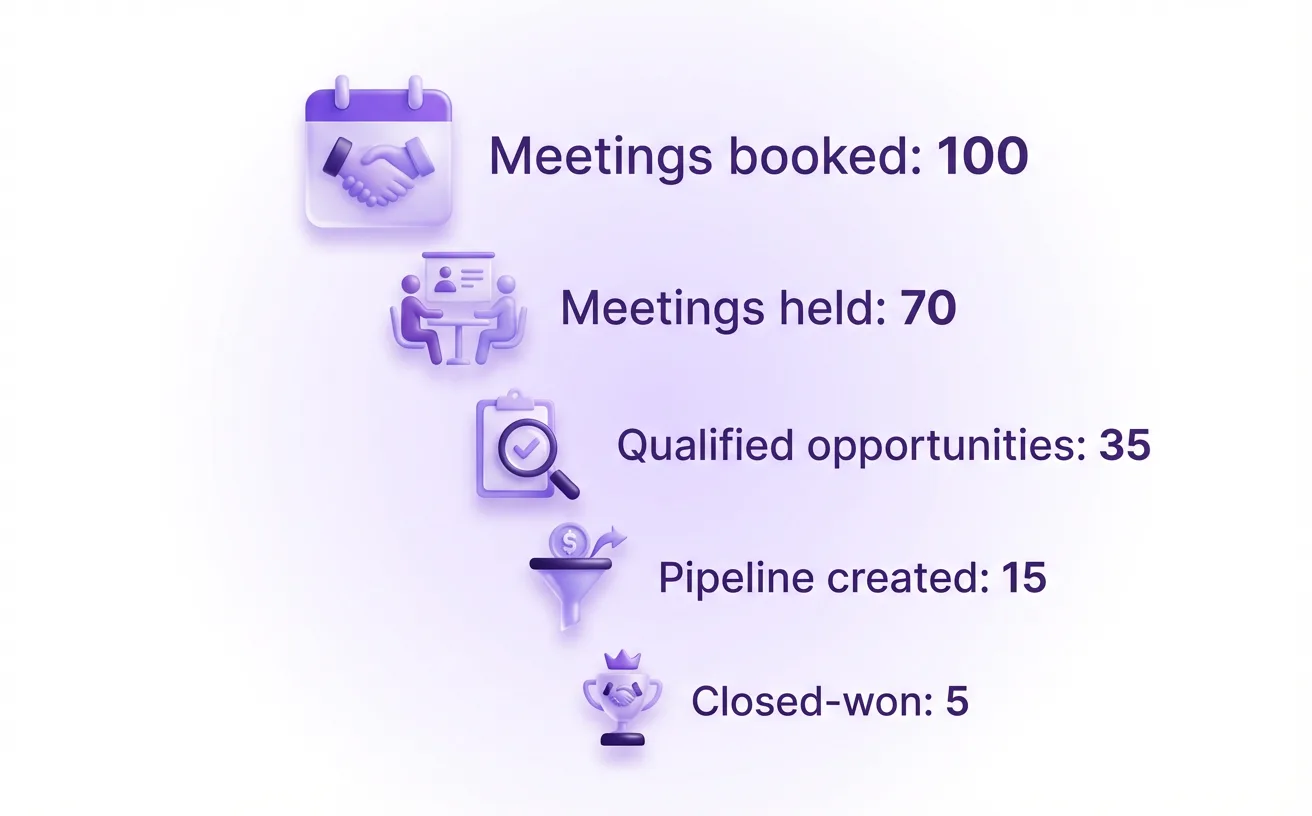
Track conversions through the funnel to know if appointment setting is working.
When to hire, outsource, or use AI for appointment setting
A VP of Sales I worked with scaled outbound from 5 to 40 meetings a week, then watched close rates drop because half the calendar was “curious” instead of qualified. The fix wasn’t more activity; it was choosing the right operating model for appointment setting based on how much context, credibility, and control the sale required. Once your messages and cadences are consistent, your next lever is deciding who (or what) runs them day to day.
Decide between in-house, agency, or hybrid based on your sales motion
In-house wins when nuance matters, like selling into regulated industries, multi-stakeholder deals, or categories where your wording shapes trust. Your internal team learns product edge cases faster and can coordinate tightly with AEs on target accounts, timing, and meeting outcomes.
Agencies win when speed and coverage matter more than deep context, like broad mid-market offers with simple qualification and short sales cycles. A hybrid model often performs best: keep ICP, messaging, and qualification rules internal, and outsource the first-touch volume or list building while your team handles replies and booking.
Use AI and automation where it helps (research, drafting, routing) and avoid where it hurts (trust, compliance)
Use AI to remove busywork, not responsibility. AI can summarize account news, draft first-pass personalization, classify replies, and route “ready to book” leads to the right rep; that’s where curated AI agent tools and workflows save hours without changing your standards.
Avoid AI where it can damage trust or create compliance risk. Don’t auto-generate claims you can’t verify, don’t “guess” job responsibilities, and don’t fully automate high-stakes replies (pricing, security, legal) without a human check; use tools like Overloop to keep approvals, throttling, and handoffs explicit.
Evaluate vendors with questions that reveal list quality, process, and reporting rigor
Vendor promises are cheap, but their inputs and reporting tell the truth. Ask questions that force specifics and make it easy to compare offers apples-to-apples.
List sourcing: Where does the data come from, how is it verified, and how often is it refreshed?
ICP adherence: Who approves targeting and messaging changes, and how do they handle “edge-case” accounts?
Quality definition: What qualifies as a booked meeting, and what disqualifies one?
Reporting: Will you see booked vs. held, show rates, reasons for disqualification, and call/email samples weekly?
Process: What’s the daily cadence, and what happens when a prospect asks technical questions?
Protect your domain and reputation with guardrails and compliance checks
Your sending reputation is an asset you can lose quickly, so separate risk from your core brand. Use a dedicated outbound subdomain, enforce SPF/DKIM/DMARC alignment, cap daily volume increases, and keep a clean suppression list with instant opt-out handling.
Compliance needs operational checks, not vague intent. Confirm how consent is handled where required, how data requests are processed (deletion/access), and how call recording or local dialing rules are respected; if you run campaigns in Overloop, bake these guardrails into templates, approval steps, and audience rules so “moving fast” doesn’t become “cleaning up” later.
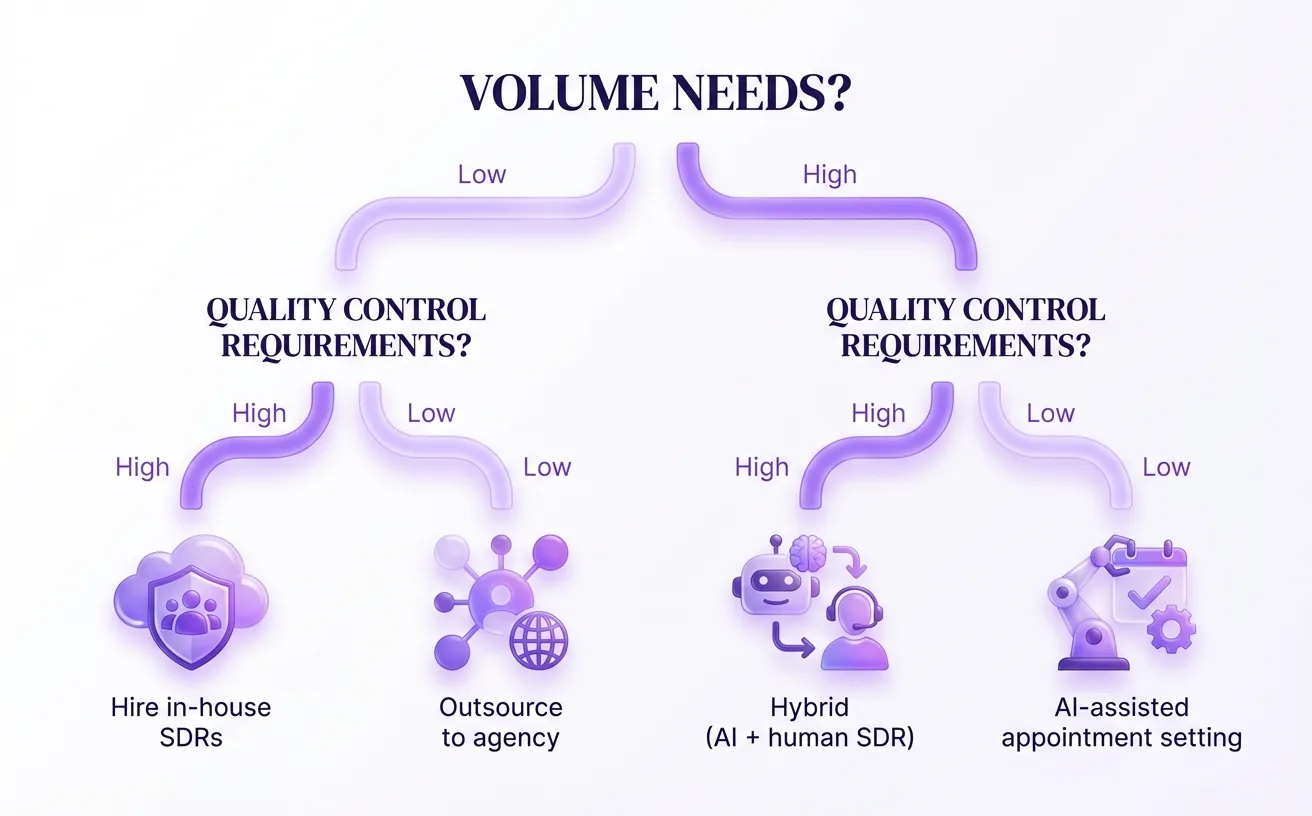
Choose the operating model that fits your volume and quality constraints.
Want to spend more time selling?
Book a demo and see Overloop free up your week.
Start with Overloop →See a demoConclusion
More meetings come from clarity and repeatability, not louder outreach. Lock in one audience, one offer, and one workflow, then qualify for fit and intent so you spend time on people who can actually buy. Your message and follow-up do the heavy lifting. Lead with a relevant observation and a low-friction next step, then run a persistent, varied sequence because most replies happen after the first touch. Measure what matters: booked-to-held rate, qualified opportunities, and pipeline created. If you want speed without losing control, tools like Overloop help you generate targeted B2B leads and automate sequences, and Overloop also makes handoffs and tracking easier so inputs stay consistent.
Frequently asked questions
What is sales appointment setting?
Sales appointment setting is the process of booking qualified meetings between a prospect and a sales rep, usually a 15 to 30 minute discovery or diagnosis call. The job is not to fill the calendar, it is to fill it with prospects who match your ICP, have a real pain, and can move a decision forward. Booked but unqualified meetings cost more than they earn.
How long should an appointment-setting meeting be?
Aim for 15 to 30 minutes for the first meeting, framed as a diagnosis, not a demo. The shorter slot feels low-risk to the prospect and forces you to keep the scope tight: confirm the pain, map the decision path, agree on next steps. Longer demos work only after a qualified discovery call confirmed fit.
How many touches does it take to book a meeting?
A practical default is 8 to 12 touches over 14 to 21 days across email, phone, and LinkedIn. Spacing is faster early when intent is hot, slower later when you are resurfacing. Most replies come after the first touch, so a one-and-done outreach leaves the majority of pipeline on the table.
What qualification framework should appointment setters use?
Use BANT for simple sales, MEDDIC-lite for process-heavy deals, or a custom 4 to 6 field checklist for unique motions. The framework matters less than consistent application across reps and weeks. Six targeted questions on pain, impact, urgency, decision path, constraints, and success criteria beat twenty generic ones.
How do you reduce no-shows on booked meetings?
Confirm the meeting outcome, attendees, and 'success' criteria in the invite. Send two reminders, one the day before and one 15 to 30 minutes before. Add one piece of pre-meeting value like a 3-bullet agenda. If no-shows persist, add a pre-call micro-task such as 'reply with your top two priorities' so the prospect invests before the slot. For teams running outbound at scale, Overloop combines a 450M+ contact database, AI personalization, and email + LinkedIn sequences in one workflow.
When should you outsource appointment setting?
Outsource when speed and coverage matter more than deep context: broad mid-market offers, simple qualification, short cycles. Keep in-house when nuance, regulation, or multi-stakeholder coordination drive the deal. The most common winning setup is hybrid: ICP, messaging, and qualification rules stay internal, list building and first-touch volume go to an agency, replies and bookings handled by your own team.
What metrics matter most for appointment setting?
Track reply rate by persona, positive reply rate, connect rate on calls, and calendar-close rate (yes to booked) weekly. Then track the funnel: booked to held, held to qualified opportunity, opportunity to revenue. A booked meeting that never shows or never qualifies is a defect, not an asset. Diagnose with simple math: how many conversations do you need to hit 20 held meetings.