

10 Data Enrichment Tools Compared for B2B Teams
Compare 10 data enrichment tools for B2B teams: Apollo, Clay, ZoomInfo, Cognism, HubSpot, Lusha, FullEnrich and more, by workflow, price and API fit.
On this page
- 10 data enrichment tools at a glance
- Choose the workflow before the vendor
- Choosing an MCP connection for enrichment
- Calculate cost per usable record
- What each enrichment tool is built to do
- Run a vendor bake-off you can reproduce
- Four data types that should not share one accuracy score
- Privacy and data-governance checks
- Where Overloop fits after enrichment
- A comparison based on documented capabilities
- Frequently asked questions
Compare ten data enrichment tools by workflow, delivery model, public pricing and operational limits. No invented match-rate league table. Use the included calculator and bake-off plan to measure each provider on your own records.
The main data enrichment tools for B2B teams in 2026 are Apollo, Clay, ZoomInfo, Cognism, HubSpot Data Enrichment, People Data Labs, Lusha, FullEnrich, BetterContact and GetProspect. Data enrichment adds missing or updated fields to an existing company or contact record. For contacts headed to outbound, Overloop finds and verifies work emails and reveals phone numbers inside the tool that runs the email and LinkedIn sequence.
The right tool depends on the job: Apollo combines a database with CRM, CSV and API enrichment; Clay orchestrates multiple providers; ZoomInfo and Cognism focus on governed CRM enrichment; HubSpot keeps enrichment inside its CRM; People Data Labs is API-first; and FullEnrich or BetterContact focus on waterfall email and phone discovery. Overloop charges 5 credits per revealed phone number, only when a number is found.
Do not buy from a generic accuracy percentage. Run the same representative sample through every shortlisted vendor, audit returned fields against primary sources, and compare cost per usable record.






10 data enrichment tools at a glance
The list is grouped by workflow, not ordered from best to worst. Entry prices for Apollo, Clay, Cognism, Lusha, FullEnrich and BetterContact were re-read on each official page on September 28, 2026; the other entry points were checked on August 1, 2026. Where no stable price exists, the table tells you what to confirm directly. Overloop, the publisher, is listed first for contact data before outbound, not ranked against the ten.
Scroll horizontally to compare every field.
| Tool | Best fit | Delivery model | Public entry point | Verify before buying |
|---|---|---|---|---|
| Overloop (publisher) | Work email finding and phone number reveal before outbound | Email finder, verification, phone reveal across several providers, CSV export, email and LinkedIn sequences | Starter $69 per user a month, 250 credits; phone reveal 5 credits, only on a match | Field scope: work email and phone number, not firmographic CRM maintenance |
| Apollo | Database plus enrichment | CRM, CSV, API and waterfall | Free; Basic $49 per seat monthly, billed annually | Credit rules and yield on your regions |
| Clay | Multi-provider orchestration | Tables and waterfalls; CRM and warehouse auto-sync on Growth+ | Free without phone enrichment; Launch $185 a month, or $167 a month billed annually | Actions, data credits and setup overhead |
| ZoomInfo | Enterprise CRM data operations | CRM, marketing automation, APIs and multi-vendor rules | Contact sales | Edition, record limits and licensed fields |
| Cognism | Governed CRM enrichment for teams evaluating EMEA coverage | CRM jobs and ongoing maintenance | Quote; no price displayed on the CRM Enrichment page | Supported CRM, credits and measured regional coverage |
| HubSpot Data Enrichment | HubSpot-native records and forms | Inside HubSpot | Included with eligible paid subscriptions; no HubSpot Credits consumed | Plan eligibility, input requirements and returned fields |
| People Data Labs | API-first products and data teams | Person, company and IP APIs | Free allowance; self-serve paid tiers | Input matching, field rights and successful-match billing |
| Lusha | One-time CSV contact enrichment | CSV, workspace and selected CRM flows | Free; Starter $37.45 a month billed annually, 400 credits, 5 credits per phone | Current CRM availability and phone credits |
| FullEnrich | Waterfall work email and phone discovery | CSV, API, CRM and MCP | 50 trial credits; Pro $55 a month for 1,000 credits, 10 credits per mobile | Field depth, phone cost and source policy |
| BetterContact | Verified email and phone waterfalls | CSV, API and integrations | Starter $15 a month for 200 credits, 10 credits per mobile | Tier price, credit deductions and catch-all handling |
| GetProspect | SMB CSV and API enrichment | CSV, API, browser and CRM sync | Free; Starter $49 monthly for 1,000 valid emails | Phone allowance and required attributes |
Choose the workflow before the vendor
A shortlist becomes easier once you decide where enrichment must run and which fields must come back.
Start with Apollo when the team wants prospecting, enrichment and campaign features in one commercial package.
Start with Clay when RevOps wants to combine several sources, AI research and writeback logic.
Shortlist ZoomInfo for multi-vendor data operations and Cognism when EMEA coverage is a buying priority to test.
Evaluate HubSpot first when records, forms and users already live in HubSpot and a separate pipeline adds avoidable work.
Evaluate People Data Labs when engineers need documented APIs rather than a sales-user interface.
Compare FullEnrich and BetterContact for waterfall discovery; include GetProspect or Lusha for simpler CSV workflows.
Choosing an MCP connection for enrichment
If an AI client needs to enrich a known record, start with the identifiers you already have: a company domain, profile URL or name and employer. Check the connection's accepted inputs, matching behavior and returned fields. Discovering people who match an ICP and enriching a known person are separate operations.
Our B2B data MCP comparison maps documented search and enrichment operations across four providers. Use it to shortlist a connection, then apply the matching and usable-record checks in this guide to your own sample.
Calculate cost per usable record
Price per credit is not comparable across vendors. A useful denominator is the record that both comes back and passes your audit.
Illustrative defaults only. The prefilled values below are not measured vendor results. Replace all four inputs with numbers from your own controlled test.
Formula: usable records = submitted records × measured coverage × the share of covered records that pass your complete required-field audit. Cost per usable record = total spend ÷ usable records. Use your own test results, not a vendor homepage percentage.
What each enrichment tool is built to do
Apollo: database, CRM and API enrichment in one stack
Database plus workflowApollo combines contact and account data with CRM, CSV and API enrichment. Its current pricing page lists automated CRM enrichment, API enrichment, CSV enrichment, waterfall enrichment and job-change enrichment on paid tiers. The public Basic entry price is $49 per seat per month when billed annually; the free tier includes a smaller CRM enrichment allowance.
Primary source: Apollo data enrichment pricing and plan matrix.
Clay: orchestration across many data providers
Waterfall orchestrationClay is an orchestration layer rather than one proprietary contact database. Its pricing page describes multi-provider enrichment, waterfalls, AI web research and bring-your-own API keys. Current packaging separates actions, which meter platform work, from data credits, which pay for data bought through Clay's marketplace; automatic CRM and warehouse sync are listed on Growth and higher tiers.
Primary sources: Clay pricing and actions and data credits documentation.
ZoomInfo: enterprise CRM and marketing data operations
Enterprise data operationsZoomInfo's Data-as-a-Service materials describe CRM and marketing automation enrichment, APIs, data normalization, deduplication and multi-vendor waterfall logic in its higher enrichment edition. Public pricing is not disclosed, so a defensible comparison must use the exact proposal, licensed fields, record limits and renewal terms offered to your company.
Primary source: ZoomInfo Operations.
Cognism: governed CRM enrichment positioned for EMEA
CRM enrichmentCognism positions CRM Enrichment around selecting records and fields, scheduling enrichment and maintaining priority contacts. On September 28, 2026 its CRM Enrichment page showed no price to visitors, so budget for a quote. Cognism's July 2026 product update says its CRM Enrichment suite currently supports Salesforce and plans HubSpot for a future phase. The same update separately documents a live native, real-time HubSpot two-way sync, so confirm which HubSpot workflow your team needs before buying.
Primary sources: Cognism CRM Enrichment and H1 2026 product update.
HubSpot Data Enrichment: native enrichment for HubSpot records
CRM nativeHubSpot's enrichment experience fills missing contact and company fields without exporting records to a separate workspace. HubSpot's current documentation says Data Enrichment is included with eligible paid subscriptions and does not consume HubSpot Credits. Contacts need a business email address and companies need a company domain name for enrichment, so confirm plan eligibility and input coverage on your own records.
Primary sources: HubSpot AI CRM enrichment and HubSpot Data Enrichment documentation.
People Data Labs: API-first person and company enrichment
Developer APIPeople Data Labs exposes person, company and IP enrichment APIs for teams building data into an application or internal pipeline. Its help center documents successful-match billing and separate pricing tiers by product. The free plan currently includes monthly person and company enrichment allowances; paid self-serve minimums and per-credit rates vary between person and company products.
Primary sources: Person Enrichment API and pricing and credits.
Lusha: CSV enrichment and selected CRM workflows
Contact enrichmentLusha's current Enrich hub accepts CSV records identified by LinkedIn URL, email, or name plus company and returns contact and company data. Its documentation distinguishes one-time CSV enrichment from ongoing workspace workflows. The separate CRM enrichment document currently describes Salesforce access for legacy Scale users, which is an important availability constraint to verify.
Primary sources: Lusha Enrich hub and CRM data enrichment documentation.
FullEnrich: waterfall email and phone discovery
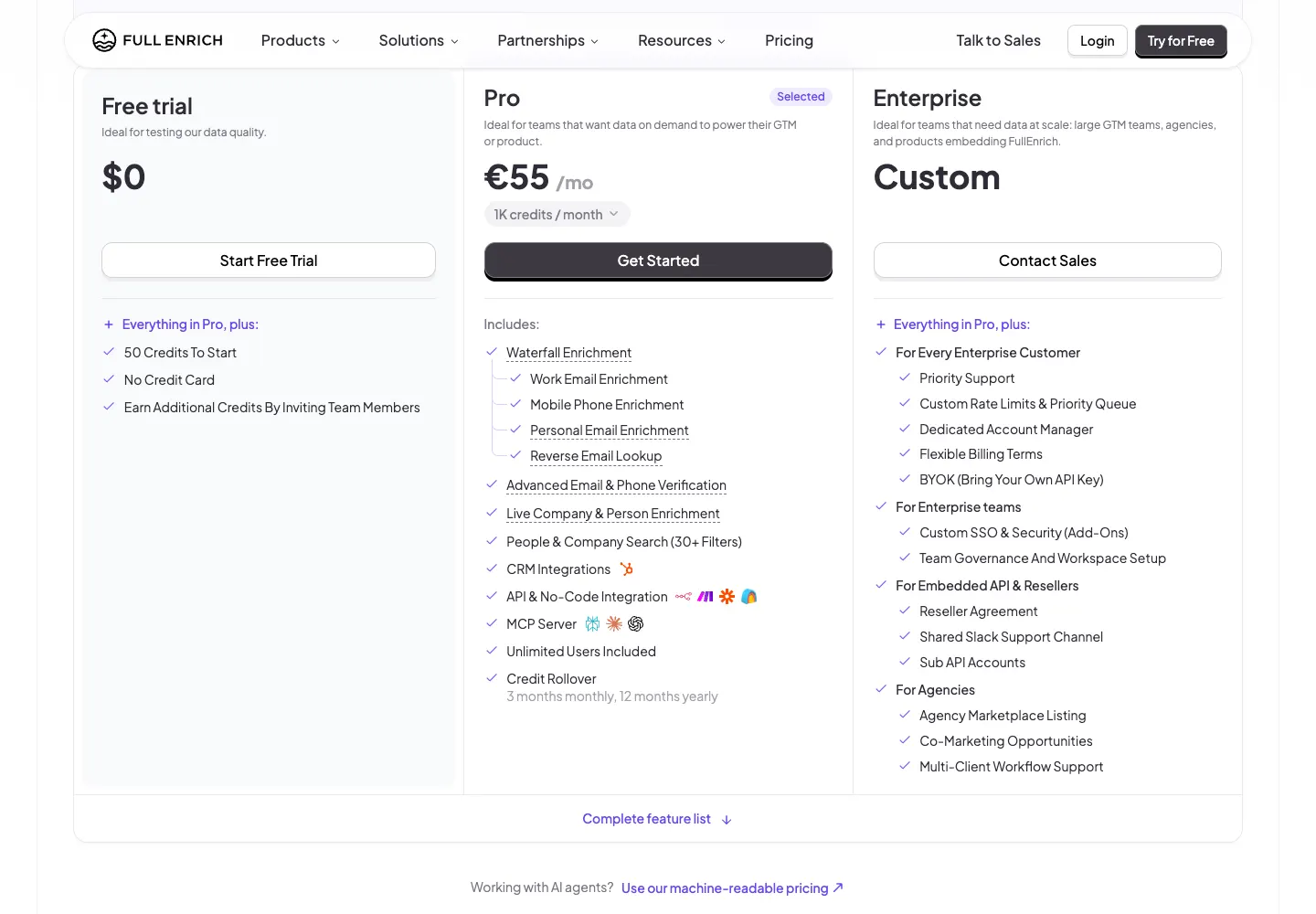
Pay-on-result waterfallFullEnrich focuses on work emails, personal emails, mobile phones and profile completion through a multi-source waterfall. Its pricing page says credits are charged when data is found and verified, lists CSV, API, CRM and MCP access, and offers 50 trial credits. On September 28, 2026 Pro cost $55 a month for 1,000 credits, and a mobile phone costs 10 credits, so about $0.55 per mobile at best; the page can display euros to European visitors.
Primary source: FullEnrich pricing and feature matrix.
BetterContact: verified email and phone waterfalls
Waterfall specialistBetterContact combines multiple email and phone providers, verification and integrations. Its pricing page describes more than 20 provider connections, a free 50-credit test, API access and billing on valid data. On September 28, 2026 Starter cost $15 a month billed monthly for 200 credits, and a mobile phone costs 10 credits, so 20 mobiles or about $0.75 each; larger tiers are set through an interactive calculator, so copy the exact volume and billing period into your evaluation.
Primary source: BetterContact pricing and waterfall details.
GetProspect: accessible CSV and API enrichment for smaller teams
SMB contact dataGetProspect supports CSV contact and company enrichment, API access, browser workflows and CRM sync. Its current pricing page lists 50 valid emails on the free plan and a $49 monthly Starter tier with 1,000 valid emails and 2,000 verifications. The same Starter package lists only five phone numbers, so email-heavy and phone-heavy use cases have very different economics.
Primary sources: GetProspect enrichment and GetProspect pricing.
Run a vendor bake-off you can reproduce
The strongest comparison is a controlled test on your data. A vendor can be excellent on US SaaS executives and weak on local manufacturers, junior titles or companies without a clean domain. Build the test around your real failure modes.
- Define the required output. List every mandatory field, acceptable nulls, maximum age and whether a verified work email is required.
- Select a representative sample. Use at least a few hundred real records across your target regions, company sizes, industries and seniority bands. Keep a hidden holdout if possible.
- Normalize the input. Give every vendor the same fields and formatting. Do not let one provider see extra LinkedIn URLs or cleaner domains.
- Separate coverage from accuracy. Coverage is the share of submitted records with an answer. Accuracy is the share of audited answers that are correct.
- Audit against primary evidence. Check a random sample against company sites, current professional profiles, registries or a controlled email verification step.
- Measure usable yield. Count only records that satisfy the required-field rule and pass the audit. A populated but wrong field is not a success.
- Capture total cost. Include subscription minimums, credits, implementation, connectors, writeback and operator time.
- Test deletion and correction flows. Confirm how the vendor handles opt-outs, source disputes, stale jobs and field overwrite conflicts.
Audited accuracy = correct audited values / audited returned values
Usable yield = records meeting your rule / submitted records
Cost per usable record = total test cost / usable records
Four data types that should not share one accuracy score
A provider may be strong on company headcount and weak on mobile numbers. Collapsing every field into one percentage hides the buying decision.
Company name, domain, industry, location, headcount, revenue band and ownership. Define accepted sources and update cadence per field.
Current employer, title, seniority, work email and phone. Job changes and role transitions make recency central.
Installed technologies and infrastructure signals. Test detection evidence, false positives and the age of each observation.
Research, hiring, funding, job changes or website activity. Ask whether the signal is first party, licensed or inferred and when it expires.
Privacy and data-governance checks
Buying enrichment software does not make the resulting campaign compliant by itself. The vendor, your company, the source of the data, the recipient's jurisdiction and the communication channel can create different obligations.
Questions to put in the RFP
- Which fields come from proprietary collection, public sources, licensed partners, customer contributions or inference?
- Can the vendor identify the source category and observation date for a disputed record?
- How are correction, deletion, suppression and opt-out requests propagated to downstream exports?
- Which subprocessors and transfer mechanisms apply to your account and chosen region?
- What rights do you receive to store, export, model on or expose the data inside another product?
- How does the system prevent a scheduled refresh from overwriting a verified first-party CRM field?
Where Overloop fits after enrichment
Overloop is a B2B outbound platform, not a general-purpose replacement for Clay, ZoomInfo, Cognism or People Data Labs. Teams can find prospects in Overloop, discover or verify work emails for imported contacts, and use prospect context to prepare coordinated email and LinkedIn campaigns. External enrichment workflows can also hand campaign-ready records to Overloop. For phone numbers, the Overloop phone number finder queries several providers in sequence and charges 5 credits per revealed number, only when a number is found.
The boundary matters: enrichment supplies or updates the record; verification checks the address; outbound software controls targeting, review, sequencing, sending and replies. Keeping those jobs explicit makes both the buying decision and the campaign easier to audit.
See the current Overloop feature scope, pricing and credit rules, and the help-center explanation of email-finder credits.
A comparison based on documented capabilities
Many enrichment roundups rank vendors with anonymous match rates or untraceable pricing. That looks precise but gives a buyer no way to reproduce the result. This comparison uses a narrower and auditable method.
Frequently asked questions
What is B2B data enrichment?
B2B data enrichment adds missing, corrected or updated company and contact fields to records you already hold. Common outputs include company size, industry, job title, work email, phone, technology usage and event signals.
Which B2B data enrichment tool is best?
There is no universal winner. Apollo fits an all-in-one database workflow, Clay fits multi-provider orchestration, ZoomInfo and Cognism fit governed CRM programs, HubSpot fits native HubSpot records, People Data Labs fits API products, and waterfall specialists fit email or phone completion. Test the shortlist on your own records.
What is an example of data enrichment?
A sales team uploads 500 contacts with only a name and a company domain. The enrichment tool returns a job title, a verified work email, a mobile number, company size and industry for the records it can match, and flags the rest. The team then keeps only records that pass its field audit and loads them into a CRM or an outbound sequence.
How should I test an enrichment provider's accuracy?
Submit the same representative sample to every provider, separate coverage from accuracy, audit a random set of returned fields against primary evidence, and calculate usable yield and cost per usable record. Do not test on a vendor-selected demo list.
Is an enriched email the same as a verified email?
No. Enrichment finds or adds an address. Verification evaluates whether the address appears deliverable and how confidently it can be used. Verify enriched emails before sending and retain unknown or catch-all results as a separate risk group.
How often should B2B records be re-enriched?
Use triggers rather than one universal calendar: refresh when a job-change signal appears, before reactivating a dormant list, before a high-value campaign, and when a critical field exceeds your accepted age. Measure field-level staleness to set the ongoing schedule.
What is cost per usable record?
Cost per usable record is total test spend divided by the records that both came back and passed your required-field and accuracy checks. It is more comparable than price per credit because providers charge for different actions and return different field combinations.
Is Overloop a general-purpose data enrichment platform?
No. Overloop includes prospect discovery and work-email finding or verification, then helps teams prepare and run email and LinkedIn outreach. Use a dedicated enrichment provider when you need broad CRM maintenance, multi-provider waterfalls, technographics or a data API.
Does buying enriched B2B data make outreach compliant?
No. You still need to assess the purpose, lawful basis, transparency, objection handling, retention, suppression, vendor terms, transfers and the channel rules that apply to each campaign and jurisdiction. Product labels do not replace that due diligence.
Turn campaign-ready contacts into reviewed outreach
Use Overloop to organize prospects, verify work emails and coordinate email plus LinkedIn steps after your enrichment and privacy checks are complete.
Try Overloop free
Nicolas Finet
CEO at Sortlist and Overloop. Writes about B2B prospecting, outbound systems and the operational tradeoffs behind sales software.