

How to Use LinkedIn Sales Navigator: Complete 2026 Guide
English
Step-by-step guide to LinkedIn Sales Navigator in 2026: ICP filters, boolean search, lead lists, InMails, and how to automate the follow-up.

On this page
- What is LinkedIn Sales Navigator?
- Sales Navigator Core vs Advanced vs Advanced Plus
- Get Sales Navigator
- Define your ideal customer profile
- Build advanced searches with boolean operators
- Save leads and account lists
- Use Smart Links to share content
- Send InMails strategically
- Export to your outbound tool (Overloop)
- Pro tips most teams miss
- Sales Navigator vs alternatives
- Sales Navigator + Overloop: the prospecting stack
- Frequently asked questions
LinkedIn Sales Navigator is the premium B2B prospecting search tool ($99/mo Core, $149/mo Advanced). Used right, it finds high-fit prospects 10x faster than free LinkedIn through 40+ filters, boolean search, and real-time intent alerts on job changes, content posts, and funding rounds. Combined Overloop multi-account outbound, it powers full prospecting sequences across LinkedIn and email, with reply detection, CRM sync, and a 450M B2B contact database to fill in missing emails. This 7-step guide walks through every setup and search trick we use at Overloop.
How to use LinkedIn Sales Navigator in 5 steps
- Subscribe to Sales Navigator ($99/mo Core, $149/mo Advanced). Start the 30-day free trial.
- Set up your ICP filters: company size, industry, geography, seniority, function, job title.
- Save searches and add matching leads to Lead Lists and Account Lists.
- Use boolean operators (AND, OR, NOT, quotation marks) to layer filters and cut noise.
- Export saved leads to a tool like Overloop for outreach automation across LinkedIn and email.
What is LinkedIn Sales Navigator?
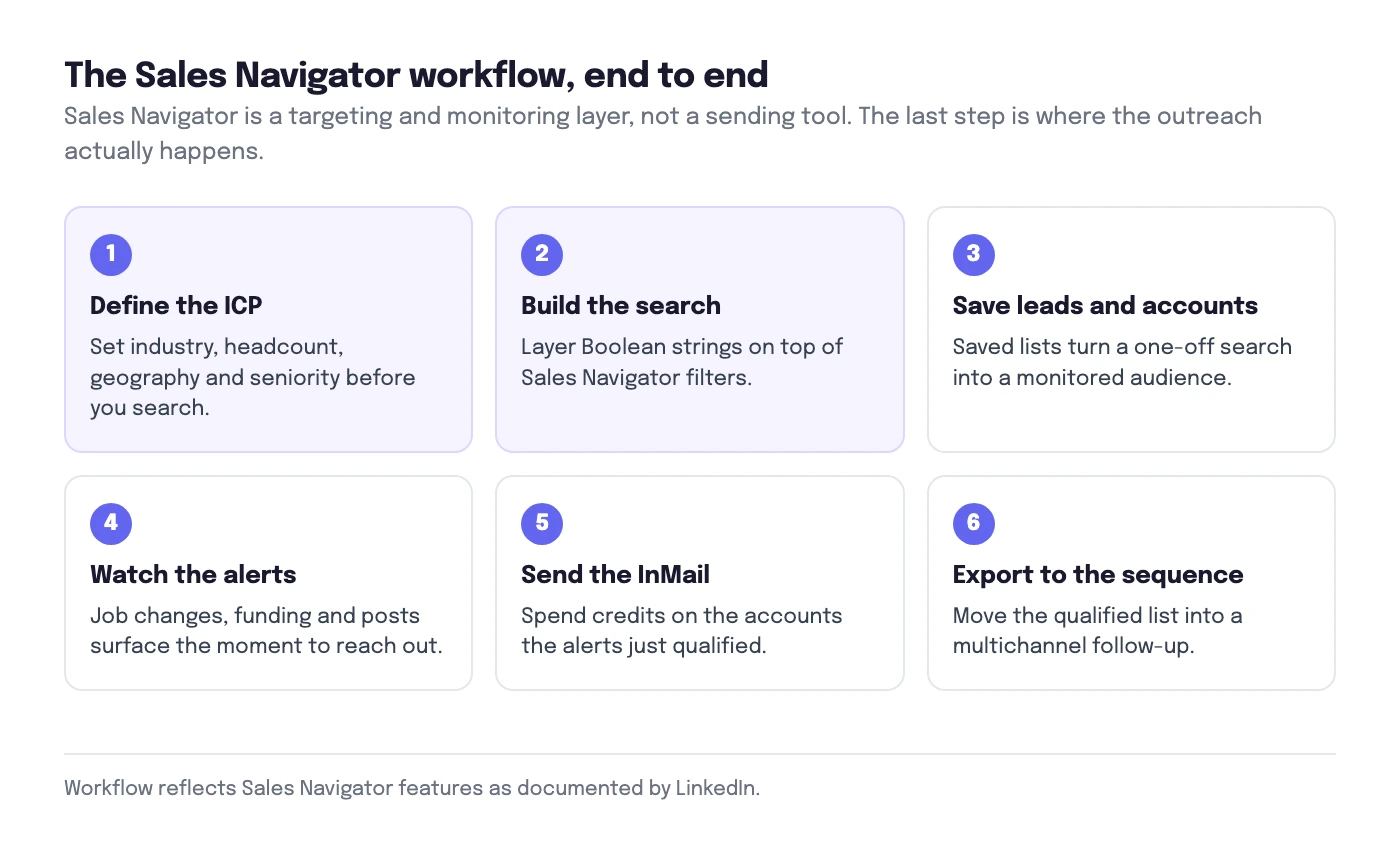
LinkedIn Sales Navigator is a premium subscription product from LinkedIn built for B2B sales prospecting. It sits on top of the regular LinkedIn graph and adds:
- 40+ advanced search filters covering firmographics (company size, industry, revenue), persona (seniority, function, job title, years in role), and intent signals (changed jobs, posted on LinkedIn, mentioned in news).
- Lead Lists and Account Lists to organize prospects with notes, tags, and assigned ownership.
- Real-time alerts when a saved lead changes role, gets promoted, posts content, or joins a target company.
- InMail credits (50/month) to message people you are not connected with.
- Smart Links to send tracked content (proposals, decks, case studies) with engagement analytics.
- CRM sync with Salesforce, HubSpot, Microsoft Dynamics, and Pipedrive (Advanced and Advanced Plus only).
What it is not: a sequencer. Sales Navigator finds and surfaces leads. To actually run multi-touch outbound campaigns, you connect it to an outbound platform. More on that in step 7.
Sales Navigator Core vs Advanced vs Advanced Plus
LinkedIn sells Sales Navigator in three tiers. Pricing below verified against LinkedIn's published Sales Navigator pricing page (May 2026).
| Tier | Price | Best for | Key extras |
|---|---|---|---|
| Core | $99/mo or $959/yr | Solo reps, founders, agencies | 40+ filters, 50 InMails, Smart Links, custom lists |
| Advanced | $149/mo or $1,300/yr | Sales teams (2-20 reps) | Everything in Core + TeamLink, CRM sync (HubSpot/Salesforce), bulk InMail, usage analytics |
| Advanced Plus | Custom (~$1,600+/seat/yr) | Enterprise sales orgs | Everything in Advanced + SSO, advanced CRM sync, data validation, contract terms |
Our pick for most teams: Core. Unless you specifically need TeamLink (see who in your company already knows a prospect) or in-platform CRM sync, Core covers 95% of the value at 66% of the price. You can replicate CRM sync via the Overloop integration on top of Core.
Get Sales Navigator
Subscribe to Core or Advanced and start the 30-day free trial. No credit card required upfront.
Go to linkedin.com/sales/start from your personal LinkedIn account. LinkedIn binds your Sales Navigator seat to your personal profile, so use the LinkedIn account you actually prospect from, not a burner. A complete profile with a healthy LinkedIn SSI score also gives your searches and outreach more reach from day one.
- Pick Core ($99/mo) if you are solo or under 3 reps. 50 InMails, 40 filters, Smart Links all included.
- Pick Advanced ($149/mo) if you need TeamLink or native CRM sync. TeamLink shows you which prospects your colleagues are already connected to.
- Take the 30-day free trial. You can downgrade before day 30 and lose nothing.
- Annual saves about 19% versus monthly. Switch to annual only after you have used the tool daily for 30 days.
Define your ideal customer profile
Translate your ICP into Sales Navigator filters before you run a single search. Skip this and you waste hours filtering on the fly.
Your ICP needs to map to filters Sales Navigator actually supports. Write it down in this exact format:
# Example ICP for a B2B SaaS company
Company size:     51-200 employees
Industry:         SaaS, Software Development
HQ location:      United States, United Kingdom
Revenue:          $10M-$50M
Seniority:        Director, VP, C-Level
Function:         Sales, Marketing
Job titles:       "Head of Sales", "VP Sales", "Chief Revenue Officer"
Years in role:    6+ months (not brand new, not 10-year veterans)
Translate each line into a Sales Navigator filter. Then save the filter set with a clear name like ICP - US/UK SaaS Sales Leaders. You will reuse it weekly.
Build advanced searches with boolean operators
Boolean strings turn a 5,000-result mess into 80 perfect matches. Learn 4 operators and you double your prospecting precision.
Sales Navigator supports four boolean operators in keyword fields (Job Title, Company, Keywords):
- AND: both terms required. Example:
sales AND SaaS. - OR: either term qualifies. Example:
("VP Sales" OR "Head of Sales"). - NOT: excludes a term. Example:
"Head of Sales" NOT recruiter. - Quotation marks: exact phrase match. Example:
"Chief Revenue Officer".
Real boolean string examples
# Find senior sales decision-makers in B2B SaaS
("VP Sales" OR "Head of Sales" OR "Chief Revenue Officer") AND (SaaS OR "B2B software") NOT recruiter

# Find marketing leaders excluding agencies
("VP Marketing" OR "CMO" OR "Head of Marketing") NOT (agency OR consultancy OR freelance)

# Find ops people at scaling startups
("Head of Operations" OR "VP Operations" OR "COO") AND (Series B OR "Series C")
Stack boolean keywords on top of the structural filters (company size, geography, seniority) from step 2. Most teams expect boolean to replace filters. It does not. Boolean refines the filter-narrowed result set.
(A OR B) AND C behaves differently from A OR B AND C.Save leads and account lists
Lists are the unit of work in Sales Navigator. Notes, alerts, exports, and CRM sync all attach to a list.
From any search result, click the bookmark icon next to a lead to add them to a Lead List. To add the company, click the company name and save it to an Account List. Mastering LinkedIn boolean search multiplies what those filters can do.
Why both lists matter
- Account Lists trigger company-level alerts: funding rounds, M&A, leadership changes, news mentions. Treat them as your buying-signal radar.
- Lead Lists trigger person-level alerts: job changes, promotions, content posts. Treat them as your outreach pipeline.
- Together they map the buying committee: which companies are in motion, and which individuals inside those companies are most reachable.
List hygiene rules
- One list per ICP segment. Do not dump 4,000 prospects in a single "All Leads" list.
- Tag list members by status:
cold,contacted,replied,booked. - Archive lists after 90 days. Sales Navigator caps active lists at 100; clean lists protect performance.
Use Smart Links to share content
Smart Links wrap your decks, proposals, and case studies in a tracked URL. You see who opened, scrolled, and re-shared.
Smart Links are the most underused feature in Sales Navigator. Sales reps think of them as "fancy file sharing." They are actually intent detection at the document level.
The Smart Link workflow
- Upload a PDF, deck, or proposal to Smart Links (Sales Navigator > Smart Links > Create).
- Send the Smart Link to a prospect via InMail or LinkedIn message.
- Get notified when they open, scroll past page 3, or forward to a colleague.
- Use the forwarded-to information to multi-thread the deal: now you know the second stakeholder by name.
Forwarding signals are gold. If your champion forwards your deck to "Sarah from Procurement," Sarah is your next target.
Send InMails strategically
InMails are scarce (50/month). Treat them as a high-intent channel, not a spray-and-pray tool.
An InMail that gets a reply within 90 days refunds the credit. That single rule should change how you write them.
InMail copy rules that double reply rate
- Keep it under 400 characters. LinkedIn's data shows InMails under 400 chars get 22% more replies than longer ones.
- Lead with a specific trigger. "Saw your post on [X]" or "Congrats on the [Y] round." Generic openers tank reply rate.
- One question, one ask. Multi-ask InMails get ignored.
- Never copy-paste a cold email. InMails are read on LinkedIn, often on mobile, with no subject line. The first sentence has to land.
- Use the subject line. InMails have one, cold emails on mobile often hide it. Make it specific: "Quick question on [their company]'s [X]."
Export to your outbound tool (Overloop)
Sales Navigator finds leads. It does not send sequences. Connect it to Overloop to run automated multichannel cadences on top.
Here is where most teams plateau: they build great lists in Sales Navigator, then manually copy-paste profiles into a spreadsheet, hand it to a VA, and lose 80% of the velocity Sales Navigator gave them.
Overloop integrates directly with Sales Navigator. Pull any saved Lead List or Account List into Overloop via the Chrome extension. From there:
- Run multichannel sequences: LinkedIn connection request → LinkedIn message → email → second email → follow-up LinkedIn message, all auto-paced.
- Multi-account support: run sequences from 2-10 LinkedIn accounts in parallel, each staying under LinkedIn's daily invite and message limits.
- Reply detection pauses sequences automatically when a prospect responds on any channel.
- CRM sync with HubSpot, Salesforce, Pipedrive, and others (replicates Sales Navigator Advanced's CRM sync at half the price).
- 450M B2B contact database as a fallback when Sales Navigator gives you a profile but no email.
Pro tips most teams miss
1. Saved-search alerts compound
Every saved search runs daily in the background. You get email alerts when new leads match. Build 5-10 saved searches across different segments and Sales Navigator becomes a pipeline-generation machine without you running a single manual search. Keep an eye on the LinkedIn limits while you work through these workflows.
2. TeamLink is worth Advanced for teams of 3+
If you have 3+ reps and they all have LinkedIn networks, TeamLink shows you which prospects your colleagues are already connected to. A warm intro from a coworker beats a cold InMail by roughly 5x reply rate (LinkedIn's own data from State of Sales 2024).
3. Content engagement is your highest-intent signal
The "Mentioned in news" and "Posted on LinkedIn in last 30 days" filters surface buyers who are actively in your category. Combine them with the "Changed jobs in last 90 days" filter and you find the rarest target: someone who just started a new role and is publicly active. New hires have 90-day mandates and budget.
4. Alert filters beat alert volume
Sales Navigator alerts get noisy fast. Filter alerts to only Lead Lists you actively work and only signal types you can act on (job changes, leadership news, content posts). Mute the rest. Quiet alerts = real signal.
5. Boolean over filters when you can
Filters are limited to LinkedIn's predefined categories. Boolean in the Job Title field catches roles LinkedIn never categorized (founder, CRO, head of revenue, RevOps lead). When in doubt, boolean wins.
Sales Navigator vs alternatives
Sales Navigator is not the only B2B prospecting tool. Quick comparison:
| Tool | Price | What it is | When to use |
|---|---|---|---|
| Sales Navigator | $99-149/mo | LinkedIn's premium search | Default for B2B prospecting. Best data on senior decision-makers. |
| Free LinkedIn | Free | Basic search, no advanced filters | Trying out a single search. Hard cap on commercial use after a few hundred searches/month. |
| LinkedIn Recruiter | $170+/mo | LinkedIn's hiring tool | Recruiters, not sales reps. Different filter set focused on candidates. |
| Apollo.io | $59-149/mo | Database + outbound platform | When you need email addresses and a sequencer in one tool. Less depth on LinkedIn data. |
| Overloop | $69-99/mo | Outbound platform + 450M database | On top of Sales Navigator, to run cadences and sync to CRM. Or standalone if you want one tool covering email + LinkedIn outbound. |
The real answer: Sales Navigator for discovery + Overloop for execution. They cover different jobs. Sales Navigator without an outbound tool is just an expensive search box. An outbound tool without LinkedIn's data is sequencing into the void.
Sales Navigator + Overloop: the prospecting stack
Sales Navigator and Overloop are designed to sit next to each other. The integration is direct: install the Overloop Chrome extension, log into Sales Navigator, and import any saved search, Lead List, or Account List into Overloop with one click.
What Overloop adds on top of Sales Navigator:
- Multichannel sequences across LinkedIn (connection requests, messages, voice notes) and email, paced automatically to stay under LinkedIn's daily limits.
- Multi-account orchestration: run cadences from 2-10 LinkedIn accounts at once, ideal for agencies or sales teams scaling outbound.
- Email enrichment: Sales Navigator does not provide email addresses. Overloop can add prospect search and a separate SMTP-checking step; review catch-all and risky results before sending.
- Reply detection on both LinkedIn and email pauses sequences instantly when a prospect replies anywhere.
- CRM sync to HubSpot, Salesforce, Pipedrive at $69/mo (cheaper than Sales Navigator Advanced's $149/mo CRM tier).
- Privacy review: check the current DPA, subprocessor list, processing regions, and transfer mechanisms.
Pricing: Overloop Starter is $69/mo. Growth is $99/mo. Together with Sales Navigator Core ($99/mo), the total stack runs $168-198/mo, less than half the cost of Sales Navigator Advanced Plus alone.
Frequently asked questions
How much does LinkedIn Sales Navigator cost?
Is LinkedIn Sales Navigator worth it?
What is the difference between LinkedIn Sales Navigator and LinkedIn Premium?
Can I use Sales Navigator with automation tools?
How many InMails do I get with Sales Navigator?
What is the best way to find leads on Sales Navigator?
Does Sales Navigator integrate with CRMs like HubSpot or Salesforce?
Turn your Sales Navigator lists into running sequences
Overloop integrates with LinkedIn Sales Navigator out of the box. Multichannel cadences across LinkedIn and email, multi-account support, reply detection, CRM sync, 450M contact database. From $69/mo.
Try Overloop free