


LinkedIn Sales Navigator has three tiers in 2026: Core at $119.99 per seat per month (about $89.99 billed annually), Advanced at $159.99 per seat per month (about $149.99 billed annually), and Advanced Plus by quote, with 50 InMail credits a month on every tier. This guide breaks down what each tier changes, how annual and monthly billing differ, when the price is worth it, and where a lower-cost outbound platform like Overloop does the actual sending Sales Navigator was never built for.
Disclosure: I am the CEO of Overloop, an outbound platform. Sales Navigator is a genuinely strong sourcing tool, and this guide treats it that way. I will also be honest about where it stops and where you need something else, because the two products solve different jobs.
The short version
- Three tiers. Core ($119.99/mo, $89.99 billed annually), Advanced ($159.99/mo, $149.99 billed annually), Advanced Plus (quote-based). 50 InMail credits a month on every tier.
- Per seat, per user. Everyone who prospects needs their own license. Sharing logins violates LinkedIn terms.
- Annual is cheaper per seat but locks you into a 12-month term with renewal clauses to manage.
- You pay for admin, reporting, and CRM sync at the higher tiers, not for better search.
- Sourcing, not sending. Sales Navigator finds leads. You still need a separate system to run the outbound.
- Confirm the live price. LinkedIn changes packaging often, so the figures here are anchors, not quotes.
How Much Does LinkedIn Sales Navigator Cost in 2026?
LinkedIn rarely gives one universal public price, because your quote depends on three things: how many seats you buy, how long you commit, and which tier you need. In practice most buyers see one of two paths: self-serve monthly billing for individuals, or an annual contract quoted by LinkedIn Sales Solutions for teams.
Use these as your reality check. Core is $119.99 per seat per month billed monthly, or about $89.99 per seat per month billed annually ($1,079.88 per year) on LinkedIn's self-serve pricing. Advanced is $159.99 per seat per month billed monthly, or about $149.99 per seat per month billed annually ($1,799.88 per year). Advanced Plus is quote-based and shifts materially with seat count, contract structure, and integration requirements. All three tiers include 50 InMail credits per month. LinkedIn adjusts packaging regularly, so check the live figure before you commit.
A few factors move the number on a real invoice:
- Seats. Pricing is per user. A one-seat founder setup prices differently than a 25-seat SDR team, because volume and packaging change.
- Contract term. Annual agreements usually cut the per-seat rate. Month-to-month, when available, costs more per seat.
- Tier and feature gating. The biggest jumps map to admin controls, reporting, and CRM integration, not to better search.
- Region, currency, and tax. LinkedIn bills globally through local entities. VAT or similar taxes can apply based on your billing address.
Sales Navigator Plans Compared
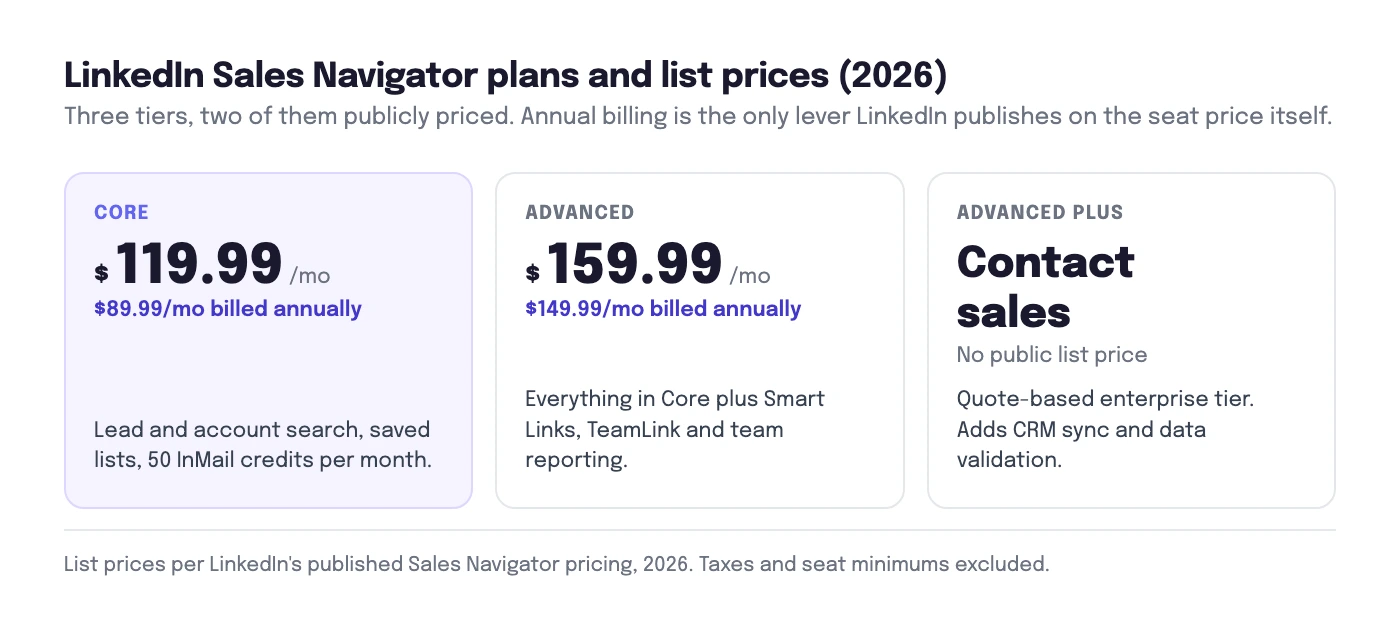
The plan choice usually comes down to four questions: how many saved leads and searches you need, whether you must sync to a CRM, what reporting your manager expects, and who needs admin control over seats. Here is how the three tiers compare on price and what actually changes between them.
| Plan | Monthly / seat | Annual / seat / mo | InMail credits | Key features | Best for |
|---|---|---|---|---|---|
| Core Self-serve, monthly available |
$119.99/mo | ~$89.99/mo ($1,079.88/yr) |
50 / month | Advanced lead and account search, saved lists, alerts (job changes, growth signals) | Solo sellers and small teams prospecting mainly inside LinkedIn |
| Advanced Team workflow tier |
$159.99/mo | ~$149.99/mo ($1,799.88/yr) |
50 / month | Everything in Core plus CRM integration (Salesforce, HubSpot), team smart links, shared lists, better reporting | SDR teams that need shared workflow and CRM context |
| Advanced Plus Quote-based, enterprise |
Custom quote | 50 / month | Deepest CRM integration, enterprise reporting and governance, advanced admin and seat management, data validation | Revenue orgs needing governance and enterprise rollout across many seats | |
| Overloop Outbound execution, not sourcing-only |
From $69/mo | N/A | 450M-contact database, email finder and verifier, multichannel email + LinkedIn sequences, reply tracking, privacy documentation available for review | Teams that need to run the outbound, not just find leads | |
Read the table by intent, not just by price. Core through Advanced Plus all answer the same question: who should we reach out to? They differ on team admin, reporting depth, and how cleanly leads land in your CRM. The last row answers a different question: how do we actually contact them at volume, across channels, without burning deliverability? That is why many teams run Sales Navigator and a separate sender rather than choosing one.
Sales Navigator Core: What You Get for $119.99/mo
Core is the individual tier, and for most solo sellers it is the only one they will ever touch. At $119.99 per seat per month billed monthly, or about $89.99 per seat per month billed annually ($1,079.88 per year), it unlocks advanced lead and account search with the full filter set, saved lead and account lists, alerts on job changes and company growth, and 50 InMail credits per month to message people outside your network.
What Core does not give you is team infrastructure. There is no CRM integration, lightweight admin only, and basic individual usage visibility rather than team reporting. If you are one founder doing your own prospecting and you live inside LinkedIn, Core is enough. The moment a manager wants to coach from activity dashboards, or leads need to flow into Salesforce, you are looking at Advanced.
Sales Navigator Advanced: What You Get for $159.99/mo
Advanced (the tier LinkedIn previously called Team) is built for SDR teams. At $159.99 per seat per month billed monthly, or about $149.99 per seat per month billed annually ($1,799.88 per year), it keeps every Core prospecting feature, including the same 50 InMail credits a month, and adds the things that make a team work together: CRM integration with Salesforce and HubSpot for lead and account context, TeamLink to surface warm paths through colleagues' networks, shared lists, smart links to track content engagement, and stronger reporting so a manager can see adoption and activity.
The jump from Core to Advanced is not about better search. It is about workflow and visibility. If your team runs pipeline in a CRM and a manager coaches from metrics, that is the tier you need. If your system of record is a spreadsheet and reps work solo, you are paying about $40 more per seat per month for features you will not use.
Sales Navigator Advanced Plus: Quote-Based Enterprise
Advanced Plus (formerly Enterprise) is sold by quote, and the price moves with seat count, contract structure, and how deep your integration needs run. It adds the things large revenue orgs ask for: the deepest CRM integration including data validation that flags stale records, enterprise-grade reporting and governance, advanced admin and seat provisioning, and single sign-on style controls.
You only need Advanced Plus when RevOps requires governance across many seats: centralized provisioning, usage policy enforcement, and reporting that rolls up across the org. For a 5 to 20 person team, Advanced almost always covers the workflow at a fraction of the negotiation overhead. Get the exact integration and admin language written into the order form rather than accepting "included" on a slide.
Annual vs Monthly Billing: Which Saves More?
This is where the effective cost diverges from the sticker price. The trade-off is simple:
- Annual billing usually lowers the per-seat rate and is often the only way to get Advanced and Advanced Plus. The cost is commitment: a 12-month term, frequently prepaid, with auto-renewal clauses you have to manage. On Core that takes the rate from $119.99/mo down to about $89.99/mo, and on Advanced from $159.99/mo down to about $149.99/mo.
- Monthly billing, when available (mostly on Core), costs more per seat but keeps your commitment short. It is the right choice while you are still validating whether Sales Navigator fits your motion.
The practical rule: buy monthly Core for a one-month proof, then move to an annual term only after a pilot shows reps are saving qualified leads and booking meetings. Do not sign a 12-month, multi-seat annual deal on a hunch. The cheapest plan is the one you do not over-commit to.
Is LinkedIn Sales Navigator Worth the Cost?
Sales Navigator pays off when it becomes a daily sourcing habit. The seat cost is justified when reps build lists, work alerts, and turn LinkedIn's network into a steady flow of qualified leads. ROI gets weak in three situations:
- Your pipeline comes from inbound, partners, or events. If most of your revenue is referrals or product-led inbound, reps will not prospect enough to justify $120 to $160 per seat per month. Keep one Core seat for opportunistic research and spend the rest on conversion.
- You need bulk data for high-volume cold outreach. Sales Navigator is built for in-product prospecting and governed workflows, not for exporting thousands of contacts a month. If that is your motion, you will fight limits and policy risk. Source from a dedicated B2B database instead.
- Your team cannot sustain LinkedIn-first activity. In heavily regulated industries, or verticals where prospects barely use LinkedIn, the seats sit idle. Switch the primary channel to email and calling, and keep LinkedIn for research, not daily quotas.
Worth noting on the broader context: LinkedIn is the dominant B2B social channel, more than 1 billion members reported by LinkedIn, and marketers consistently rate it the top platform for B2B lead generation. That reach is real. The question is never whether LinkedIn matters, but whether paying per seat for Sales Navigator matches how your specific team actually books meetings.
Lower-Cost Ways to Run Outbound
The most common mistake is treating Sales Navigator as your whole outbound stack. It is a sourcing and signal product. It excels at finding the right roles, mapping buying committees, and catching job changes. It is not built to run multi-step sequences, manage email deliverability, or report on outreach across channels. For the click-by-click of using it well, see our companion guide on how to use LinkedIn Sales Navigator. This page is about cost, so here is the cost angle.
Once you add up Sales Navigator seats plus a separate sending tool plus a data provider, the "total cost of a working outbound motion" is what matters, not the Sales Navigator line item alone. That is where a consolidated platform changes the math.
Overloop is the outbound execution layer. It turns a list of prospects into a structured sequence, finds and verifies emails against a 450M-contact database, runs email and LinkedIn steps together, personalizes at scale, and tracks replies and bounces so you can iterate. It pulls verified emails from LinkedIn profiles and feeds them straight into a sequence, then keeps your list clean with a built-in email verification step. Pricing starts at $69 per seat per month with finder credits included, which often makes the all-in cost lower than Sales Navigator Advanced plus a standalone sender.
A realistic stack is not Sales Navigator or Overloop. It is Sales Navigator Core for sourcing and Overloop for the sending, which keeps you off the most expensive Sales Navigator tiers while still running real multichannel outreach. For the full method, see the LinkedIn outreach playbook, and for a side-by-side of dedicated tools, our roundup of the best AI LinkedIn outreach tools.
The bottom line
LinkedIn Sales Navigator costs $119.99 per seat per month for Core ($89.99 billed annually), $159.99 per seat per month for Advanced ($149.99 billed annually), and a custom quote for Advanced Plus, with 50 InMail credits a month on every tier, but always confirm the live figure on LinkedIn, because packaging changes. You pay for admin, reporting, and CRM sync at the higher tiers, not for better search.
Buy the lowest tier that matches your workflow, prove it with a monthly Core pilot before signing an annual term, and remember what you are buying: a way to find and save leads. To actually run the outbound at lower total cost, pair it with a sending platform like Overloop rather than stretching Sales Navigator into a job it was never built for.
Frequently Asked Questions
How much does LinkedIn Sales Navigator cost in 2026?
LinkedIn publishes Sales Navigator Core at $119.99 per seat per month billed monthly, or about $89.99 per seat per month billed annually ($1,079.88 per year). Advanced is $159.99 per seat per month billed monthly, or about $149.99 per seat per month billed annually ($1,799.88 per year). Advanced Plus is quote-based and varies with seat count and integration needs. All three tiers include 50 InMail credits per month. Always confirm the current figure on LinkedIn's own plan pages, since pricing and packaging change.
What is the difference between Sales Navigator Core, Advanced, and Advanced Plus?
Core is the solo and small-team tier: advanced lead and account search, saved lists, and alerts. Advanced adds team features and CRM integration with Salesforce and HubSpot, plus better reporting. Advanced Plus is the enterprise tier with the deepest CRM integration, enterprise reporting, and admin governance, and it is sold by quote. The biggest price jumps map to admin, reporting, and CRM sync rather than to better search.
Is Sales Navigator cheaper billed annually or monthly?
Annual billing is usually cheaper per seat but locks you into a 12-month term with renewal language to manage. Monthly billing, where available, costs more per seat but keeps your commitment short. Many teams only see Advanced and Advanced Plus through annual order forms quoted by LinkedIn Sales Solutions.
Does Sales Navigator have a free trial?
LinkedIn sometimes offers a free trial, most often on the individual Core plan, but availability varies by region and whether you buy self-serve or through a sales rep. Treat any trial as a workflow test rather than a feature tour: measure leads saved, connection acceptance rate, reply rate, and meetings booked before you commit to a term.
Is LinkedIn Sales Navigator worth the cost?
It is worth it when prospecting on LinkedIn is a daily habit for your reps and the saved lists, alerts, and advanced search feed a real pipeline. It is weak value when your pipeline comes from inbound, partners, or events, when you need bulk data export it is not built for, or when your team cannot sustain LinkedIn-first activity. In those cases a dedicated outbound platform usually delivers more pipeline per dollar.
Can Sales Navigator export contacts to a CRM or outbound tool?
Sales Navigator is built for in-product prospecting, not bulk data export. Advanced and Advanced Plus include governed CRM integrations with Salesforce and HubSpot for lead and account context, but LinkedIn limits how you extract and automate contact data. To run multichannel sequences you pair it with an outbound platform such as Overloop, which sources verified contacts, runs email and LinkedIn steps, and tracks replies.