



- Shortlist for
- Prospect sourcing plus outreach
- Channel approach
- Email and LinkedIn sequences
- Buying unit / plan
- Credits and connected email accounts
- Decision before switching
- Compare sourced prospects and email lookups with monthly credits
Best HeyReach alternatives compared

- Shortlist for
- Agency LinkedIn sender operations
- Channel approach
- LinkedIn; email through integrations
- Buying unit / plan
- Senders and client workspaces
- Decision before switching
- Keep the existing email platform in the total cost

- Shortlist for
- LinkedIn-led SMB prospecting
- Channel approach
- Business adds email sequences
- Buying unit / plan
- Pro / Advanced / Business
- Decision before switching
- Email features and inbox add-on change the package

- Shortlist for
- LinkedIn sequences with email follow-up
- Channel approach
- LinkedIn and email in a sequence
- Buying unit / plan
- Business / agency terms
- Decision before switching
- Confirm seats and agency permissions

- Shortlist for
- LinkedIn and email drip campaigns
- Channel approach
- Both channels on paid plans
- Buying unit / plan
- Basic / Pro / Advanced
- Decision before switching
- Basic has one campaign; multi-team management is higher-tier

- Shortlist for
- Data extraction and custom automations
- Channel approach
- Automation workflows; separate campaign setup
- Buying unit / plan
- Execution time and automation slots
- Decision before switching
- Budget configuration and downstream sending tools

- Shortlist for
- LinkedIn outreach with email add-on
- Channel approach
- LinkedIn plus optional email automation
- Buying unit / plan
- Per LinkedIn account
- Decision before switching
- Team management and email are plan decisions

- Shortlist for
- Configurable LinkedIn workflows
- Channel approach
- Local or cloud-based storage version
- Buying unit / plan
- Standard / Pro and deployment choice
- Decision before switching
- Compare setup, data credits and integrations
 Lemlist
Lemlist- Shortlist for
- Multichannel sales sequences
- Channel approach
- Email, LinkedIn, calls and SMS by plan
- Buying unit / plan
- Email / Multichannel / Enterprise
- Decision before switching
- Email plan is not the LinkedIn plan

- Shortlist for
- Sequences around a sender identity
- Channel approach
- LinkedIn and email; more channels by plan
- Buying unit / plan
- Per identity
- Decision before switching
- Count identities separately from team members

- Shortlist for
- LinkedIn-led individual or team outreach
- Channel approach
- Pro adds multichannel automation
- Buying unit / plan
- Basic / Pro / Team
- Decision before switching
- Basic limits active campaigns; compare higher tiers
All tools (11)
| Tool | Shortlist for | Channel approach | Buying unit / plan | Decision before switching |
|---|---|---|---|---|
| Prospect sourcing plus outreach | Email and LinkedIn sequences | Credits and connected email accounts | Compare sourced prospects and email lookups with monthly credits | |
| Agency LinkedIn sender operations | LinkedIn; email through integrations | Senders and client workspaces | Keep the existing email platform in the total cost | |
| LinkedIn-led SMB prospecting | Business adds email sequences | Pro / Advanced / Business | Email features and inbox add-on change the package | |
| LinkedIn sequences with email follow-up | LinkedIn and email in a sequence | Business / agency terms | Confirm seats and agency permissions | |
| LinkedIn and email drip campaigns | Both channels on paid plans | Basic / Pro / Advanced | Basic has one campaign; multi-team management is higher-tier | |
| Data extraction and custom automations | Automation workflows; separate campaign setup | Execution time and automation slots | Budget configuration and downstream sending tools | |
| LinkedIn outreach with email add-on | LinkedIn plus optional email automation | Per LinkedIn account | Team management and email are plan decisions | |
| Configurable LinkedIn workflows | Local or cloud-based storage version | Standard / Pro and deployment choice | Compare setup, data credits and integrations | |
| Lemlist | Multichannel sales sequences | Email, LinkedIn, calls and SMS by plan | Email / Multichannel / Enterprise | Email plan is not the LinkedIn plan |
| Sequences around a sender identity | LinkedIn and email; more channels by plan | Per identity | Count identities separately from team members | |
| LinkedIn-led individual or team outreach | Pro adds multichannel automation | Basic / Pro / Team | Basic limits active campaigns; compare higher tiers |
What the Overloop interface shows
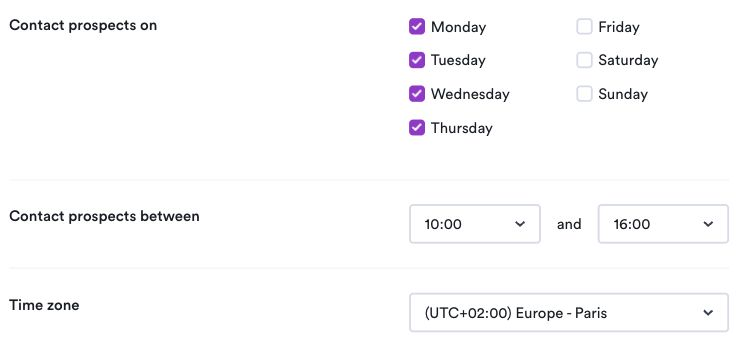
Screens captured in a signed-in Overloop account on September 13, 2026. Each caption identifies the controls we observed.
Inspect the autopilot settings

Check days, hours and time zone
Inspect the import steps
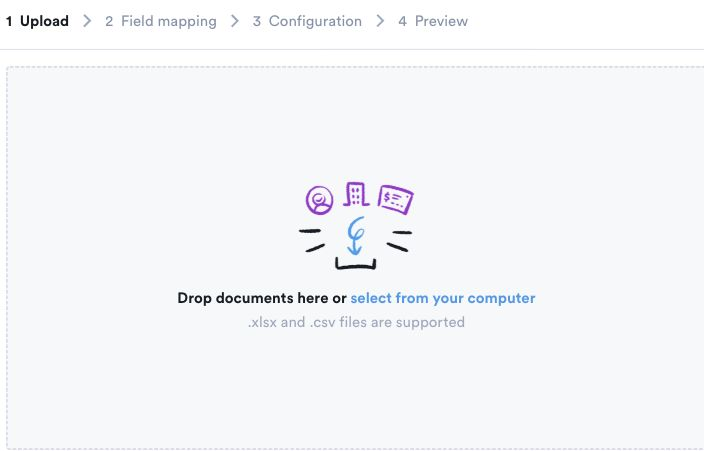
We did not run a prospect search, launch a campaign or import a file. These screens do not establish data quality, outreach results or a successful end-to-end import. Source: app.overloop.ai
Check the workflow during your trial
- Use a small sample you are allowed to process and accounts you control. Keep campaigns paused; in Overloop, leave both autopilot switches off.
- Apply the same targeting criteria in each shortlisted tool. Record returned fields, relevant contacts and credits used.
- Draft one sequence without activating it. Check the audience, message edits, days, hours, time zone and reply ownership.
- If migration is required, use an authorized test file. Check field mapping, duplicates and exclusions, then inspect the preview before proceeding.
Compare ten HeyReach alternatives by LinkedIn senders, email workflows, contact data and client setup. Price the capacity your team needs, including the option to keep HeyReach and change only the connected email platform.
Compare the capacity of your connected stack: LinkedIn senders, client workspaces, prospect data and email follow-ups. The pricing table below separates the plans from the workflow recommendations.
Publisher disclosure: Overloop publishes this guide. Recommendations use public vendor sources; we did not run a comparative product trial. Method and dated sources.
Ten alternatives plus HeyReach as the baseline. The plan and cost distinctions below come from the vendor sources in the next table; the shortlist recommendations are our interpretation.
HeyReach alternatives pricing and plan limits
Primary sources checked September 13, 2026. USD unless marked EUR. Annual equivalents require annual payment; where a page has a dynamic billing selector, confirm the selected term before checkout. Free trials let you evaluate a paid product and should not be confused with permanent free plans.
| Tool and primary source | Published price | Limit that matters |
|---|---|---|
| Overloop pricing | $69/user/month Starter; $99 Growth | Starter: 250 credits and 1 connected email account; Growth: 500 and 3. These are email-account quotas. |
| HeyReach pricing | $79/sender/month; $63 equivalent on yearly billing | Agency: $999/month for 25 senders. Unlimited: $2,999/month, capped at 300 senders under fair use. |
| Waalaxy pricing | Displayed Pro €19, Advanced €49, Business €69 per user/month | Confirm the selected billing period. Business adds cold email; LinkedIn inbox is an add-on. |
| Expandi pricing | $99/month; annual billing advertises 20% off | Business includes LinkedIn and email follow-ups in one sequence; agency terms are quoted. Source rechecked September 13, 2026. |
| Dripify pricing | $59/user/month Basic; $39 with annual billing | Basic: 1 campaign. Pro adds unlimited campaigns; Advanced adds multi-team management. |
| PhantomBuster pricing | $69/month Start | Execution time, automation slots and enrichment credits govern capacity. A 14-day trial is not an ongoing free plan. |
| SalesRobot pricing | $59/LinkedIn account/month Basic; $39 with annual billing | Email automation is listed separately at $15/email account/month; compare team-management tiers. |
| Linked Helper pricing | $15/month Standard local-storage version | Cloud-storage Standard is $29.90/month. Compare deployment and Standard / Pro limits. |
| lemlist pricing | $109/user/month Multichannel; $87 with annual billing | 5 email senders per user; enrichment and additional channel usage need a separate budget. |
| La Growth Machine pricing | Basic displayed at €60/month per identity | An identity is the sender. Count paid identities and confirm billing period and workflow tier. |
| Meet Alfred pricing | $59/user/month Basic; $99 Pro on monthly billing | Basic has 3 active campaigns; Pro adds multichannel automation. |
Compare the complete setup: sender licenses + email platform + mailboxes and domains + data credits + client-management options. Overloop’s lower entry price per user does not prove a lower agency bill at your sender count.
Why teams look for a HeyReach alternative
A replacement should remove a concrete cost or workflow constraint. Use these four reasons to narrow the list before starting trials.
Bring email into the same campaign
Compare an integrated sequence with keeping HeyReach plus an email platform. HeyReach documents native Instantly and Smartlead integrations, so adding email does not automatically require a migration.
Source prospects before outreach
If buying lists and moving data between tools is the bottleneck, evaluate Overloop’s prospecting workflow. For a wider data-led shortlist, compare Apollo alternatives, including their enrichment and export allowances.
Pay for the capacity you use
Compare the cost for your actual senders, operators and clients. A low per-user entry price can be less useful than a sender bundle; an agency bundle can be excessive for one founder.
Reduce campaign handoffs
During a trial, rebuild a real sequence and check reply ownership, pause-on-reply behavior, permissions and CRM handoff. Do not assume another tool has a better approval process without seeing it work.
The buying criteria that actually matter
A strong HeyReach alternative should be judged on the workflow and controls it provides, not only on whether it can send LinkedIn actions.
| Criteria | Why it matters | What to check before switching |
|---|---|---|
| Sender scale | Agencies and high-volume teams need multiple LinkedIn profiles without losing operational clarity. | How accounts are connected, monitored, paused, and assigned. |
| Campaign review | Bad LinkedIn copy can burn a founder, SDR, or client profile quickly. | Whether managers can review audiences, messages, timing, and ownership before launch. |
| Personalization workflow | Connection notes and follow-ups need a real buyer reason, not fake intimacy. | How lists, signals, ICP fields, and message variants are handled. |
| Reply ownership | LinkedIn conversations are useless if nobody owns the next step. | How replies are surfaced, assigned, and moved into the sales workflow. |
| Email follow-up | Email should support the LinkedIn motion, not replace it on a LinkedIn-intent page. | Whether email can be added only when it helps: accepted-no-reply, known contacts, high-intent accounts. |
| Migration risk | Switching tools can break active campaigns, sender history, and reporting habits. | Whether you can migrate one campaign first before moving every sender. |
Keep HeyReach or replace the whole workflow?
Consider Overloop
Your next job is prospect data plus email and LinkedIn
Evaluate list building and both channels in one workflow, then check the credit and connected-email-account limits. Compare lemlist alternatives if you also need other multichannel options.
Keep HeyReach on the shortlistIf client workspaces, many LinkedIn senders and an existing email platform already meet the brief, migration may add work without removing a bottleneck.
Compare a dedicated LinkedIn tool
Your workflow stays LinkedIn-led
Waalaxy, Expandi and Dripify offer different campaign and packaging choices. Price the plan that includes your required email, inbox and team features, not just the entry tier.
Compare the connected stackIf you keep HeyReach and change only the email layer, use our cold email software comparison to shortlist senders by contacts, monthly sends and client requirements.
1. Overloop: prospect data, email and LinkedIn in one workflow
Shortlist Overloop when your current process starts with finding B2B prospects, then copying them between a data source, an email sender and a LinkedIn tool. Its relevant fit is prospect sourcing plus AI-assisted email and LinkedIn sequences; campaign review is a step to verify during evaluation, not evidence that competing products lack controls.
Reasons to evaluate it
- Build a prospect list and outreach sequence in the same product.
- Use email and LinkedIn steps in the campaign instead of operating a LinkedIn-only sender.
- Review audience and message drafts before launch.
Limits to check first
Starter and Growth have different monthly credits, connected email accounts and campaign quotas. CRM integration scope also varies by plan. Keep HeyReach in consideration if your primary requirement is managing a large pool of LinkedIn senders rather than adding prospect data and email.
HeyReach: the baseline for LinkedIn sender scale
Before switching, check whether your current plan or an integration already solves the gap. HeyReach documents a unified inbox, client workspaces and permissions, API/webhooks, plus Instantly and Smartlead integrations for multichannel campaigns. Its enrichment allocation is one-time rather than a recurring monthly allowance.
These are reasons to compare the full stack instead of portraying HeyReach as a sender with no sales workflow. Check the current plan limits and our HeyReach review before deciding.
Which tool fits your actual team?
Agency
Managing many client senders
Compare HeyReach’s sender bundle with the total licenses, workspaces and email subscriptions of the replacement. Rebuild one client campaign before moving the rest.
SDR team
One process for data and outreach
Shortlist Overloop, lemlist and La Growth Machine. Check audience sourcing, both channels, reply handoff and the CRM actions your team actually needs.
Founder-led sales
One sender and a limited list
Start with the required channel and list size. A smaller Waalaxy or Dripify plan may fit; choose a broader workflow only if it removes another tool or repeated manual work.
Other HeyReach alternatives worth comparing
Waalaxy
Compare Pro and Advanced for LinkedIn prospecting, or Business if you need email sequences. Include the separate inbox option in your budget.
Expandi
Compare its LinkedIn and email sequence builder, then verify the permissions and client setup available in your quoted package.
Dripify
Compare Basic for one campaign, Pro for more campaigns and Advanced for multi-team management. Current paid plans document LinkedIn and email sequences.
PhantomBuster
Consider it for data extraction and configurable automation workflows. Check execution time and slots, and decide how extracted leads will reach your sending tool.
SalesRobot
Compare per-account LinkedIn pricing, team-management tiers and the separate email automation add-on.
Linked Helper
Compare Standard and Pro, then decide between local and cloud-based storage versions. Include configuration, integration and data-credit needs in the evaluation.
Lemlist
Compare the Multichannel plan when email and LinkedIn belong in the same sequence. The lower-priced Email plan does not include LinkedIn automation.
La Growth Machine
Compare LinkedIn and email sequences priced per sender identity. Verify which tier permits the custom workflows and integrations you need.
Meet Alfred
Compare Basic for LinkedIn campaigns with Pro for multichannel automation; check active-campaign limits and team settings.
What a better LinkedIn outreach workflow should include
A HeyReach alternative should not only ask, “can it automate LinkedIn?” It should ask how the audience, messages, replies and follow-up will be managed by the team.
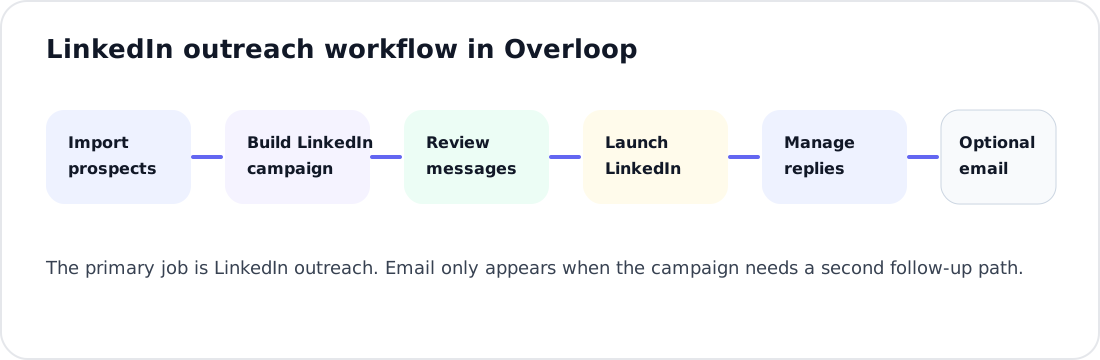
| Workflow step | What good looks like | Why it matters |
|---|---|---|
| Prospect import | Clean lists, owner fields, ICP filters, and source context | Bad lists create bad LinkedIn campaigns |
| Connection request | Short, relevant, no fake intimacy | This is the first brand touch |
| LinkedIn follow-up | Tied to a concrete buyer reason | Generic follow-ups get ignored |
| Review before launch | Human approval for messaging and audience | Helps catch targeting and messaging errors before launch |
| Replies | Clear ownership and next step | Conversations only matter if sales follows up |
| Email follow-up | Use when the buyer can be reached appropriately on both channels | Evaluate both channels within the actual sales process |
Migration checklist if you are leaving HeyReach
- Export active campaign logic: audiences, sender accounts, connection notes, follow-ups, and reply labels.
- Separate volume problems from quality problems: if volume is the only issue, keep HeyReach on the shortlist.
- Define your LinkedIn review process: who approves lists, messages, launch timing, and replies.
- Rebuild one campaign first: do not migrate every sender at once.
- Add email only where it helps: for accepted connections with no reply, known email contacts, or high-intent accounts.
- Measure meetings, not only conversations: LinkedIn activity is not the same as pipeline.
Want a HeyReach alternative without breaking your LinkedIn motion?
Evaluate Overloop if you want to find B2B prospects and build email and LinkedIn sequences together. Start with one audience and check the required credits, accounts and integrations before switching.
Try Overloop freeBefore you switch, map:
- which senders stay active
- which campaigns need approval
- which replies need owner assignment
- where email follow-up should support LinkedIn
How we compared HeyReach alternatives
This is a comparison of public product documentation and published plans, checked on . We distinguish documented features from our editorial judgment about buyer fit; we did not run a controlled reply-rate or deliverability test.
Publisher disclosure: this guide is published by Overloop. Overloop is included for its prospect data plus email and LinkedIn workflow, not as a universal winner.
Primary evidence
The pricing table links directly to the vendor page for each product. The HeyReach plan comparison is the baseline for sender allowances, workspaces and email integrations.
Buying criteria
Channel execution, data sourcing, paid-plan limits, billing unit, client setup and migration effort. List order is not a performance ranking.
How to use the comparison
Pick two products that solve your missing job, then verify that job with one representative audience and campaign during their trials.
This update
Corrected the alternative count, refreshed prices and plan distinctions, and added a choice between retaining a connected stack and moving to an integrated workflow.
FAQ
What is the best HeyReach alternative?
For prospect data plus email and LinkedIn, compare Overloop, lemlist and La Growth Machine. For a dedicated LinkedIn-led workflow, compare Waalaxy, Expandi and Dripify. Keep HeyReach as the baseline if managing many LinkedIn senders is your priority.
Is Overloop a LinkedIn automation tool?
Overloop supports LinkedIn and email sequences alongside B2B prospect sourcing and AI-assisted campaign workflows. Compare its monthly credits, connected email accounts and integration scope before moving an existing setup.
Is HeyReach better than Overloop?
The buying units and workflows differ. HeyReach is relevant for a pool of LinkedIn senders and can connect to email platforms. Overloop is relevant when you want prospect data and email plus LinkedIn sequences in one product. Neither is a universal replacement for the other.
Can I keep HeyReach and add email outreach?
Yes. HeyReach documents native integrations with Instantly and Smartlead. Compare that connected stack with an integrated alternative, including the cost of both subscriptions, mailboxes, data and the work needed to maintain campaign handoffs.
Which HeyReach alternative should you choose?
Keep HeyReach on the shortlist when client workspaces and LinkedIn sender scale are the job. Evaluate Overloop, lemlist or La Growth Machine when the missing piece is a combined prospecting and multichannel workflow. Compare Waalaxy, Dripify and Expandi when you want to change the LinkedIn sequence experience without redesigning the entire stack.
Read the Overloop vs HeyReach comparison if those are your final two choices. Validate the winning workflow with one campaign before moving every sender.