


LinkedIn InMail is a paid message you send to someone you are not connected to. It lands in their LinkedIn inbox without an accept gate, which is what separates it from a connection request and changes how you should write it. Connection requests build a network slowly; InMail is for a clear, time-bound ask where you want a simple yes or no. This guide covers how credits and refunds work, InMail versus connection requests versus regular messages, open versus Sponsored InMail, response-rate benchmarks, and the copy that earns replies. Where InMail is one channel, Overloop runs LinkedIn and email together so you are never stuck waiting on credits alone.
LinkedIn InMail is a paid message you can send to a LinkedIn member you are not connected to. It reaches their inbox directly, with no connection request and no accept step. InMail credits come bundled with LinkedIn Premium and Sales Navigator plans, and LinkedIn refunds a credit when the recipient replies within 90 days. That refund rule is the key to using InMail well: when your message earns replies, credits recycle; when it gets silence, every send is a permanent cost. Treat InMail as a high-intent channel for a single, clear ask, not a volume play.
Disclosure: I am the CEO of Overloop, a multichannel outbound platform that runs LinkedIn and email together. I recommend Overloop where it fits, but most of this guide is about using InMail itself well, because the channel works best inside a wider system, not on its own.
The short version
- InMail = paid message, no connection needed. It skips the accept gate a connection request requires.
- Credits refund on a reply. LinkedIn returns the credit if the recipient responds within 90 days, even to say no.
- It outperforms email about 3x. LinkedIn reports InMail response rates roughly triple a comparable email.
- Short wins. InMails under 400 characters get meaningfully higher response rates than the average.
- One channel, not the whole system. Credits are capped, so pair InMail with email for volume.
What Is LinkedIn InMail?
InMail is LinkedIn's paid direct-message feature for reaching people outside your network. You can spend money on it and still get silence, and most misses come from two avoidable problems: people send InMail like it is a connection note, and they treat it like a volume channel instead of a high-intent one.
Mechanically, an InMail lands in the recipient's LinkedIn inbox under the InMail label. It does not require a connection request, so it avoids the friction of an accept step, and it allows a longer message than the short note attached to a connection request. Access comes through LinkedIn Premium or Sales Navigator, which issue a monthly allotment of InMail credits.
InMail vs Connection Request vs Regular Message
These three are easy to confuse, and using the wrong one is the most common reason outreach falls flat. Here is how they differ on what matters: who you can reach, what it costs, and how much you can say.
| Type | Who you can reach | Cost | Length limit | Best for |
|---|---|---|---|---|
| InMail | Anyone (no connection) | Uses a credit (Premium / Sales Nav) | Up to ~1,900 characters | A specific ask to a stranger, now |
| Connection request note | Anyone (must accept first) | Free | 300 characters on most accounts | Slow network building |
| Regular message | Existing 1st-degree connections | Free | No practical limit | People who already accepted you |
The split is simple. A connection request asks for permission to enter someone's network and only lets you message them freely once they accept. A regular message works only with people who already accepted you. InMail is the one tool that reaches a stranger's inbox immediately, which is why it is paid. If you want the full mechanics of the free path, our guide on writing connection request messages covers the 300-character note in depth.
How InMail Works: Credits, Limits, and Refunds
Reply rates depend on your copy, but InMail mechanics set the ceiling. Misunderstand credits, limits, and refunds and you will either under-test out of caution or burn budget on low-signal sends.
Credits, delivery, and refunds
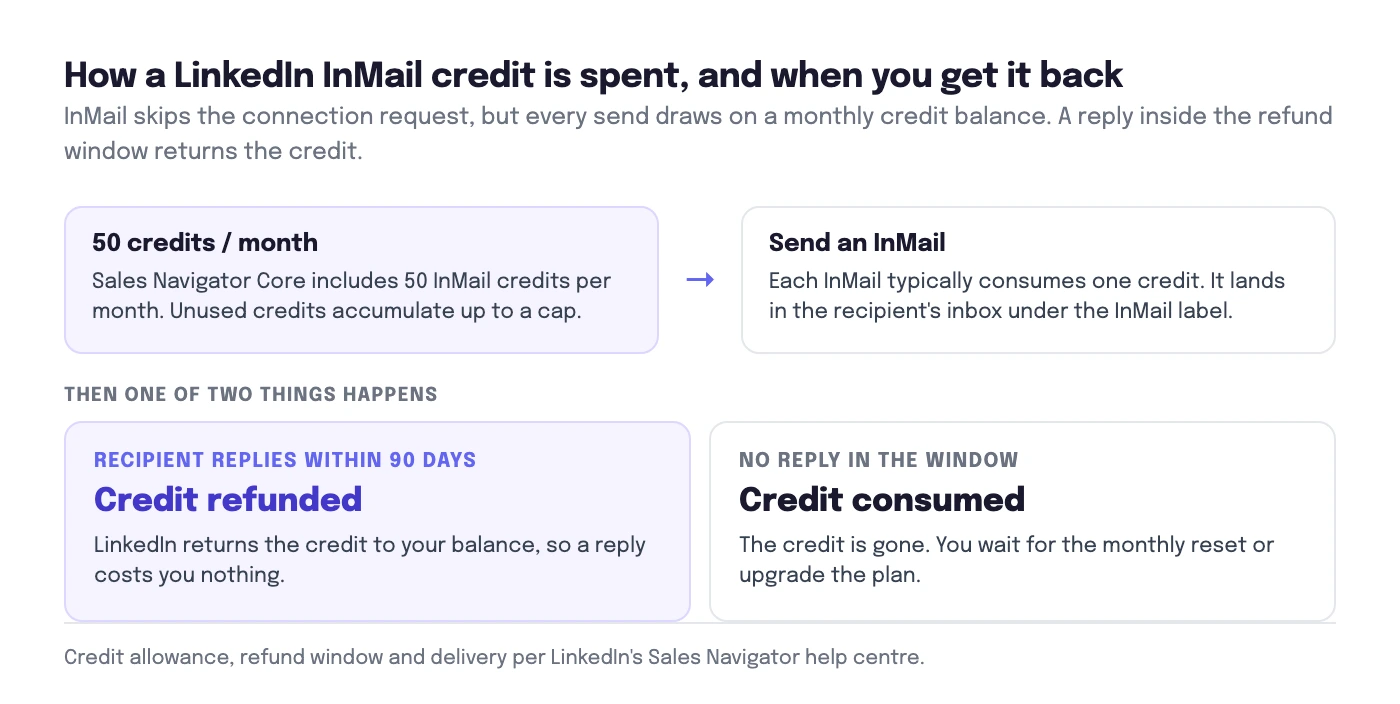
- Credits. Each InMail you send typically consumes one credit. According to LinkedIn's Sales Navigator help center, Sales Navigator Core includes 50 InMail credits per month, and unused credits accumulate up to a cap. When you run out, you wait for the monthly reset or upgrade.
- Delivery. InMail lands in the recipient's inbox under the InMail label. No connection request is required, so it skips the accept step.
- Refunds. LinkedIn refunds the credit if the recipient replies within 90 days, per its help documentation on InMail credits. Any reply counts, including "not interested." No reply, no refund.
- Limits. LinkedIn applies account-level restrictions and anti-abuse controls. Exact caps are not published and vary by account health and usage. Sending patterns that look automated can get an account flagged, so volume is genuinely constrained.
The credit allowance changes with your plan. Here is what LinkedIn's help center lists for the plans people ask about most:
| Plan | InMail credits / month | Accumulation cap |
|---|---|---|
| Premium Career | 5 | 15 |
| Premium Business | 15 | 45 |
| Sales Navigator Core | 50 | 150 |
| Sales Navigator Advanced | 50 | 150 |
| Recruiter Lite | 30 | 120 |
| Recruiter Pro | 100 | Not published |
| Recruiter Corporate | 150 | Not published |
Unused credits accumulate up to three times your monthly allowance and expire after 90 days, and extra credits cost roughly $10 each, per LinkedIn's help center.
When you need the most current wording for your plan, check LinkedIn's official pages first, because program rules change.
What this means for volume and testing
Credits reset monthly, so you often test with tens of sends, not thousands. Run InMail like a controlled experiment:
- Budget credits for learning. Assume your first tests will not refund many credits. Treat early campaigns as paid research.
- Test one variable at a time. Keep the audience constant while you test the subject or opening line, then keep the copy constant while you test a tighter segment.
- Expect small sample sizes. Write messages that make "yes," "no," and "later" all easy to send.
- Track replies, not impressions. InMail success is binary: either you got a response that starts a conversation, or you did not.
Don't want to ration credits?
Overloop runs LinkedIn and email in one sequence, so a stalled InMail credit budget never stops your pipeline. Sourcing, personalization, and reply tracking stay consistent across both channels.
Try Overloop free →Open InMail vs Sponsored InMail
"InMail" covers three distinct things, and conflating them wastes credits or budget. Here is the distinction:
- Standard InMail. Sent from a personal account to one recipient, one-to-one, using your InMail credits. This is what most of this guide is about.
- Open Profile InMail. Free to send to members who have switched on Open Profile, a setting available to Premium members. If the recipient has it on, you can message them without spending a credit, which is worth checking before you send.
- Sponsored InMail (now Message Ads). A paid LinkedIn advertising format bought through Campaign Manager, not with credits. It delivers a message to a targeted audience at scale and only reaches people when they are active on LinkedIn. According to LinkedIn's Message Ads documentation, the format is built for one-to-many promotion, not one-to-one conversation.
The practical rule: standard and Open Profile InMail are for personal, one-to-one outreach where a reply matters. Message Ads is advertising. If your goal is a conversation with a named prospect, stick to standard InMail and the copy framework below.
InMail Response-Rate Benchmarks
Two numbers from LinkedIn itself set your expectations. First, LinkedIn reports that InMail messages get a response rate roughly three times higher than a regular email. Second, LinkedIn's own research found that shorter InMails perform better: messages under 400 characters get response rates meaningfully above the average, and the response rate declines as length grows. Brevity is not a style choice, it is a measurable lever.
Track your own InMail like a funnel with three numbers:
- Reply rate (replies ÷ delivered InMails). Your "did it earn attention?" metric. A practical target for cold InMail is 10%+. Under 5% usually means weak targeting, a vague offer, or an ask that is too big.
- Positive reply rate (positive replies ÷ delivered). Define "positive" in advance: agrees to a call, asks for the asset, or routes you to the owner. A useful target is 3% to 6%. If reply rate is high but positive is low, your hook invites chat but your offer misses.
- Meeting rate (meetings ÷ delivered). Many teams land around 1% to 3% on cold outreach when the ICP and trigger are real.
Log one more field: time to first reply. InMail replies often arrive within 24 to 72 hours. If they only show up after your day-7 or day-14 follow-up, your initial message did not carry the weight.
The 5-Point Pre-Send Checklist
Reply tracking only helps if you send the right message to the right person. Before you write a word, run this five-point checklist. It prevents most spray-and-pray InMails and keeps your tests clean.
- 1) ICP match. Confirm the person can buy, influence, or execute. Check title, seniority, region, and team. If your offer targets RevOps but you are messaging an SDR, expect polite confusion or silence.
- 2) Intent signals. Look for a reason this week: started a new role, hiring for a specific role, posted about a problem, announced a tool change, or funding and expansion news. "Works at a company in your niche" is a weak signal. If you cannot name a trigger in one sentence, do not send yet.
- 3) Hook angle. Pick the most specific angle you can support: a trigger (new role, hiring, tool rollout), peer proof (a relevant customer), a problem pattern for their role, or a teardown (one concrete observation about their funnel, careers page, or job post).
- 4) Offer clarity. Define what you offer in one line and who it is for. "Help with outbound" is vague. "A 10-minute review of your current LinkedIn sequence, with 3 edits you can copy-paste" is concrete.
- 5) One measurable CTA. Ask for one small next step that is easy to answer. Use a binary or bounded question. Avoid stacked CTAs (call + demo + referral). Pick one.
Two fast guardrails that save credits
Keep personalization to one relevant detail. One sharp cue beats three random compliments. "Saw you are hiring SDRs in EMEA" connects to your message. "Loved your recent post" rarely does.
Decide your stop condition before you send. For example: if no reply after one follow-up, you stop. That rule keeps InMail a high-intent channel and keeps your learnings comparable across segments and hooks. For the wider system this fits into, see our LinkedIn outreach playbook.
The InMail Copy Framework: Subject, Opening, Value, CTA
If the recipient cannot tell why you picked them and what you want in the first two lines, they will archive it. Use this fill-in-the-blank framework, keep it to 70 to 120 words, and remember LinkedIn's own finding that under 400 characters performs best. Write for a mobile screen: short lines, one idea per sentence.
- Subject: [Trigger] + [Outcome], or a simple question.
- Opening line: one personalization cue tied to the trigger.
- Value: one specific observation + one specific way you can help + proof if you have it.
- CTA: one micro-decision with a bounded answer.
Copy blocks you can paste and customize
Subject line formulas (pick one):
- [New role / hiring] quick question
- Idea for [team metric or workflow]
- [Tool they use] setup: worth a 10-min compare?
- Should I send the 5-line example?
Opening line (one sentence): "Saw you [trigger]. I had one idea that usually matters for [role] in the first [timeframe]." Triggers that feel normal: hiring SDRs, rolled out HubSpot, posted about pipeline quality, opened a new region. Skip compliments about "inspiring content."
Value (two to three sentences, specific): state one observation ("On your job post, the must-haves suggest you want reps who can do X"), one concrete way to help ("I can share a short sequence we use to attract that profile"), and optional proof. Keep proof honest and checkable. If you do not have a relevant customer name or metric, use a concrete artifact (template, teardown, checklist) instead.
CTA (one line, easy reply): "Want me to send the template here, or should I email it?" or "Open to a 10-minute call next Tue or Wed?" or "Is [priority] on your list this quarter, yes or no?"
7 InMail Templates for Common Plays
When the trigger line is your only variable, templates become a testing asset instead of a shortcut. Use the same structure every time, then swap the cue you found in your research.
1) Recruiter to candidate.
Subject: Quick question about [Role] at [Company]
"Hi [First name], I'm hiring a [Role] for [Company]. I noticed your background in [specific skill] at [Current company]. Would you be open to a 10-minute chat this week to see if it's a fit, or should I send the job spec here?"
Best when: the role is live and the candidate matches tightly.2) Agency to hiring manager.
Subject: Your [Role] opening, 2 quick details?
"Hi [First name], saw you're hiring a [Role]. Before I send any profiles, can I confirm 2 points: must-have skills are [A/B], and the interview process is [X stages]? Reply with corrections and I'll align the shortlist."
Best when: the job post is vague and you need clarity fast.3) Trigger-based sales (new role).
Subject: New role at [Company] and [pain]?
"Hi [First name], congrats on the move to [Role]. When teams change leadership, I often see [specific problem] in the first 60 days. If I share a 5-line checklist we use to spot it, would that be useful?"
Best when: you have a real trigger (new role, reorg, hiring spree).4) Account-based sales (teardown).
Subject: One quick observation on [asset]
"Hi [First name], I looked at your [pricing page / careers page / signup flow]. I think you might be losing [buyer/candidate type] at the [specific step] because [one reason]. Want a 60-second outline of the fix, yes or no?"
Best when: you can point to one concrete, checkable detail.5) Partnerships.
Subject: Partner idea for [Company] x [Your company]
"Hi [First name], I noticed [Company] works with [tool/ecosystem]. We see overlap with teams using [related tool] who also need [outcome]. Open to a 12-minute call to sanity-check a simple referral or co-webinar idea?"
Best when: you can name the overlap (shared ICP, tool, or channel).6) Warm intro request.
Subject: Quick intro to the right owner?
"Hi [First name], we work with [peer company] on [specific result]. I'm trying to find who owns [area] at [Company]. Are you the right person, or should I speak with [title]?"
Best when: you want routing, not a full pitch.7) Event follow-up.
Subject: Follow-up from [Event]
"Hi [First name], I saw you attended [Event] or engaged with [topic]. Quick question: are you working on [problem] this quarter? If yes, I can send the 2-slide summary we use to frame options. Want it?"
Best when: the event topic matches your offer tightly.
Follow-Up Without Being Annoying
Follow-up is where most teams ruin the test. They resend the same pitch, add more words, and create more reasons to ignore them. A good follow-up keeps the original value, changes the frame, and makes the reply easier. Use this simple sequence, assuming your first InMail was 70 to 120 words with one micro-CTA:
- Day 0 (initial InMail): your best hook + one specific offer + one bounded question.
- Day 3 (bump): one line, same thread. "Quick bump, is this on your list this quarter?"
- Day 7 (new angle): change one thing, the hook or the artifact, keep the CTA. "Different angle: I noticed [trigger]. Want a 5-line example for [use case]?"
- Day 14 (exit): close the loop with a polite stop condition. "I'll close this out after today. If someone else owns [topic], who should I talk to?"
Stop after the day-14 exit. If your ICP and trigger were real, they either reply or they do not. More pings lower your future deliverability and train recipients to ignore you. Keep the offer and micro-CTA stable across the sequence so you can tell what actually worked.
Scaling Beyond InMail: LinkedIn + Email Together
Here is the honest limit of InMail: credits are capped, refunds only recycle some of them, and account-level anti-abuse controls mean you cannot simply send more. InMail is one channel, and a good one for high-intent, one-to-one asks. It is not a system you can scale on its own.
Overloop exists for the wider system. It runs LinkedIn and email together in one sequence, so a stalled InMail budget never stops your pipeline. The fit with an InMail-first workflow looks like this:
- Lead sourcing that matches your trigger. Build lists from a 450M B2B contact database using ICP filters, kept organized by segment so you can test "new role" against "hiring" against "teardown" without mixing audiences.
- Personalization you reuse across channels. Store the same cues (trigger, tool mentioned, priority) once and reuse them in both LinkedIn and email, so reps do not re-research the same account.
- Email deliverability that keeps tests honest. Bulk and real-time email verification means bounces and spam placement do not drown out your signal when you compare LinkedIn against email.
- Multichannel sequences with controlled variables. LinkedIn steps and email steps with consistent timing, so you keep the offer and CTA stable and change one input at a time.
- Tracking that maps to outcomes. Reply tracking (including out-of-office) by segment, so you measure reply rate, positive reply rate, and meetings booked per variable instead of guessing.
A practical next step: pick one ICP segment, pick one trigger, write one InMail with a micro-decision CTA, then run the same hook and CTA as a short email. Launch both in one sequence, log time to first reply, and keep every other variable fixed until you have enough data to earn your next change. For a wider view of the tools, our roundup of the 13 best LinkedIn automation tools covers where each fits.
The bottom line
InMail is a high-intent channel, not a volume one. Treat each send as paid research, write under 400 characters, ask for a micro-decision, and lean on the refund window by earning replies. Then stop relying on credits alone: pair InMail with email in one multichannel sequence so your pipeline keeps moving when the credit budget runs dry.
Frequently asked questions
What is LinkedIn InMail?
LinkedIn InMail is a paid message you can send to a LinkedIn member you are not connected to. It lands directly in their inbox without a connection request, so it skips the accept gate. InMail credits come with LinkedIn Premium and Sales Navigator plans. It is best used for a clear, time-bound ask where you want a simple yes or no, not for slow network building.
What is the difference between InMail and a connection request?
A connection request asks someone to add you to their network, and you can only attach a note (300 characters on most accounts) before they accept. InMail is a paid message that reaches the inbox immediately, with no accept step and a longer character limit. Use connection requests to build a network over time, and InMail when you have a specific reason to reach a stranger now. See our guide on connection request messages for the free path.
How many InMail credits do I get?
The number depends on your plan. LinkedIn issues a monthly allotment of InMail credits with Premium and Sales Navigator, and Sales Navigator Core includes 50 InMail credits per month. Credits accumulate up to a cap, and LinkedIn refunds a credit when the recipient replies within 90 days, so a reply, even a negative one, returns the credit. Always check LinkedIn's own plan pages for the current numbers. Our breakdown of Sales Navigator pricing covers what each tier includes.
Are InMails refunded if there is no reply?
No. LinkedIn refunds an InMail credit only when the recipient responds within 90 days, and any reply counts, including "not interested." If you get no reply, the credit is gone. This is why targeting and copy matter so much: replies recycle your credits, silence makes every send a permanent cost.
What is a good InMail response rate?
LinkedIn reports that InMail gets a response rate roughly three times higher than a regular email, and shorter InMails under 400 characters perform meaningfully better than the average. A practical target for cold InMail is a 10% or higher reply rate; under 5% usually points to weak targeting, a vague offer, or an ask that is too big for a stranger.
What is the difference between open InMail and Sponsored InMail?
Standard InMail is sent from a personal account to one recipient and uses your InMail credits. Open Profile InMail is free to send to members who have turned on Open Profile. Sponsored InMail, now called Message Ads, is a paid LinkedIn advertising format that delivers a message to a targeted audience at scale and is bought through Campaign Manager, not with credits. The first two are one-to-one outreach; Message Ads is advertising.