
LinkedIn outreach that gets replies (no spam)
Your LinkedIn inbox is full of “quick question” cold outreach—and you’ve learned to ignore it. The fix isn’t more templates; it’s a system that earns the right to connect, then makes the first message feel like it was written by a real person.
LinkedIn outreach matters more in 2026 because your prospects check your profile before they reply, and LinkedIn content increasingly shows up in AI-driven search experiences. At the same time, high-volume sending connection requests and copy-paste outreach messages are getting accounts flagged and results suppressed, so your outreach sequences have to be tighter and more human.
This guide gives you a 5-step sequence that consistently gets replies without spam, plus practical sequence steps for connection requests, follow ups, targeting, and safe scaling—alongside tools like Overloop to pair LinkedIn messages with AI-driven B2B lead generation and email automation.
Use this 5-step LinkedIn outreach sequence today
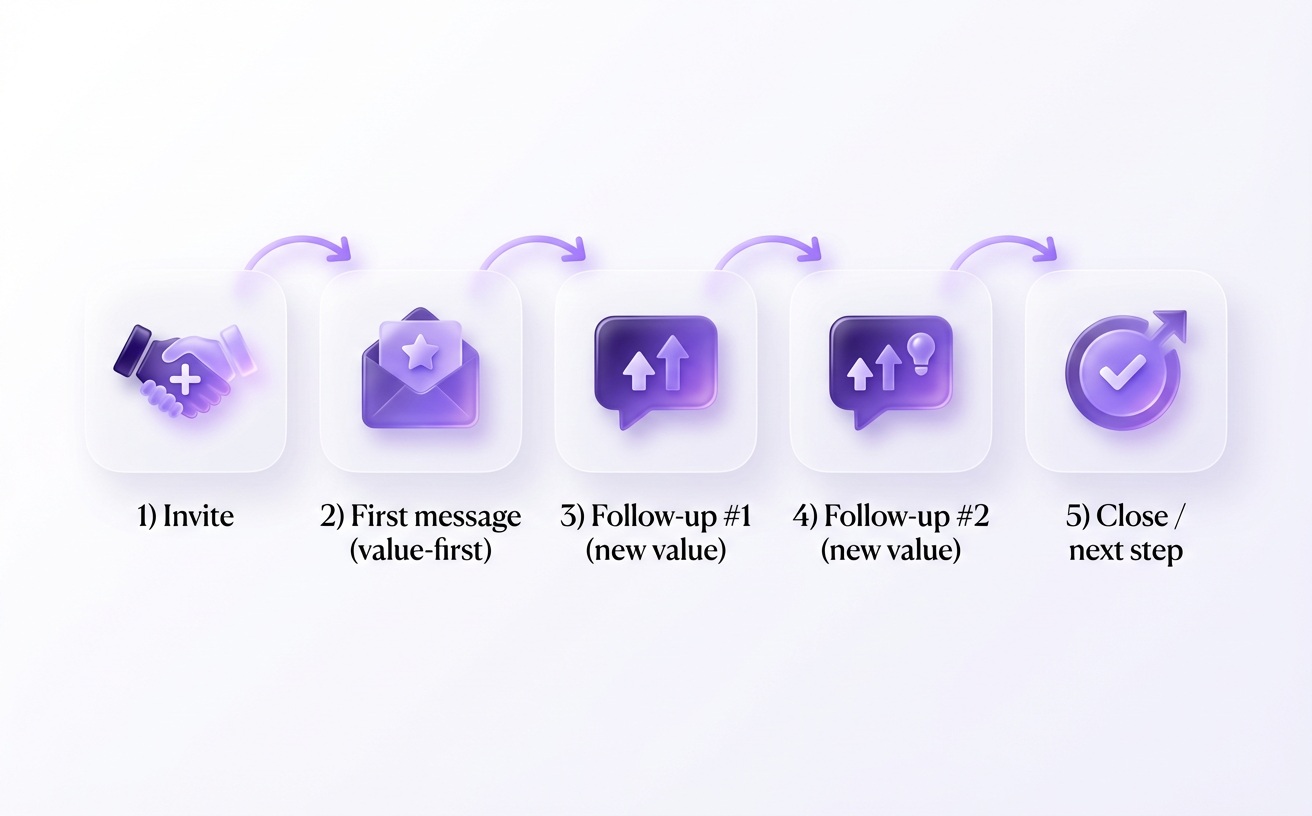
Do you want a LinkedIn outreach routine you can run every week without rewriting everything from scratch? A simple, value-first set of outreach sequences (invite → first message → follow ups) wins because it respects attention and creates repeatable sequence steps. You can also keep your LinkedIn and email motions aligned by borrowing patterns from this reply-getting outreach playbook while using tools like Overloop to manage targeting, messaging, and handoffs to email automation when a prospect is ready.
The practical 5-step flow is: pick one goal, build a tight list, send connection requests, send a first message, then follow up with something new. Keeping each step small reduces “pitch panic” and makes cold outreach feel like a normal business conversation.
Pick one goal per campaign (meeting, referral, partnership)
One campaign should have one outcome, because mixed asks create vague outreach messages and weak replies. A “meeting” campaign can ask for a 15-minute fit check, while a “referral” campaign can ask “who owns X?” inside their org. A “partnership” campaign can ask for the right person to explore a co-marketing idea, not a call with five stakeholders.
Build a tight target list using role + relevance + a trigger
Your list should be narrow enough to write naturally, because relevance beats volume on LinkedIn. Start with role (who feels the pain), add relevance (why your offer fits their world), then add a trigger (why now) so your LinkedIn message doesn’t sound random.
- Role: job title + seniority that can say yes.
- Relevance: industry, tech stack hints, or what they post about.
- Trigger: hiring, funding, new product page, event talk, or a recent post you can reference.
Overloop can help you keep this targeting consistent across LinkedIn and email so you don’t rebuild lists every time you test a new angle.
Send connection requests that explain “why you” in one line
Your LinkedIn connection requests should earn the right to connect by stating the shared context in a single line. Aim for something they can read in under 30 seconds, and avoid attaching a pitch to the invite. If you’re sending connection requests at scale, vary the wording and reference the trigger to avoid pattern-y invites.
Send a first message that offers value and asks one simple question
Your first message should lead with value, then one question, because multi-question messages create decision fatigue. A useful rule from 2026 outreach guidance is to keep it short—often 100–300 characters—and send it within 48–72 hours of when you connect, while the context is still fresh.
Offer a small asset (a one-paragraph teardown, a relevant template, a quick benchmark) and ask one easy-to-answer question like “Worth a 2-sentence idea?” or “Who owns this in your team?” When they reply, your next step is a follow up that adds new information (not “bumping this”), and Overloop can help you track replies and move the conversation to email when it’s time to book.
Write messages that sound human and earn replies
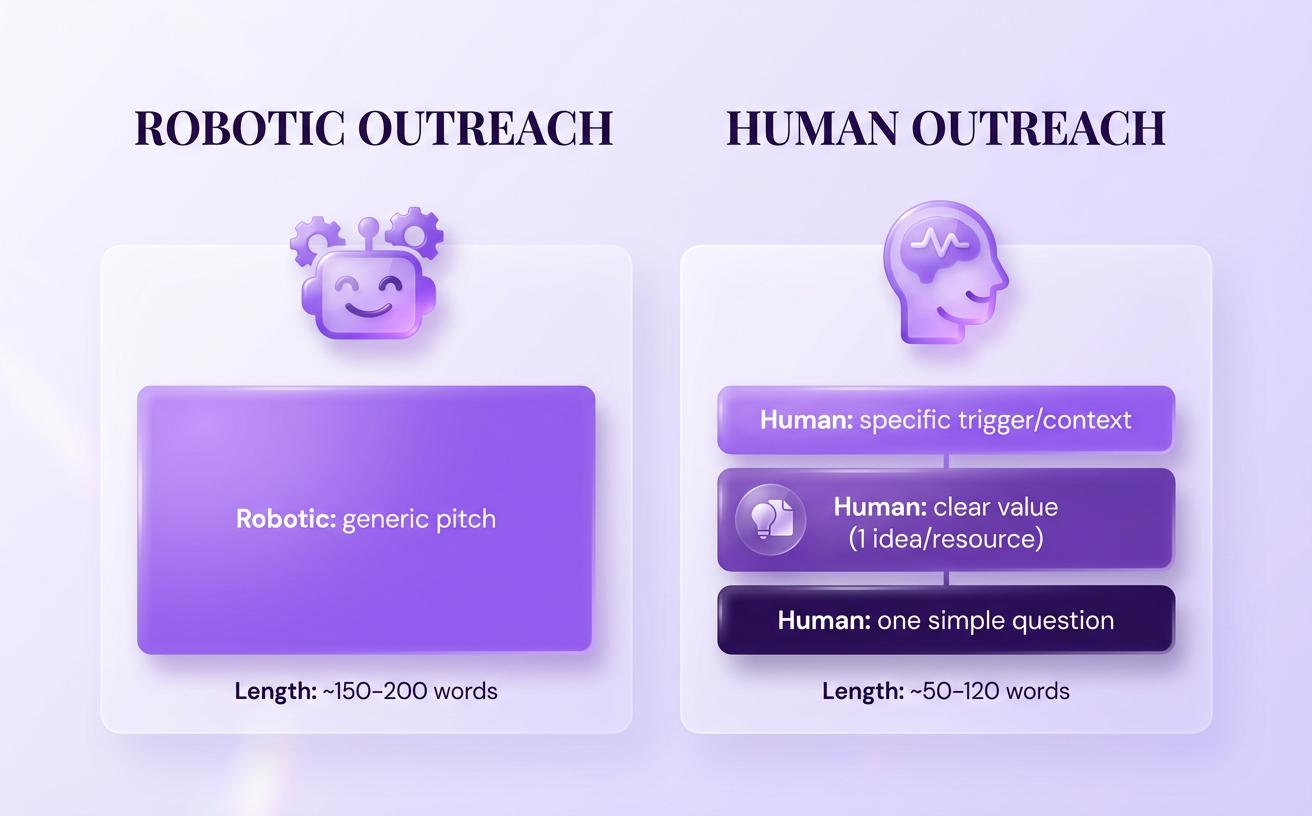
Most LinkedIn outreach messages fail because they sound like a workflow, not a person. The outreach messages that get response rates are short, specific, and anchored in the recipient’s reality—what they do, what they care about, and what they just shared. When you write like you’re starting a real conversation, your reply rates improve even before you touch automation or cadence.
Keep each message under 30 seconds to read. Anna Svitlychna’s 2026 roadmap recommends 100–300 characters per message and sending your first message within 48–72 hours of connecting, which forces clarity and prevents rambling. Use tools like Overloop to keep your sequences consistent across LinkedIn and email, but keep the personalization and the “human behavior” feeling in the copy.
Personalize in 30 seconds using public profile signals
Fast personalization beats deep research if it’s accurate and relevant. Scan their linkedin profile for one concrete signal you can mirror back: a recent role change, a pinned post, a hiring push, or a comment they left on someone else’s posted content. This kind of personalization is hard to fake, which is exactly why it earns replies.
Use one signal, not five. “Saw you’re hiring SDRs” is enough; stacking details reads like surveillance and kills engagement.
Lead with relevance, then value, then a question
Relevance is the price of admission. Open by naming the shared context (“Noticed you’re building X in Y market”), then offer a small piece of value (a quick insight, a template, a short example), then ask one simple question to start conversations. This structure works because it makes your message about them, not your product.
Example: “Saw your team’s expanding into DACH. I’ve got a 6-line outbound checklist that usually prevents week-2 pipeline drop-offs. Want me to paste it here?”
Make your ask smaller to get the first reply
Your first CTA should be a “yes/no” that takes five seconds. Instead of “open to a 30-min call?”, ask for permission to share, a quick preference, or the right owner. Smaller asks produce more messages back, and the first reply is what unlocks momentum.
Try: “Worth sending 3 subject lines that have worked for similar teams?” or “Is this on your plate, or someone else’s?”
Handle the three common reply types: yes, no, and “not now”
You win by making the next step effortless, regardless of the reply. Keep your responses crisp and keep the conversation moving:
- Yes: Confirm the goal, offer two time windows, and propose a switch to email for logistics; Overloop can help you capture the thread and run the email handoff without losing context.
- No: Acknowledge, ask one learning question (“What made it a no?”), then disengage politely to protect future engagement.
- Not now: Ask what would make it timely, then set a specific follow-up window (“Cool—should I circle back in 6 weeks or next quarter?”) and log it so you don’t rely on memory.
Find the right people fast (without endless scrolling)
You’ve probably had this happen: you send a perfectly reasonable message, get a “not now,” and realize the real issue wasn’t timing—it was fit. Better targeting makes your conversations feel obvious, because you’re talking to people who already have the problem you solve. When you consistently hit the right people, you need less “clever” copy and fewer follow-ups to get to a real reply.
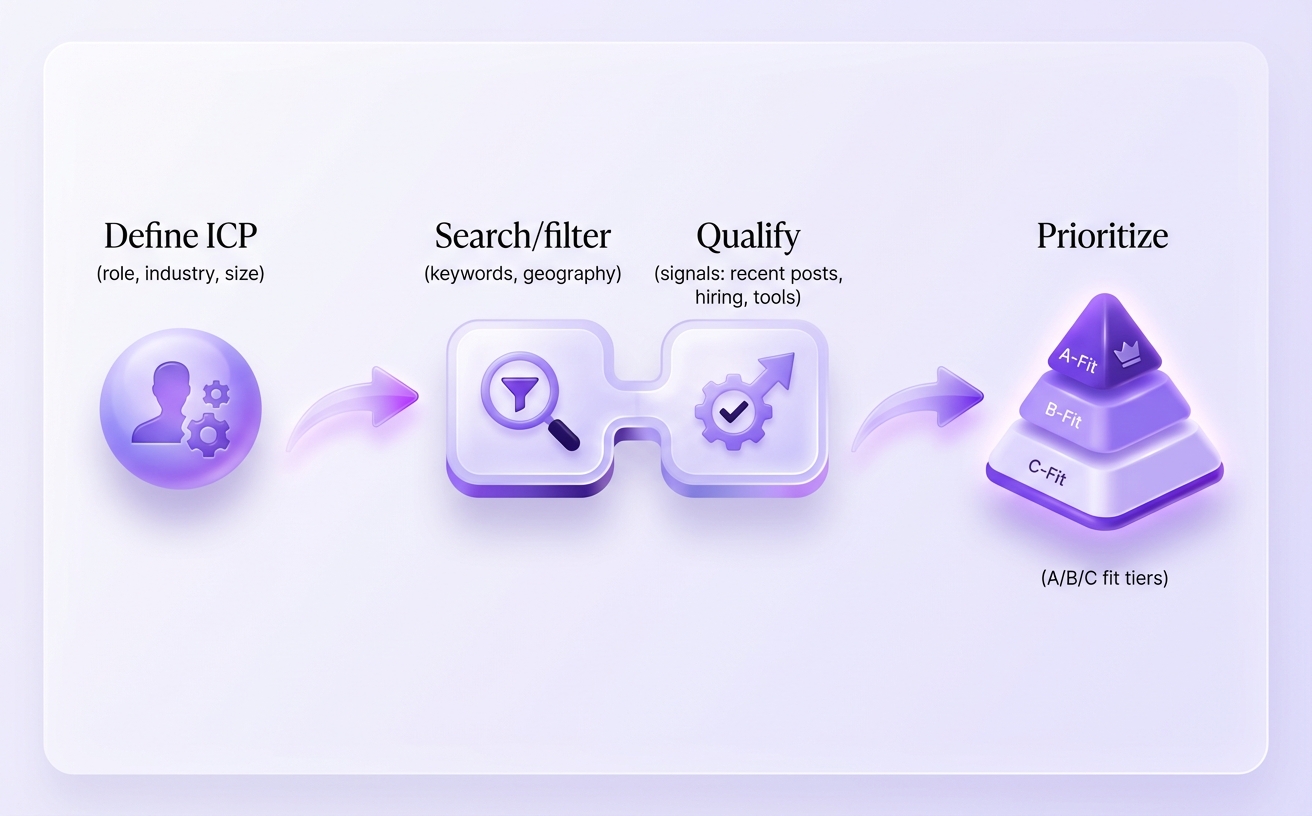
Use LinkedIn search filters to create an ICP list you can reuse
Your fastest win is turning “anyone in my industry” into a reusable list built on specific criteria. Start with specific job titles (and the exact job title variations you see in the wild), then tighten by geography, industry, and company size so your target audience is stable week to week.
Save this as a simple ICP recipe: role + relevance + a trigger, then reuse it instead of rebuilding searches every time. If you’re doing outreach plus email, you can also enrich contacts as you go—use this guide to find emails from profiles so you’re not forced to keep every conversation inside LinkedIn.
Use Sales Navigator-style filters to narrow by intent and fit
LinkedIn Sales Navigator (often written as sales navigator) is built for this moment: you want fewer results, but higher-quality ones. Use its advanced search filters to isolate decision makers who match your ICP and show signs they might actually be in-market.
- Seniority + function to avoid “researchers” when you need buyers
- Company headcount + growth to match budget and urgency
- Posted on LinkedIn recently to focus on people likely to respond
Tools like Overloop can complement this by helping you organize those ideal prospects into workable lists and coordinate email touches once you’ve qualified them.
Target active users by engagement signals to boost reply rates
Reply rates usually jump when you prioritize people who are already active. Use quick engagement signals—recent posts, fresh comments, or frequent reactions—to decide who to message first, then visit profiles to grab one specific detail you can reference.
Even a lightweight signal like “commented on a hiring post this week” can make your opening line feel relevant without forcing personalization theater.
Create warm paths through mutuals, groups, and recent interactions
Warm paths reduce friction because you’re not starting from zero trust. Check for mutual connections and first degree connections who can provide context, look for shared groups, and prioritize prospects who’ve interacted with your content or company page recently.
If you can’t get an intro, you can still “borrow familiarity” by referencing a mutual community or conversation theme, then asking a small, specific question that confirms they’re one of your ideal prospects.
Turn outreach into meetings with smart follow-up
Build your follow-up plan before you send the first message, and commit to adding something new each time you reach out. Most meetings come from follow ups that create momentum in the relationship, not from repeating the same ask with different wording. When you’ve already confirmed they’re a fit with a small question, your job shifts to guiding the next step with relevance and timing.
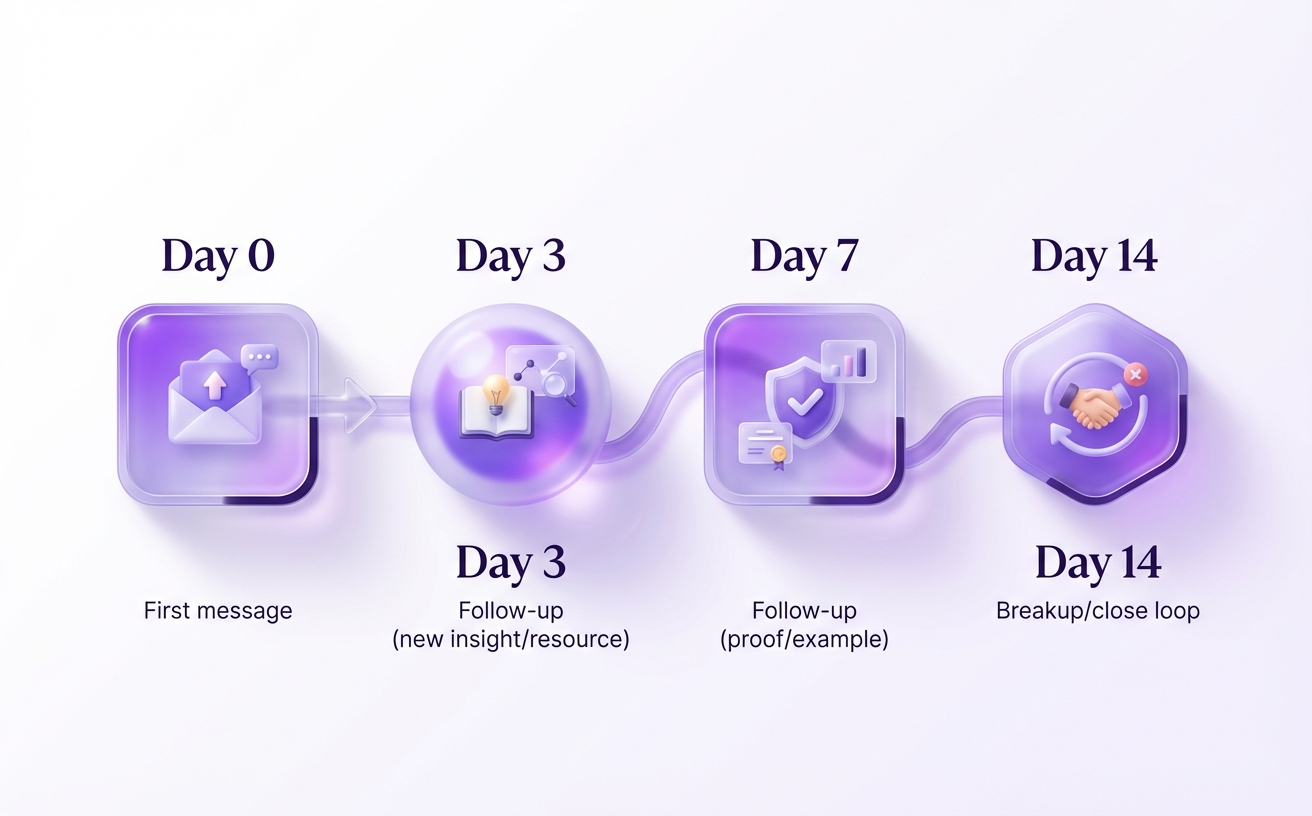
Use a 2–4 touch cadence that respects attention and timing
Keep your sequence tight: 2–4 touches is usually enough to get a clear “yes,” “no,” or “not now” without burning goodwill. Anna Svitlychna’s 2026 roadmap recommends messaging within 48–72 hours of connecting, then spacing follow ups at 3–5 days and 5–10 days, and keeping messages around 100–300 characters. That cadence fits how people actually check LinkedIn: in short bursts between calls, not in long inbox sessions.
Follow up with new information: insight, resource, or observation
Make every follow-up earn its place by giving them a reason to respond. “New value” can be tiny, as long as it’s specific to their role and your earlier discuss point.
- Insight: “Noticed teams hiring AE + RevOps usually see handoff gaps—are you solving routing or qualification right now?”
- Resource: “Here’s a 6-line checklist we use to avoid vague follow up messages after demos—want it?”
- Observation: “Saw your post on onboarding—curious if you’re optimizing for activation or expansion this quarter?”
This is how LinkedIn sales engagement turns into qualified leads that actually move through your sales pipeline.
Multithread inside an account without spamming the company
Multithreading means involving one additional stakeholder when it helps the buyer, not blasting ten titles at once. Start with the person closest to the pain, then add a second contact only after a signal (profile view, reply, or a clear “loop in X”). Keep your message consistent so internal customer interactions don’t feel disjointed, and track who saw what so you don’t repeat context.
Move from LinkedIn to email or a call at the right moment
Switch channels when there’s intent, not when you’re impatient. If they ask for details, share constraints, or answer your qualifying question, propose two specific times and offer email as the place to send context; tools like Overloop help you follow up by email with the same thread and keep activity organized across campaigns. If they go quiet after engagement, a short “Should I send this by email?” creates a low-friction bridge while you continue to generate leads without forcing a call.
If you’re running LinkedIn plus email together, Overloop also helps you manage sequencing and handoffs so your follow ups don’t compete with each other or confuse the buyer.
Scale safely: automation, limits, and account health
Are you trying to scale outreach volume without waking up to a LinkedIn restriction?
Scaling LinkedIn outreach is a risk-management game: keep activity patterns boring, personalization credible, and your workflows controlled so your account stays usable. Treat linkedin automation as “assistance,” not a volume knob, and you’ll get more reliable replies with less drama. Tools like Overloop can help you coordinate LinkedIn touches with email automation, so you’re not stacking channel pressure on the same buyer.
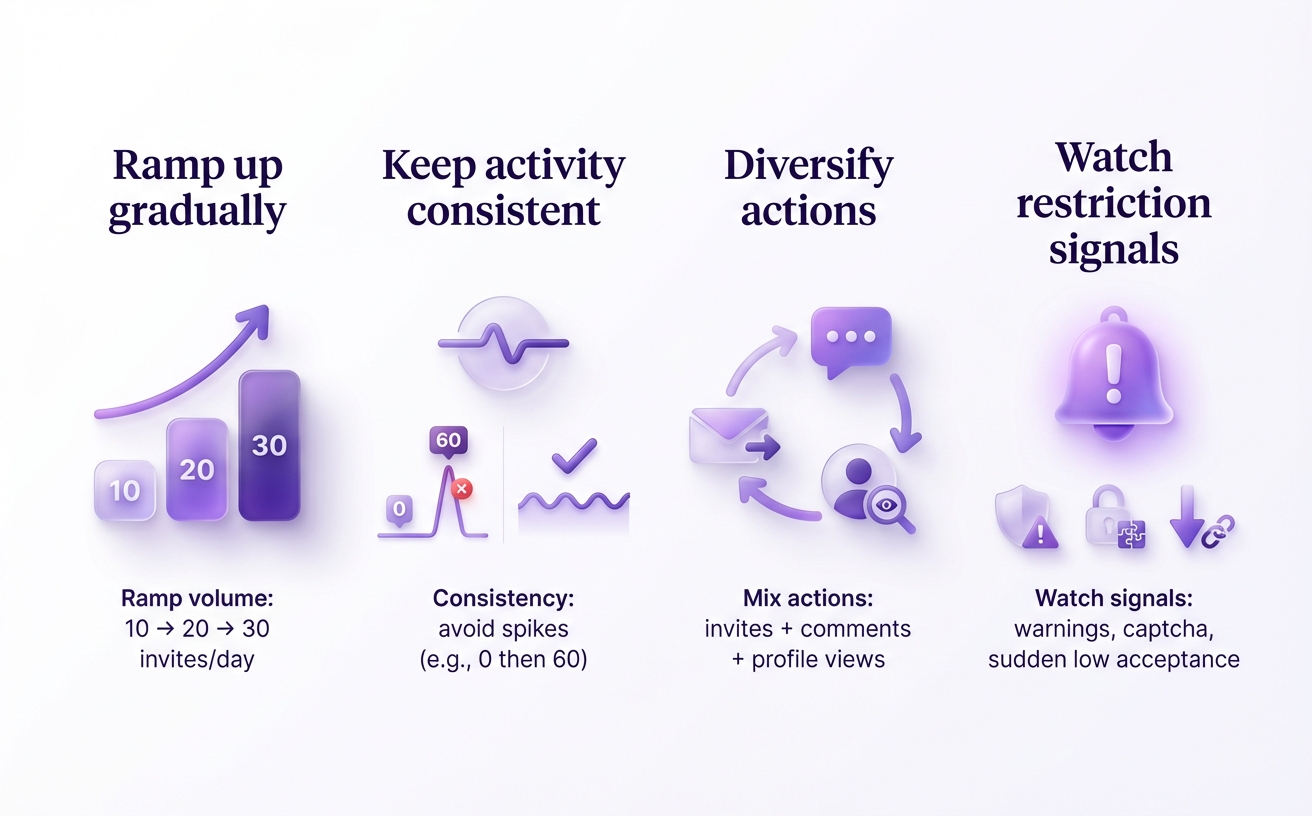
Stay within safe activity patterns so your account doesn’t get restricted
Assume LinkedIn watches patterns, not just totals, so consistency matters more than bursts. Multiple 2026 safety guides put official connection request limits around 100–200 per week, and the safer operating range is roughly 30–40% below that, especially if your account is newer or recently changed behavior.
Plan for “human-looking” behavior: vary send times, don’t run identical intervals all day, and keep your IP/location consistent when you automate linkedin outreach. If you want a practical baseline and what happens when you hit thresholds, the breakdown in automation safety limits helps you set guardrails before you scale.
Decide what to automate vs what must stay manual
Automate the repetitive steps, but keep judgment calls human, because the fastest way to get ignored (or flagged) is believable targeting paired with generic messaging. A good workflow for automated outreach is:
- Automate linkedin prospecting and list building (filters, triggers, exports) so targeting stays consistent.
- Automate connection requests and follow-up reminders with light personalization tokens, then QA samples daily.
- Handle positive replies manually (questions, scheduling, objections) to protect quality and intent.
That division also makes it easier to route conversations into Overloop for AI-driven B2B lead generation, lead scoring, and clean handoffs into email sequences.
Evaluate tools by risk controls, team workflows, and reporting
A “safest linkedin automation tool” is usually the one with the strongest safety features: smart daily caps, randomized delays, anti-duplicate checks, and clear audit logs. Price ranges are wide in 2026—one analysis of 15+ platforms cited options from $8.25/month (Linked Helper) up to $1,499/month—so you’re mostly paying for risk controls, reporting, and team management, not just sending messages.
Prioritize reporting that ties LinkedIn steps to outcomes (acceptance, reply, meetings), and be skeptical of “unlimited campaigns” if the tool can’t prove how it keeps accounts account safe.
Run multi-account or agency outreach without losing quality
Multi-account setups fail when identity and process get sloppy. Don’t run multiple automation platforms on one profile, keep one operating rhythm per account, and use isolated browser profiles with consistent fingerprints/IPs if you manage client accounts.
Quality stays high when you standardize QA: spot-check targeting, review message variants weekly, and require a human to approve any template change before it ships across accounts.
Track what matters and iterate weekly
If you don’t measure each step, you’ll keep “improving” the wrong thing. Weekly iteration works when your analytics show exactly where prospects drop off, so you can change one lever and see campaign performance move in days, not months.
Keep your QA process from the previous section, then add a simple reporting rhythm: review results every week on the same day, document what changed, and decide the next test before you launch new campaigns.
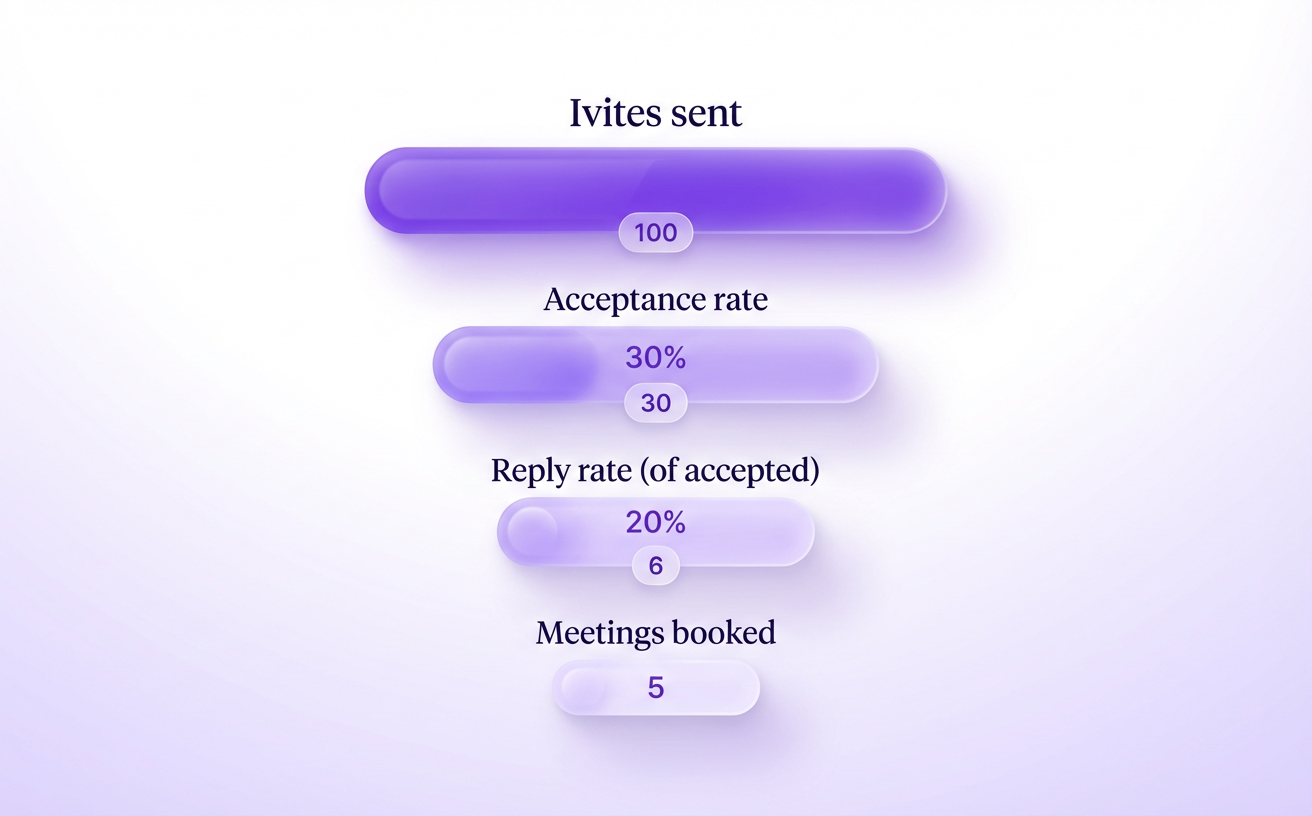
Measure the outreach funnel from invite acceptance to meeting booked
Start by tracking a funnel that matches how LinkedIn actually converts: connection → conversation → meeting. When you can see invite acceptance and reply rates separately, you stop guessing whether your targeting or your message is the issue.
- Invite acceptance rate (accepted ÷ sent) to validate targeting and profile credibility
- First reply rate (any reply ÷ first messages delivered) to validate your opener
- Positive reply rate (interested replies ÷ first messages) to validate your offer
- Meeting booked rate (meetings ÷ positive replies) to validate your handoff and CTA
- Show rate (attended ÷ booked) to validate qualification and calendar friction
Use the manual baseline from your own outreach efforts, but sanity-check expectations: one 2026 automation guide cites 2–5% reply rates for manual outreach versus 10–20% for a well-designed automated campaign, assuming you still respond like a human when someone engages.
Diagnose where it’s breaking: targeting, offer, copy, or cadence
Diagnose in order of leverage: targeting first, then offer, then copy, then cadence. If acceptance is low, your ICP list or trigger logic is off; if acceptance is fine but replies lag, your first message isn’t relevant enough to earn attention.
If you’re still deciding how to split volume across channels, use LinkedIn vs email performance to pressure-test assumptions, then align your data definitions so “reply” and “meeting” mean the same thing everywhere.
A/B test one variable at a time with a simple experiment log
Run small experiments weekly, not giant rewrites monthly. Change one variable per test (opening line, offer asset, CTA question, or follow-up spacing) and keep everything else constant so your reporting stays credible.
Log each experiment with: hypothesis, audience slice, message variant, dates, sample size, and outcome. After two weeks, you should know what to roll out and what to kill.
Build a workflow that logs LinkedIn activity in your CRM or sequencing tool
Make logging automatic, because manual updates destroy data quality fast. A practical workflow is: capture LinkedIn lead + status → sync to your crm → update stages on replies/meetings, with clear integration rules for duplicates and ownership.
Tools like Overloop can help by keeping outreach campaigns, replies, and pipeline notes in one place alongside email automation, so your lead generation efforts don’t fragment across tabs and screenshots.
Stay credible: ethics, trust, and long-term compounding
A founder I worked with booked fewer meetings for two weeks—not because their offer changed, but because a prospect replied, “Your message felt automated, so I checked your profile and hesitated.” You can recover from a missed follow-up, but you rarely recover from a first impression that breaks trust on the platform.
The outreach that wins in 2026 compounds because you protect boundaries, build authority between campaigns, and treat LinkedIn like relationship-first social selling—not a list you blast. Your prospects (and their teammates) often look you up before they answer, and LinkedIn content is increasingly discoverable through AI search experiences, so your credibility travels further than your inbox.
Avoid the behaviors that make you look like a spammer
Spam signals are mostly pattern signals: repetitive timing, generic copy, and activity spikes that don’t match human networking. You reduce risk by staying under LinkedIn’s rough ceiling of 100–200 connection requests per week and keeping your messaging pace consistent instead of “spraying” on Mondays.
Stop doing these four things if you want replies from busy professionals:
- Sending pitchy DMs immediately after connecting with no relevance
- Using identical templates and intervals across everyone (easy to spot, easy to ignore)
- Running multiple automation tools on one account at the same time
- Faking engagement without actually viewing profiles or responding like a person
If you do use automation, evaluate it like risk management; this LinkedIn Helper safety review is a good example of the kind of due diligence you should apply before scaling.
Use permission-based language and respect privacy expectations
Permission-based language lowers resistance because it gives the other person control. Try “Open to a quick idea?” or “Should I send the 3-bullet summary here, or is email better?” instead of “Can you hop on a call this week?”
Respect privacy by minimizing data creep: stick to public profile signals, don’t imply you tracked them elsewhere, and keep first messages tight (many teams aim for 100–300 characters) so your intent is clear.
Build credibility so cold messages feel warmer (content + comments)
Credibility is a pre-sell that happens in public, and it makes your next DM feel like a continuation, not an interruption. Posting consistently (a common benchmark is 5 times a week) and leaving thoughtful comments helps you engage like a peer, not a stranger.
Use comments to demonstrate expertise fast: add one practical insight, one example, and one question that invites the author to respond. You’ll also meet like minded professionals through recurring threads and LinkedIn groups where your name becomes familiar before you ever message.
Create a light nurture system for “not now” leads
“Not now” is future pipeline if you handle it cleanly, because timing—not fit—is often the real objection. Tag the reason (budget, priority, vendor lock-in), set a specific recheck date, and send one helpful update when you have new insights instead of “just bumping this.”
Keep nurture simple and connected across channels so your relationship doesn’t reset every quarter. Tools like Overloop can help you track LinkedIn replies alongside email automation, so you follow up with context, build trust over time, and avoid repeating yourself when the timing finally turns.
Keep it simple, measurable, and respectful
Replies come from a value-first sequence, not a clever pitch. Keep your invite and first message short, specific, and about the other person, then let your follow-up add fresh value instead of repeating the ask.
Targeting does more work than copy. When you focus on the right roles, triggers, and timing, conversations start easier and you can scale with realistic volumes and credible personalization.
Improve fastest by measuring each step (accept rate → reply rate → booked calls) and running small weekly tests. If you want more control as you scale, tools like Overloop can help you structure sequences, track outcomes, and keep outreach disciplined across campaigns.
Next step: write your 3-step invite → message → follow-up sequence now, then send it to 10 tightly targeted prospects today and log results (accepts, replies, meetings) for next week’s test.