AI SDR in 2026: What It Is, What It Costs, 9 Tools Compared
Compare nine AI SDR tools and buying alternatives by outbound, inbound or assisted prospecting. Check the job each product handles, the work your team keeps, and the price for your required capacity.
Choose by the job you need done
Assisted B2B prospectingOverloop; compare agent products' assisted modesCheck sourcing, message review and email plus LinkedIn while keeping launch decisions with your team.
Delegated outboundAiSDR, Agent Frank, Reply.io Jason, Artisan, 11xAsk for the exact source-to-reply workflow, automation settings, infrastructure and contract terms.
Inbound or a research layerQualified Piper, Clay, Regie.aiSeparate inbound conversations, configurable enrichment and agent-plus-rep tasks before pricing.
Native email sequencing and external campaign integrations
Claygent researches on instruction
Waterfall enrichment, credit-metered
Free tier; Launch from $167/mo billed annually or $185/mo billed monthly
Actions and data are separate allowances; evaluate the workflow you build
What the Overloop interface shows
Screens captured in a signed-in Overloop account on September 13, 2026. Each caption identifies the controls we observed.
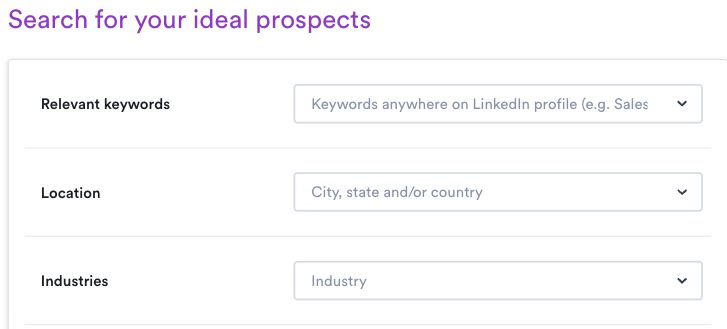
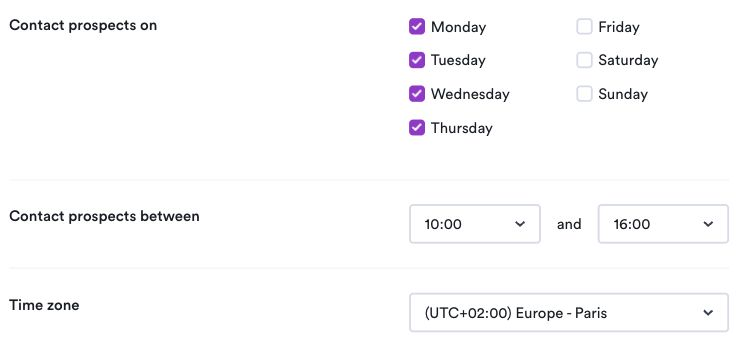
01 Inspect targeting controlsKeyword, location and industry controls are visible. No prospect search was run.02 Inspect the autopilot settingsAutopilot and Follow-up autopilot are both off in this capture. No campaign was launched.03 Check days, hours and time zoneThe schedule screen shows day, hour and time-zone settings. No scheduled campaign was executed.
We did not run a prospect search, launch a campaign or import a file. These screens do not establish data quality, outreach results or a successful end-to-end import. Source: app.overloop.ai
Check the workflow during your trial
Use a small sample you are allowed to process and accounts you control. Keep campaigns paused; in Overloop, leave both autopilot switches off.
Apply the same targeting criteria in each shortlisted tool. Record returned fields, relevant contacts and credits used.
Draft one sequence without activating it. Check the audience, message edits, days, hours, time zone and reply ownership.
If migration is required, use an authorized test file. Check field mapping, duplicates and exclusions, then inspect the preview before proceeding.
Compare the work your team keeps as well as the capacity it buys. Contact research, outbound execution and inbound qualification are different jobs; the sections below explain each product’s role.
Publisher disclosure: Overloop publishes this guide and is our first recommendation for small B2B teams that want assisted sourcing, email and LinkedIn while retaining campaign decisions. The other options address different levels of autonomy and inbound needs. Recommendations use public vendor sources; we did not run a comparative product trial. Method and dated sources.
Overloop comes first as our recommendation for an assisted B2B prospecting workflow; the other tools are grouped by the job they handle. This is an editorial recommendation, not a performance ranking. Pricing checked September 12, 2026 on the pages linked in each section.
Comparison research dated September 12, 2026. Reply.io and Clay pricing and plan details were rechecked on September 13 using the official sources in their sections. Entry prices are not quotes for equivalent contact volumes or infrastructure.
Choose by workflow, budget and migration requirements
Choose the work you want the software to own
Founder or small sales team: if you want to source contacts, review AI-written messages and run email plus LinkedIn from one campaign, start with Overloop, then compare the assisted modes of the agent products if you need different approval or reply-handling controls. Delegated outbound: if the agent must choose actions and handle replies, ask AiSDR, Agent Frank, Reply.io, Artisan or 11x to demonstrate that exact loop. Inbound team: assess Piper against your website and inbound-routing requirements. A website agent is not a substitute for outbound prospect sourcing.
A published seat price and an agent subscription buy different capacity. Overloop Starter is $69 per user per month and Growth is $99; calculate the users and source-plus-email credits you need. Agent Frank advertises $499 per month billed quarterly, with email infrastructure separate. Reply.io Jason starts at $500 per month on annual billing, with contact and LinkedIn allowances selected in the quote. Those figures narrow the conversation; they do not make the plans interchangeable.
Request one quote using the same inputs: people who need access, new prospects with valid emails, connected mailboxes, LinkedIn accounts, domains, warm-up, verification, CRM/API access and onboarding. Keep annual and quarterly commitments explicit. For custom pricing, obtain the credit definition, included service and renewal conditions before comparing totals.
Prove the workflow before switching
Use a representative prospect segment to check sourcing coverage in your geography, data fields, duplicate handling, message review, reply routing and the CRM events the integration actually supports. For LinkedIn, ask whether each step sends automatically, creates a task or only drafts copy, and confirm account limits. Keep the result as evidence for your own buying decision; a demo does not prove every integration path.
Move exclusions and active work safely
Export suppression lists, unsubscribes, bounces, contacts and the fields needed by your sequences before cancelling the old tool. Import exclusions first, rebuild sending windows and merge fields, and verify reply handling and CRM mappings on one segment. Preserve domain authentication and avoid raising volume during the move. Use the Apollo migration checklist or lemlist switching checklist for the product you are leaving.
1. Overloop: assisted sourcing, email and LinkedIn
Best for: small B2B teams that want prospect data, email and LinkedIn in one seat, with a human still driving the campaign.
Disclosure: Overloop publishes this guide. It is our first recommendation for a small B2B team that wants sourcing, AI-assisted messages, email and LinkedIn in one workflow while a person retains campaign decisions.
Overloop brings the core prospecting workflow into one platform: source prospects from the built-in database or Chrome extension, prepare AI-drafted sequences and message variants, then coordinate email and LinkedIn steps with automated follow-ups until a reply arrives. A person reviews the campaign and decides when to launch. For a founder or small sales team that wants to retain that decision, this is the assisted alternative to buying a managed autonomous agent.
Pricing is per user. Starter is $69 per user per month with 250 credits, one connected email account and three active campaigns. Growth is $99 per user per month with 500 credits, three connected email accounts, ten active campaigns, HubSpot and Pipedrive integration and REST API access. An Enterprise tier is quoted directly. Contact data is credit-gated, so the credit allowance, not the seat, is the number to plan against. The product page for the outbound workflow sits at Overloop's AI SDR page.
Watch for: the account quotas describe connected email accounts, not LinkedIn accounts, and CRM integration scope varies by plan, so it should not be read as universal two-way sync. Compare the autonomous products in Job 1 if delegating campaign decisions and reply handling is a requirement; compare Overloop when review before launch and an integrated email plus LinkedIn workflow are the requirements.
These four products aim at the same outcome. You describe an offer and a target definition, the vendor supplies data and sending infrastructure, and the software runs cold outbound with as little human involvement as you allow. They are the most expensive band and the one where a bad ideal customer profile is punished fastest, because volume arrives whether the targeting is right or not.
2. AiSDR
Best for: a small B2B team that wants a managed outbound agent with a published price and a small entry tier.
AiSDR is the most transparent product in the autonomous band, which is the main reason it opens this section. It publishes three tiers with contact volumes attached: Solo at $250 a month for 200 AI-researched contacts, one user, one domain, three mailboxes and one LinkedIn account; Explore at $900 a month for 800 contacts, billed quarterly in advance; and Scale at $2,500 a month for 2,500 contacts, also quarterly. All tiers advertise a 20 percent discount on annual billing, and all include the AI strategist persona, email sequencing, LinkedIn automation, HubSpot sync, and mailbox setup with warm-up.
The tier structure tells you how the product wants to be bought. Solo is a proof tier: 200 researched contacts a month is roughly ten a working day, enough to judge message quality and not enough to build a pipeline. The jump to Explore is 3.6 times the price for four times the contacts and moves you onto a quarterly commitment, so plan the evaluation to reach that decision with real reply data.
Watch for: quarterly payment in advance on the two larger tiers, and the fact that contact volume, not seats, is the meter. Confirm what happens to unused researched contacts at the end of a cycle.
Best for: teams that want a vendor-managed outbound agent and are prepared to run a procurement cycle to get a price.
Ava does the full loop: sourcing from an included database, per-prospect research, email and LinkedIn outreach, and reply handling inside one workspace. The positioning is deliberately a digital worker rather than a tool, and onboarding runs with the vendor.
The pricing page describes credit-based billing and tiers spanning startup to enterprise, but no numeric price was rendered to our check on September 12, 2026 and the primary call to action is a demo request. Third-party write-ups circulate figures for Artisan; they are not first-party and we do not restate them. Ask for the credit definition in writing: what consumes a credit, what a failed enrichment costs, and what happens when the allowance runs out mid-campaign.
Watch for: the gap between the demo persona and the production output. Ask to see a live campaign that has been running for at least a quarter, including the messages that did not work.
Pricing source:artisan.co/pricing, read September 12, 2026; structure only, no numbers published to our check.
4. 11x (Alice)
Best for: mid-market and enterprise teams running a formal evaluation, with the time and the budget for a managed deployment.
Alice is 11x's outbound agent: research, list building, multichannel outreach across email and LinkedIn, and reply handling. The product sits firmly in the vendor-managed camp, and the company's site is built around demos, comparison pages, and direct contact rather than self-serve signup.
There is no public pricing page. Our check on September 12, 2026 found no tier structure and no numbers, only demo and trial requests. The practical consequence is that you cannot benchmark 11x against AiSDR or Salesforge without entering a sales process, so go in with your own cost-per-researched-contact target already written down.
Watch for: the commercial shape of the agreement. Ask whether you are buying seats, leads, meetings, or a platform fee, and what the renewal looks like if the agent underperforms in the first quarter.
Source:11x.ai, read September 12, 2026; no public pricing page found.
5. Salesforge Agent Frank
Best for: teams that want a published flat price for an autonomous agent and are comfortable buying sending infrastructure separately.
Salesforge splits its product into a human path and an AI path. The human path is a conventional multichannel sequencer whose plans start at $40 a month for 1,000 active contacts, 5,000 emails, one LinkedIn sender and mailbox warm-up, with a larger tier at $80 a month. The AI path is Agent Frank, published at $499 a month billed quarterly, covering around 2,000 contacts a month, access to the vendor's contact search engine, a dedicated account manager, a shared Slack channel, and outreach in more than 20 languages.
Two details matter. First, Agent Frank's contact allowance works out to roughly 25 cents per contact at the published volume, which is a useful yardstick to carry into every other vendor conversation in this guide. Second, email infrastructure is sold as a separate tier alongside the agent, not inside it, so the real monthly cost of a working deployment is the agent plus the infrastructure plus whatever domains you buy. Salesforge is unusually clear about this, which is to its credit, but it does mean the headline number understates the commitment.
Watch for: the monthly and annual figures on the human-path plans read inconsistently on the pricing page, so confirm the cadence in writing before you commit.
Most AI SDR coverage is about cold outbound, which leaves a whole job undiscussed. If you already generate traffic and form fills, the fastest pipeline gain is usually not more cold email. It is answering the people already on your site before they leave.
6. Qualified Piper
Best for: B2B companies with meaningful website traffic and a Salesforce-centered go-to-market.
Piper works the inbound side: it engages visitors in real time through chat, voice and video, follows up by email with high-intent leads, serves personalized offers, books meetings, and notifies the team in Slack. The pitch is speed to lead, and that is a job with a well-understood relationship to conversion. Piper is built to operate within guardrails you configure, though the public pages do not document a step-by-step approval workflow, so ask for one.
Pricing is not published. Three tiers, Premier, Enterprise and Ultimate, differ on APIs, data policies, third-party intent signals, multiple brands, agent profiles and contact volume, and every tier routes to a demo. For an inbound agent that is less painful than it sounds, because the value tracks your traffic volume, which the vendor needs to see to quote sensibly.
Watch for: the traffic threshold. An inbound agent on a site with a few hundred monthly visitors is an expensive way to answer a handful of chats. Model the arithmetic on your own sessions and form fills before the demo.
Pricing source:qualified.com/pricing, read September 12, 2026; tier structure only, no numbers published.
Job 3: agent plus rep, across email and LinkedIn
This is where most small and midsize B2B teams actually land. The seller stays accountable for the account, the software carries the volume, and LinkedIn sits in the same workflow as email rather than in a second tab. Autonomy is a setting here, not the product's identity.
7. Reply.io Jason
Best for: teams that want one agent coordinating email and LinkedIn with an explicit approval surface.
Jason is the clearest example of an agent that can be dialed between copilot and autopilot. Reply documents the full loop, learning an offer and playbook, sourcing and enriching prospects, generating a sequence, sending email and LinkedIn touches, reading conversations, classifying intent and pursuing a meeting. Its agent API exposes knowledge bases, playbooks, autopilot sequences and an approval queue, which is a rarer thing to find documented than it should be.
The practical advantage is the choice of autonomy level. The practical risk is assuming every LinkedIn action behaves like an email step. Reply documents connection requests, InMail, messages, voice messages, manual tasks, account connections and action limits as distinct surfaces. Ask the vendor to demonstrate exactly which surface your proposed workflow uses, and what happens when an account hits a limit.
Watch for: beta labels on parts of the agent API, and how positive, negative and ambiguous replies are routed. AI SDR Starter begins at $500 per month on annual billing or $800 per month on monthly billing. The pricing selector changes contact volume and included LinkedIn accounts, so request the exact allowance with the quote rather than infer it from the starting price.
Sources:reply.io/jason-ai and reply.io/pricing; product documentation checked September 12 and pricing rechecked September 13, 2026.
8. Regie.ai
Best for: teams that want agents and reps in one prospecting workflow, with a genuinely low-cost entry point.
Regie.ai combines research, enrichment, drafting, a dialer and agents in one workspace, and keeps social outreach visible as seller work rather than hiding it inside an agent. That suits teams where LinkedIn activity is supposed to look like it came from a person, because it did.
Pricing is the most accessible in this guide. A free plan gives a single user 250 one-time credits and the full workspace, including agents and the dialer, with Gmail and Outlook integration. Pro is $49 a month billed monthly, or about $41 a month with annual billing, and refreshes 5,000 credits every month. Enterprise is quoted per team and adds shared workspaces, custom CRM sync, advanced analytics and SOC 2 coverage. Regie also states that enrichment costs nothing when it finds nothing, which is a fair credit policy and worth asking every other vendor to match.
Watch for: credits do not roll over between billing periods, so a slow month is spend you do not get back. Model your credit burn on a realistic weekly cadence, not a peak week.
Some teams need to build a custom research and enrichment workflow before choosing how messages are sent. Clay supports that approach and also offers native email sequencing; evaluate both parts rather than treating it as a database alone.
9. Clay
Best for: teams whose bottleneck is list quality and research depth, not sending.
Clay is a spreadsheet-shaped enrichment and research environment. Claygent is its AI research agent: it visits the web to answer a question you define for each row, which is how teams build custom data points no static database sells. Clay also offers a native email sequencer, including campaign creation and reply routing, and can connect to external campaign providers. Its role in this comparison is a configurable research-led workflow rather than a preconfigured autonomous SDR.
Clay prices two allowances: Actions for the workflow and Data Credits for provider data. At the base configuration rechecked September 13, 2026, Launch displays $167 per month on annual billing, or $185 on monthly billing, with 15,000 Actions and 2,500 Data Credits per month. Growth displays $446 per month billed annually or $495 on monthly billing, with 40,000 Actions and 6,000 Data Credits per month. The $54 and $185 annual figures beside the Actions selectors are components, not the full Launch and Growth totals. Free includes 500 Actions and 100 Data Credits per month. Changing either allowance changes the quote; Enterprise is custom.
Watch for: the number of actions and data lookups your actual workflow needs, plus email infrastructure. Test a representative table before selecting allowances. Our comparison of AI email outreach tools covers alternative sending workflows.
Public AI SDR pricing falls into four bands. Every number below is from a vendor pricing page read on September 12, 2026, and each one is sourced again in that product's section.
Band
Public entry price
What you are buying
Examples in this guide
Assisted seat
About $49 to $150 per user per month
A human-run workflow with AI drafting, reply handling, and credit-gated contact data
Overloop, Regie.ai Pro
Single managed agent
About $250 to $500 per month
An agent working a defined contact allowance; mailbox and warm-up inclusion varies by vendor
AiSDR Solo, Salesforge Agent Frank
Team-scale agent
About $900 to $2,500 per month
Higher contact volumes, several domains and mailboxes, multiple LinkedIn accounts, onboarding support
AiSDR Explore and Scale
Demo-gated
No number published
A quote built around lead volume or seats, usually annual
Artisan, 11x, Qualified
Two patterns are worth naming. First, the billing unit has moved away from seats. AiSDR and Salesforge price on researched contacts per month, Clay prices on actions and data credits, and Artisan describes a credit model. Comparing per-seat prices across this category produces a meaningless number. Compare cost per researched contact, or cost per thousand sends, instead.
Second, the published entry price is rarely the invoice. Domains, mailboxes, warm-up, extra data credits, and onboarding are frequently separate lines. Salesforge, for example, publishes an email infrastructure add-on alongside the agent subscription rather than inside it.
The comparison buyers actually want: AI SDR versus a human SDR
The Bridge Group's 2025 SDR research, based on 351 B2B companies, reports median SDR on-target earnings of $80K, split $55K base and $25K variable. The same report puts average ramp at 3.0 months, average tenure at 1.9 years, and the share of reps hitting quota at 60 percent, which it describes as the lowest on record. You can read the summary on The Bridge Group's research page.
On-target earnings are not the cost of the seat. Employer taxes, benefits, equipment, the sales tool stack, management time, and recruiting all sit on top. Applying a conservative 1.25 to 1.5 multiplier to that $80K median, which is our arithmetic rather than a survey finding, puts a loaded US SDR seat somewhere around $100,000 to $120,000 a year, or roughly $8,300 to $10,000 a month before ramp. A managed AI SDR at $500 a month is in the neighborhood of five to six percent of that.
Do not read that ratio as a replacement argument. The Bridge Group numbers describe a seat that also qualifies, handles objections, and improves with coaching. The right question is not whether software is cheaper than a person. It is which part of the job you are willing to hand to a system that has no judgment, and whether you have the offer and the list quality to make volume worth anything.
Two more cost lines are easy to forget. Ramp applies to software too: most managed agents need two to four weeks of domain warm-up before meaningful volume, so the first invoice buys setup rather than pipeline. And every product in the assisted band is credit-gated on contact data, so the subscription price and the data price are separate budgets.
What is an AI SDR?
An AI SDR is software that performs the sales development job end to end: it builds a target list from an ideal customer profile, researches each prospect, writes and sends the outreach, reads the replies, and books the meeting. What separates an AI SDR from a sequencer or an email tool is that it decides who to contact and what to say, which is why buyers compare it to the cost of a human sales development rep rather than to the cost of another subscription.
When a vendor calls a product an AI SDR, it is claiming three things at once: that the software can select targets, that it can produce a message worth reading, and that it can carry a thread far enough to hand a human a booked meeting. A product that only does the third is a meeting scheduler, one that only does the second is a writing assistant, and one that only does the first is a prospecting database.
AI SDR and AI BDR are used interchangeably by most vendors. Where companies still separate the two roles, SDR usually means inbound qualification and BDR means cold outbound, but the software is the same software. We keep a separate guide to what an AI BDR is and a longer comparison of AI BDR platforms for readers who searched the other term. There is also a real distinction worth holding on to between an AI SDR, which executes a bounded job, and an AI GTM agent, which decides which job to run.
The three generations of the category
Most confusion in the SERP comes from comparing products built in different years against the same label.
Assisted sequencers. A human builds the list and approves the copy. AI drafts variants, classifies replies, and suggests the next step. The seller stays in the loop by design.
Managed agents. The vendor supplies data, domains, mailboxes, and a persona. You give it an offer and a target definition, and it runs. Human review is a setting rather than a requirement.
Agent platforms. An agent sits inside an existing sales engagement platform, with permissions, approval queues, and an audit trail. The pitch is governance rather than replacement.
All three get sold as AI SDRs. The price difference between them is large, and so is the amount of judgment they expect you to hand over.
What an AI SDR does, and what it does not do
This is the section most category pages skip, and it is the one that prevents a bad purchase. The honest version has two columns.
An AI SDR does this well
An AI SDR does not do this
Turn an ideal customer profile into a target list and keep refilling it
Decide what your ideal customer profile should be
Research a company and a person before writing, at a volume no human sustains
Know something about a prospect that is not published anywhere
Draft, vary, and pace messages across email and, on some products, LinkedIn
Make a weak offer worth replying to
Run follow-up sequences without forgetting, for months
Guarantee inbox placement or protect a damaged sending domain
Classify replies into interested, not now, wrong person, and unsubscribe
Handle a nuanced objection or a multi-stakeholder discovery thread
Book the meeting and write the activity back to the CRM
Run the meeting, qualify properly, or carry the deal
Hold a consistent standard on a boring task that humans quietly abandon
Fix a market where nobody is buying
Two limits deserve their own sentence because vendors rarely volunteer them.
Deliverability is not a feature you can buy. Mailbox providers decide placement based on your domain history, list quality, recipient behavior, and complaint rate. Google's sender requirements make SPF or DKIM, valid forward and reverse DNS, TLS, and low spam rates a minimum for anyone emailing personal Gmail accounts, with DMARC, domain alignment, and one-click unsubscribe required above roughly 5,000 messages a day. Read Google's email sender guidelines before you evaluate any AI SDR on volume. Those rules are a floor, not a promise.
LinkedIn automation is not the same as email automation. LinkedIn actions run against per-account limits and platform terms that the vendor does not control. A product that "supports LinkedIn" may be sending connection requests through a managed account, drafting a message a human sends, or creating a task in a queue. Those are three different risk profiles. Ask which one, on a screen share, before signing.
Will SDRs be replaced by AI?
Not in the way the headlines suggest, and the numbers point somewhere more interesting. Gartner has forecast that AI agents will outnumber human sellers by roughly ten to one before 2028, while predicting that fewer than 40 percent of sellers will report that those agents improved their productivity. You can read the announcement on Gartner's newsroom. Those two statements only look contradictory if you assume an agent and a seller do the same job.
What is happening is a split. The mechanical half of sales development, list building, research, first-touch drafting, follow-up discipline and reply triage, moves to software because software does not get bored and does not skip touch seven. The judgment half, deciding which accounts deserve real effort, handling a live objection, building a relationship that survives a bad quarter, stays with people. The Bridge Group's finding that only 60 percent of reps hit quota, its lowest on record, says the volume game got harder, not the relationship game.
The practical implication for a sales leader is that the headcount question is the wrong first question. An AI SDR does not remove the need for someone who owns the number, the offer and the follow-through. It removes the excuse that there was not enough time to do the boring part properly.
Bottom line
For B2B teams that want to own the campaign while reducing the work of sourcing prospects, preparing messages and coordinating email with LinkedIn, Overloop is our first recommendation. Check its credit allowance and CRM scope against your requirements. Choose an autonomous agent when delegating campaign decisions and conversation handling is part of the purchase. Overloop publishes this comparison.
For a managed agent with a published price, AiSDR and Agent Frank let you compare numbers before a sales call. Compare Reply.io Jason and Regie.ai if you need agents inside a rep-led workflow, and inspect their approval and reply-handling controls. Piper addresses inbound website conversations. For custom research and enrichment with native email sequencing, assess Clay. Artisan and 11x require a sales conversation to establish pricing.
Explore sourcing, email and LinkedIn in one workflow
Run your own ideal customer profile through sourcing, AI-drafted sequences, and email plus LinkedIn follow-ups before you price an autonomous agent.
The comparison research used public pricing pages, product pages and documentation on September 12, 2026. Specific corrections to Reply.io and Clay were checked on September 13. Each section names its sources and verification date. Where a vendor does not publish a number, we say so instead of estimating one.
Recommendation and order: Overloop is first for an assisted B2B sourcing, email and LinkedIn workflow. The other products are grouped by the sales development job they own. This is editorial guidance, not a measured performance ranking.
Autonomy, stated plainly: we separate software that decides and sends on its own from software that drafts and waits for a human.
Channels: email only, email plus LinkedIn, website conversations, or a research layer that feeds another sender.
Data: whether contact data is included, credit-gated, or your own problem.
Public cost: the entry plan, billing cadence, and the volume it actually buys.
Evidence and limits: the Overloop walkthrough shows controls captured in its authenticated interface on September 13, 2026. We did not run a controlled send experiment across nine vendors, so this comparison includes no inbox-placement, reply-rate or data-accuracy scores. Prices are public USD prices before tax and change often.
Disclosure: Overloop publishes this page and competes in this category. Overloop is our first recommendation for an assisted sourcing, email and LinkedIn workflow. It is compared with autonomous products as a buying alternative, with the difference in responsibility made explicit.
Frequently asked questions
What is an AI SDR?
An AI SDR is software that performs the sales development job end to end: it builds a target list from an ideal customer profile, researches each prospect, writes and sends the outreach, reads the replies, and books the meeting. What separates an AI SDR from a sequencer is that it decides who to contact and what to say, which is why buyers compare it to the cost of a human sales development rep rather than to another subscription.
Will SDRs be replaced by AI?
The mechanical half of the job moves to software, and the judgment half does not. Gartner forecasts that AI agents will outnumber human sellers by about ten to one before 2028 while fewer than 40 percent of sellers report a productivity gain, which points to a split of tasks rather than a replacement of people. List building, research, first-touch drafting and follow-up discipline are the parts that transfer well.
How much does an AI SDR cost?
Public pricing falls into four bands. An assisted seat runs roughly $49 to $150 per user per month. A single managed agent runs about $250 to $500 per month, with AiSDR Solo at $250 and Salesforge Agent Frank at $499 billed quarterly. Team-scale agents run about $900 to $2,500 per month. Artisan, 11x and Qualified publish no number and quote after a demo. All figures were read on vendor pricing pages on September 12, 2026.
What are the top AI SDR tools?
Overloop is our first recommendation for small B2B teams that want assisted sourcing, email and LinkedIn while retaining campaign decisions. It is an assisted alternative to an autonomous SDR. For autonomous outbound with published pricing, compare AiSDR and Salesforge Agent Frank; for vendor-managed outbound with quoted pricing, compare Artisan and 11x. Qualified Piper serves inbound conversion. Reply.io Jason and Regie.ai combine agents with rep-led workflows; Clay fits custom research, enrichment and native email sequencing. Overloop publishes this comparison.
Is an AI SDR cheaper than hiring an SDR?
On software cost alone, yes, by a wide margin. The Bridge Group's 2025 research across 351 B2B companies puts median SDR on-target earnings at $80K, split $55K base and $25K variable, before employer taxes, benefits, tools and management. The comparison is still not like for like: human and software responsibilities differ. Confirm how each product qualifies replies and hands conversations to a person; the subscription price alone does not establish equivalent coverage of an SDR role.
What is the difference between an AI SDR and an AI BDR?
The labels overlap, but they do not guarantee identical software. Compare the work each vendor documents: prospect research, cold outbound, inbound qualification, reply handling and meeting booking. The buying distinction is the scope and autonomy of that workflow, not whether the vendor calls it SDR or BDR.
Can an AI SDR run LinkedIn outreach?
Some can, but "supports LinkedIn" hides three different mechanisms: sending through a connected account, drafting a message a human sends, or creating a task in a queue. Those carry different risks, because LinkedIn actions run against per-account limits and platform terms the vendor does not control. Ask which mechanism applies, and what happens when an account hits a limit.
How do you know whether an AI SDR is working?
Set a kill criterion before the pilot starts. Track positive reply rate and meetings held, not sends, and check data coverage in your real geography, duplicate handling, reply routing, unsubscribe behavior and CRM write-back. Use the pilot to inspect authentication, pacing and pause controls; a fixed warm-up period does not establish readiness for more volume. Review audience, offer, messages, sending setup and software behavior before attributing an outcome to the agent.