


Trigify is a signal layer: it watches social platforms for buying signals and routes them to your workflows and agents. It does not send the message. This guide compares nine alternatives by what they monitor, what they execute and what they publish as a price. Overloop watches 21 public buying-signal types, LinkedIn engagement first, and runs the email and LinkedIn sequence behind each match from $69 a user a month; Gojiberry and Buska also combine listening and sending; Clay, PhantomBuster, Common Room, Letterdrop, RB2B and UserGems each cover a different slice of the job.
- Trigify costs $40 a month for Starter and $199 a month for the Max plan, with a 14-day trial and overages at $0.012 a credit, as read on its pricing page on September 14, 2026. It monitors social signals and pushes them to workflows, CRMs and AI agents. It does not send outreach.
- If you want signals and sending in one tool, Overloop watches 21 buying-signal types across five families (LinkedIn engagement, competitor, hiring, growth, French public records), filters each match against your ICP, queues it for review and runs the email and LinkedIn sequence, from $69 a user a month. Gojiberry ($99 a month) and Buska ($49 to $249 a month) are the two other tools here that both listen and send.
- What Overloop does not cover is Reddit, X, YouTube and the other platforms in Trigify's 11+ list, and it has no MCP server for agent builders. If those two things are your job, Trigify or Buska remain the pick, and this guide says so.
- If you want to build the pipeline yourself, Clay and PhantomBuster are the two builder tools. If you want enterprise consolidation, Common Room ($2,500 a month, annual) and UserGems ($40,000 a year) are the two heavy options.
- Most other "Trigify alternatives" pages we read still quote pay-as-you-go pricing. Trigify moved to monthly plans. Check the date on any page you read, including this one.
Publisher disclosure: Overloop publishes this guide. Overloop is ranked first and is the only tool here we operate; its coverage limits are stated in its section. Recommendations use public vendor pages read on September 14, 2026. We did not run a comparative product trial. Method and dated sources.
What Trigify is, in one paragraph
Trigify describes itself as "the signal layer for AI agents". You define listening searches (a topic, a competitor, a set of profiles), Trigify monitors what it calls 11+ social platforms, and each hit becomes a signal attached to a person and a company: someone posted about a tracked topic, liked a competitor's content, changed role, started hiring, opened a new location. Workflows then enrich the person and push the record wherever you want it, with Instantly, Attio, Slack, Notion and Google Sheets named on the homepage, plus a REST API, a CLI and an MCP server for Claude, Cursor and custom agents. An AI co-pilot called Jarvis configures the searches and workflows for you. The customer logos on the homepage are AirOps, ByteDance, Clay, Instantly, HubSpot, Default and Intercom.
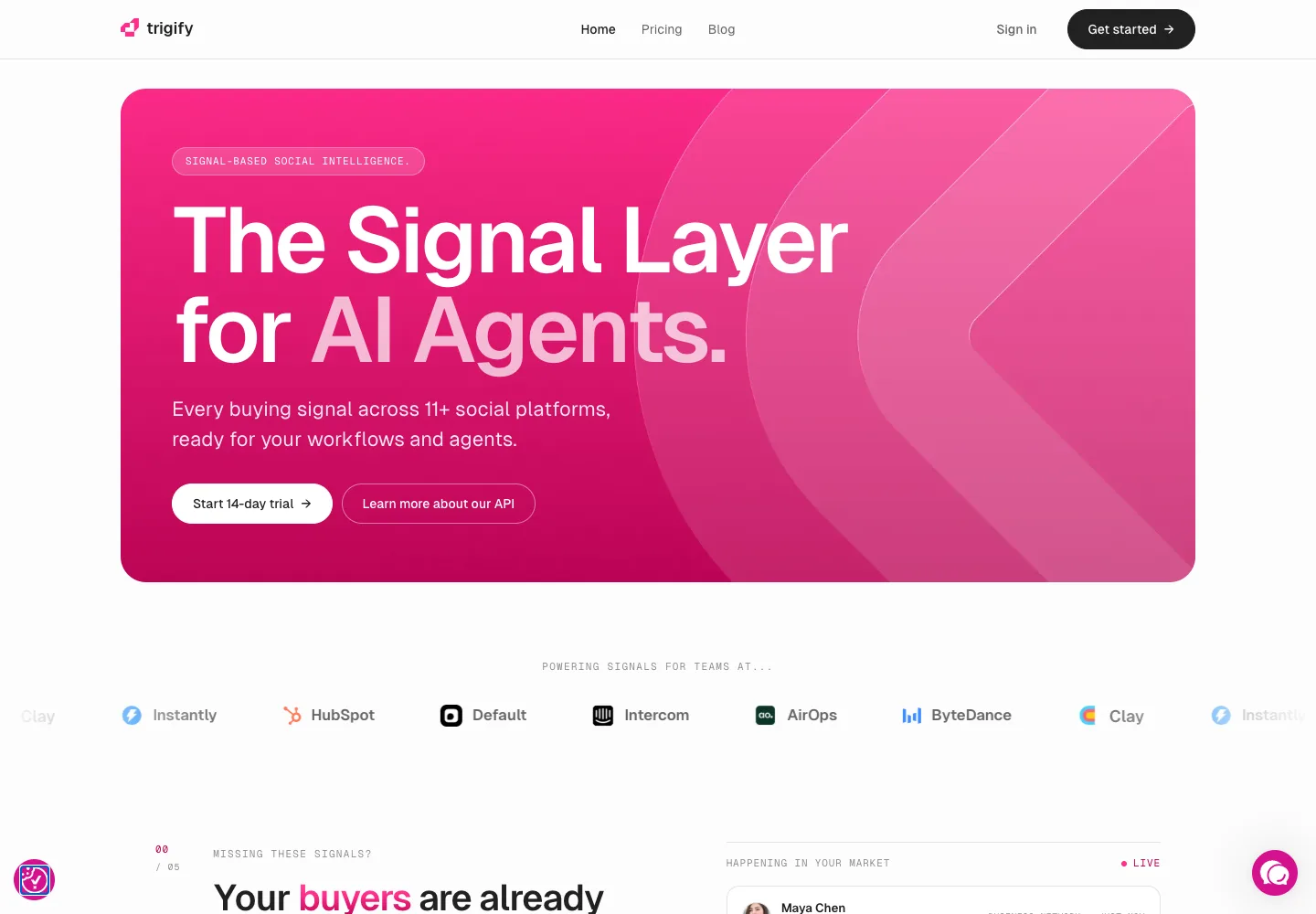
That positioning explains the shape of this comparison. Trigify is upstream of outreach. It competes with social listening and intent tools on the monitoring side, and it depends on a sequencer, a CRM or an agent on the sending side. So the question "what is the best Trigify alternative" splits in three: do you want a cheaper or broader listener, do you want listening and sending in one product, or do you already have signals and need something to act on them.
Trigify pricing in 2026
Trigify sells three plans on one credit system. Credits are consumed by signals, enrichments, engagement captures and Jarvis runs. Here is the public price list as read on September 14, 2026.
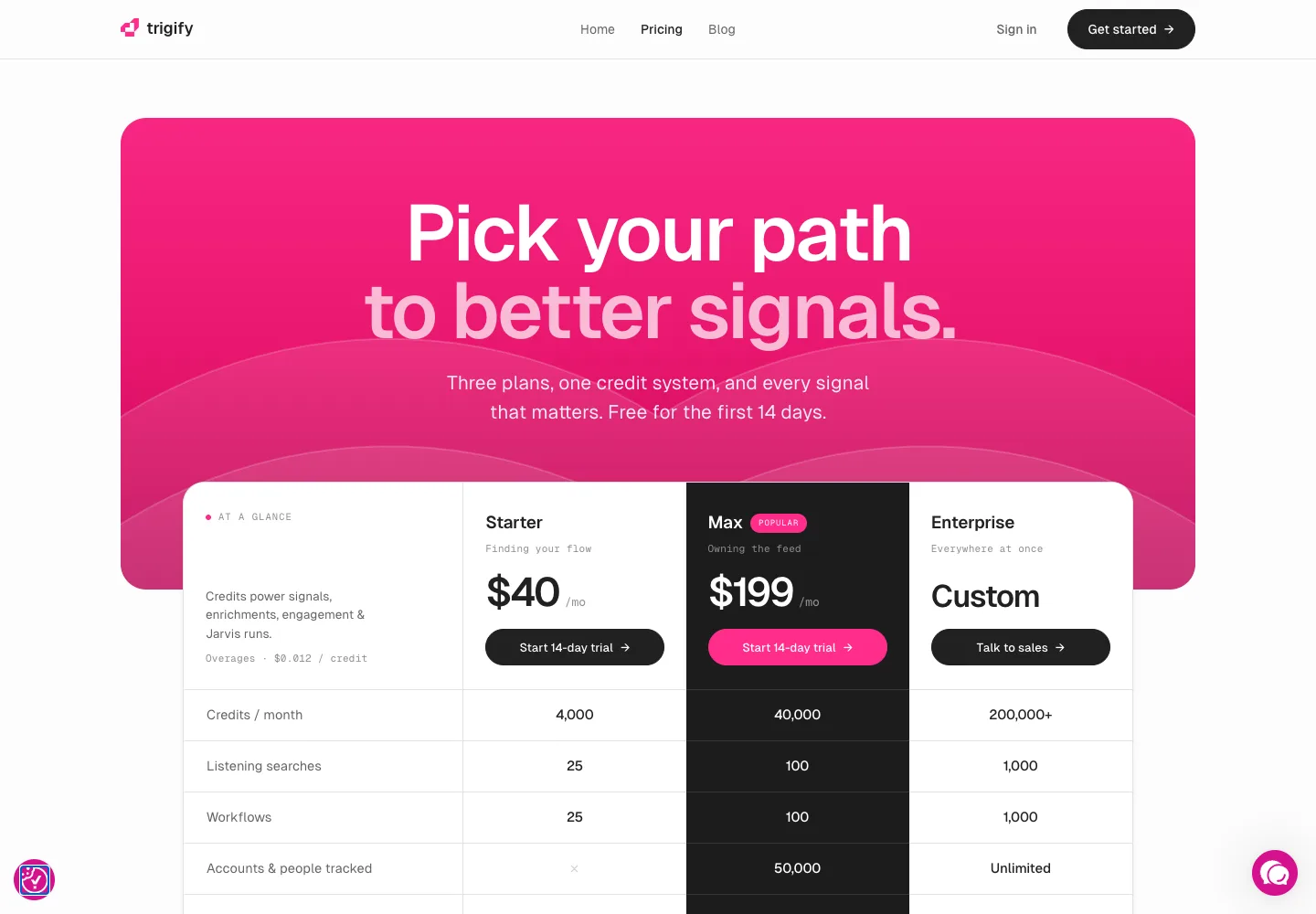
| Plan | Price | Credits a month | Listening searches | Workflows | Accounts and people tracked | Seats | Support |
|---|---|---|---|---|---|---|---|
| Trigify Starter | $40 a month | 4,000 | 25 | 25 | Not included | 2 | |
| Trigify Max | $199 a month | 40,000 | 100 | 100 | 50,000, plus 100 top accounts on social monitoring | 5 | Priority and Slack |
| Trigify Enterprise | Custom | 200,000+ | 1,000 | 1,000 | Unlimited, custom social monitoring | Unlimited | Dedicated CSM and SLA |
Three details from the comparison table matter more than the headline price. Overages are billed at $0.012 a credit on every plan. Search history is kept 7 days on Starter, 12 months on the Max plan and all time on Enterprise, and table storage runs 30 days, 90 days and unlimited respectively. Account and people tracking, the ABM half of the product, starts on the Max plan: Starter shows a cross in that row. API access, BYOK and integrations are listed on all plans; SSO and SAML are Enterprise only. Every plan includes Copilot, while Jarvis builds and executions scale with the tier. The trial is 14 days on all three plans.
Best Trigify alternatives compared
Nine alternatives plus Trigify as the baseline. The "job" column is the fastest way to shortlist: a listener, a listener that also sends, an execution tool, a builder, or an enterprise consolidation platform. The plan distinctions come from the vendor sources in the next table; the shortlist recommendations are our interpretation.
| Tool | Job it does | Signals it watches | Sends outreach? | Entry price (read Sept 14, 2026) |
|---|---|---|---|---|
| Buying signals plus execution: 21 signal types, ICP filter, review queue, email and LinkedIn sequences | LinkedIn post and page engagement, influencer audiences, topic mentions, competitor connections and content, job postings and changes, funding and M&A; French public records | Yes, email and LinkedIn | $69 a user a month | |
| Signal layer for workflows and agents | Social posts, engagement, role changes, hiring, expansion across 11+ platforms | No, routes to other tools | $40 a month | |
| AI agent that finds signals and runs outreach | Buying and social signals, lookalikes | Yes, email and social | $99 a month | |
| Social listening built for lead generation | Keyword signals across 16 to 33+ sources | Scale plan adds an AI SDR agent | $49 a month | |
| Builder: enrichment tables and GTM workflows | Whatever you wire in, including Trigify's own integration | Through connected senders | Free; Launch $167 a month | |
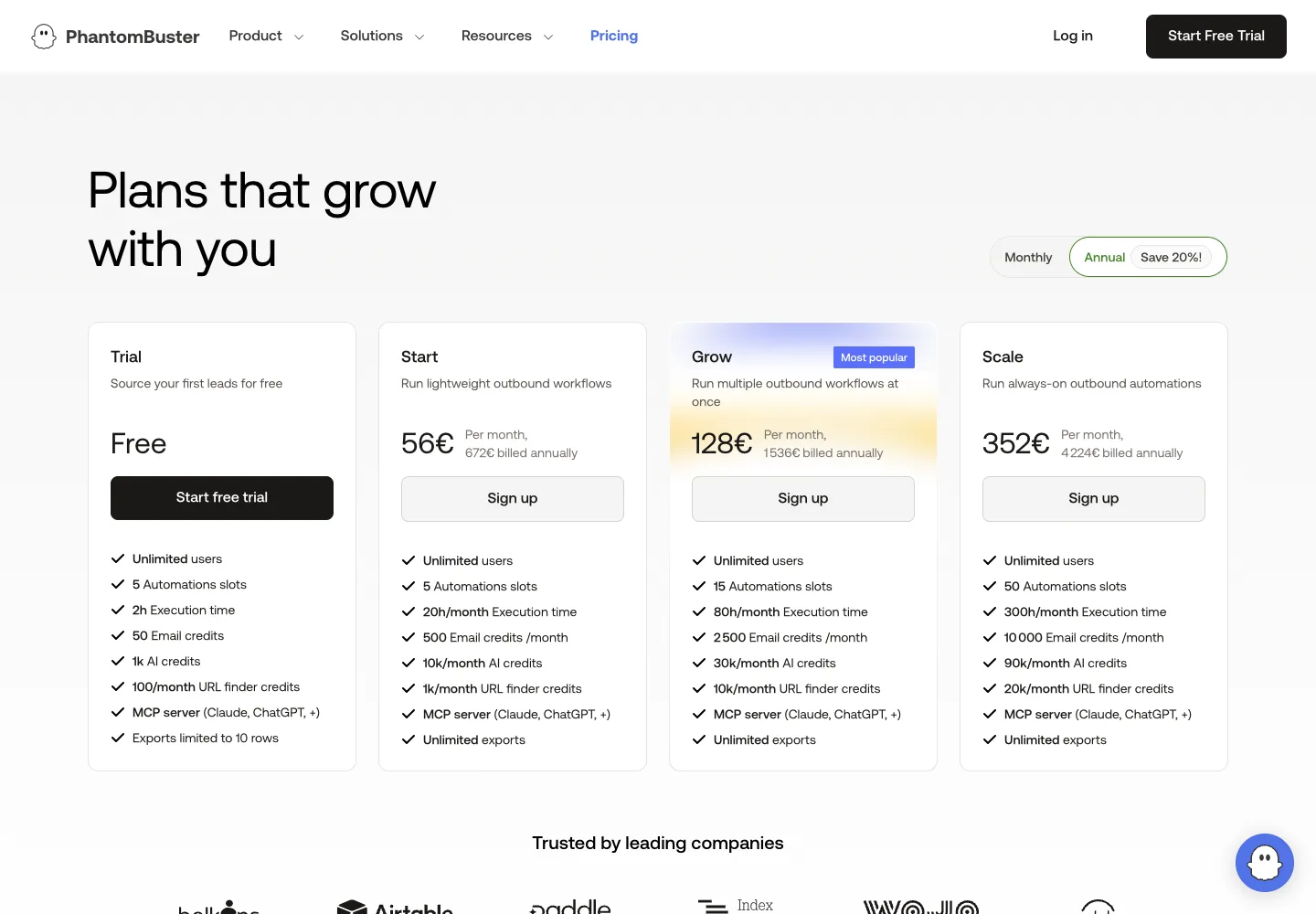
| Builder: scraping and automation recipes | Post engagers, profile data, searches you schedule | Some LinkedIn actions; email via credits | €56 a month on annual billing (EU display) | |
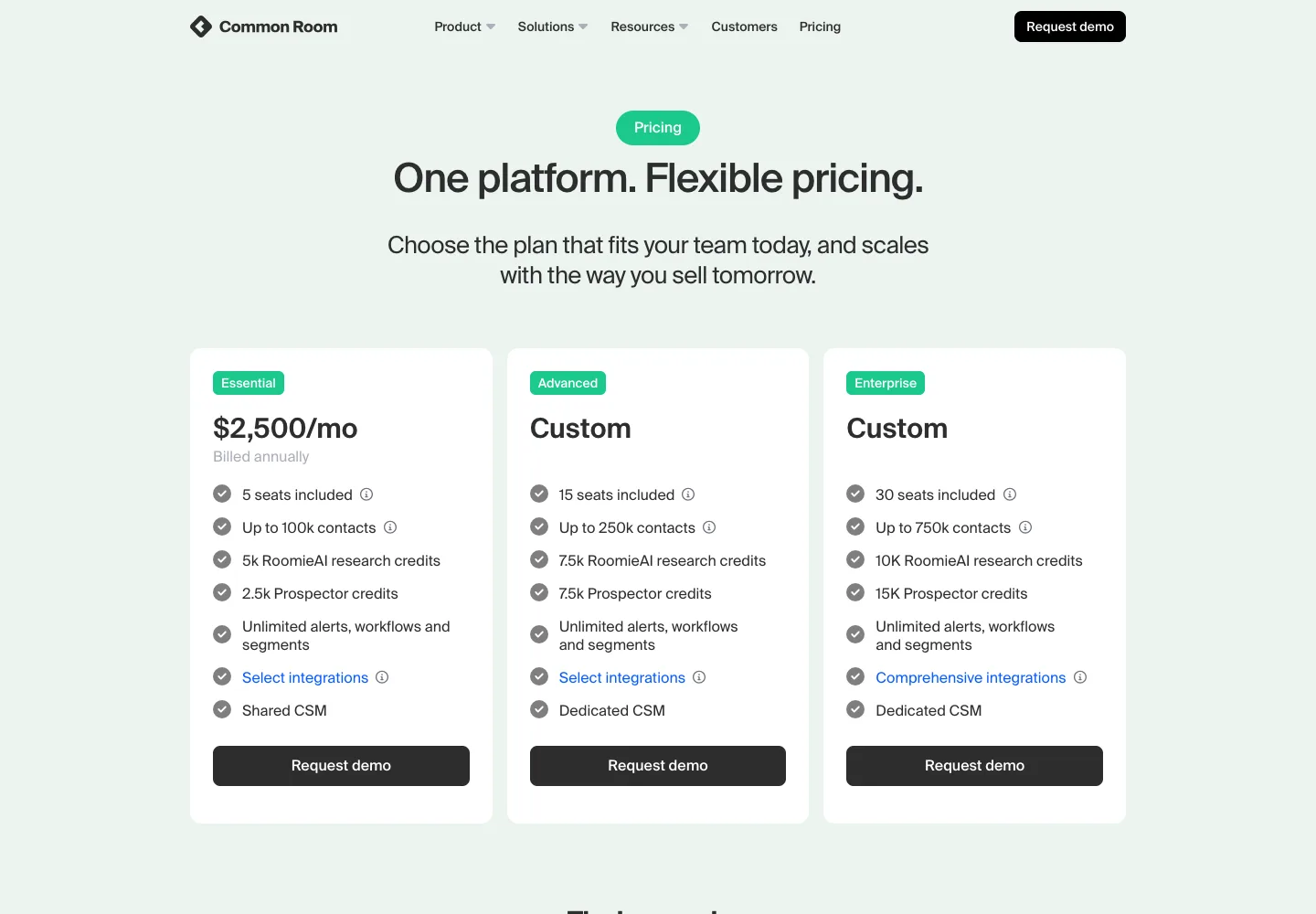
| Enterprise buyer intelligence | Job changes, web visits, product usage, social activity | Through integrations | $2,500 a month, billed annually | |
| Competitor intent and LinkedIn engagement, with an outbound agent | Accounts in live deals with competitors; engagement on your and competitors' LinkedIn content | AI outbound agent, human in the loop | Not published; demo required | |
| Website visitor identification | Web visits, not social | No, pushes to Slack, CRM and Clay | Free; Starter $79 a month | |
| Enterprise job-change and champion tracking | Job changes, past customers, buying groups | Drafts emails, pushes to sequencers | $3,333 a month, annual, plus implementation |










Trigify alternatives pricing and plan limits
Primary sources read September 14, 2026. USD unless marked EUR. Where a page shows a monthly and annual toggle, we state which one we read. Free trials are time-limited evaluations of a paid product; free plans are permanent tiers with hard caps.
| Tool and primary source | Published price | Limit that matters |
|---|---|---|
| Overloop pricing | $69/user/month Starter; $99/user/month Growth; Enterprise custom | Starter: 250 credits, 1 connected email account, 3 campaigns. Growth: 500 credits, 3 email accounts, 10 campaigns, HubSpot and Pipedrive, API. 7-day trial, no card. Signal monitoring is configured per workspace and the volume you can act on is bounded by credits; credits are per user, and the account quota is for email accounts, not LinkedIn accounts. |
| Trigify pricing | $40/month Starter; $199/month Trigify Max; Enterprise custom | 4,000 versus 40,000 credits; account tracking starts on the Max plan; overages $0.012 a credit; 14-day trial. |
| Gojiberry pricing (on the homepage) | $99/month Pro; Custom plan on request | Pro: 2 AI agents, up to 1,800 prospects contacted a month, email waterfall enrichment across 15+ providers. Free trial advertised. |
| Buska pricing | $49/month Starter; $99 Growth; $249 Scale; Agency custom | 5, 15 or 30 monitored signals; 2, 5 or 10 ICP profiles; lead refresh daily, every 3 hours or hourly; AI SDR agent only on Scale. 7-day trial, no card. |
| Clay pricing | Free; $167/month Launch; $446/month Growth; Enterprise custom | Free: 6,000 actions and 1,200 data credits a year, 200 rows a table. Launch starts at 180,000 actions and 30,000 data credits a year. Annual billing advertises 10% off. |
| PhantomBuster pricing | €56/month Start, €128 Grow, €352 Scale, each billed annually (EU display) | 5, 15 or 50 automation slots; 20, 80 or 300 hours of execution a month; 500, 2,500 or 10,000 email credits. Monthly billing removes the advertised 20% saving. Free trial with 2 hours of execution. |
| Common Room pricing | $2,500/month Essential, billed annually; Advanced and Enterprise custom | Essential: 5 seats, 100,000 contacts, 5,000 RoomieAI research credits, 2,500 Prospector credits. No free plan or trial advertised; demo request. |
| Letterdrop pricing | No public price list on the pricing page as read | The page routes to a demo. Third-party reviews quote plan prices; we do not repeat numbers we could not read on the vendor page. |
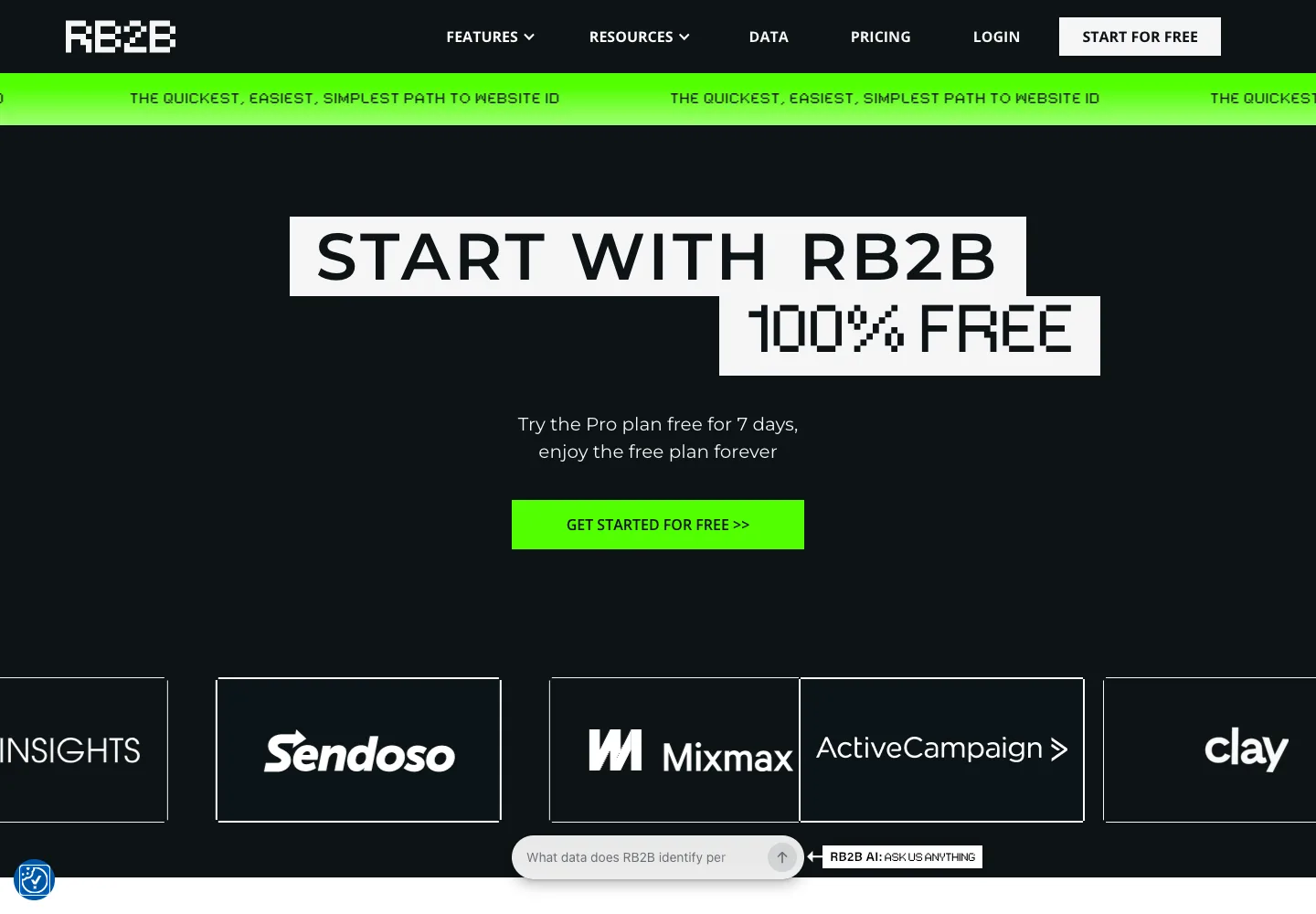
| RB2B pricing | Free; $79/month Starter; $149 Pro; $199 Pro+ | Free: 150 resolutions a month, company level only, Slack push. Starter: 300 resolutions, no email addresses. Pro and Pro+: from 600 resolutions with emails and all integrations. Person-level identification is US only, 15% to 45% coverage by plan. |
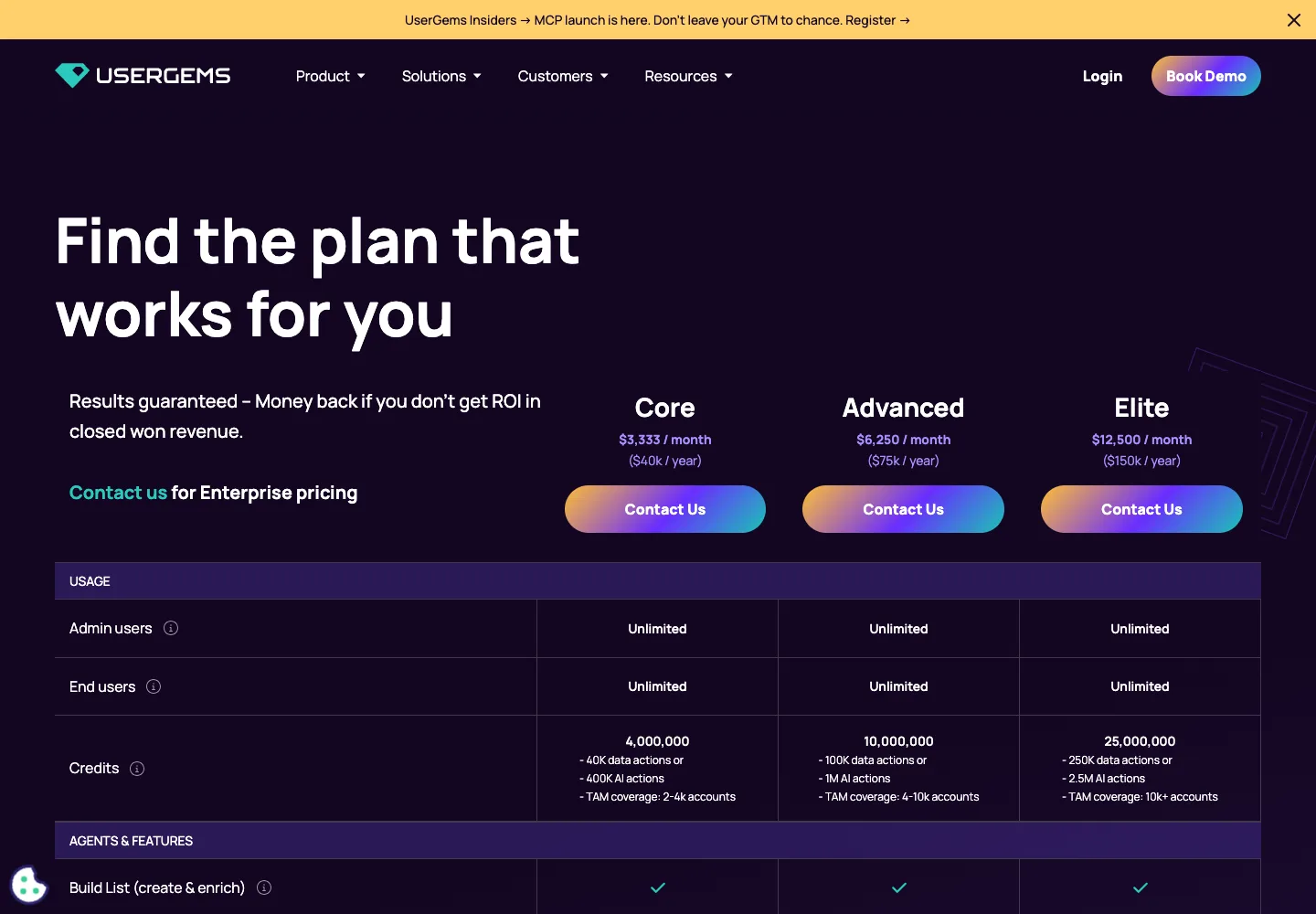
| UserGems pricing | $40,000/year Core ($3,333 a month); $75,000 Advanced; $150,000 Elite | Implementation fees of $3,000, $5,000 and $10,000 on top. Money-back guarantee tied to closed-won ROI is advertised. |
Compare the complete stack, not the entry price. A Trigify Starter at $40 still needs a sender. A Buska Scale at $249 includes one. An Overloop seat at $69 includes the LinkedIn engagement, competitor, hiring and growth signals and the sequence, with volume bounded by credits. The cheapest line item is rarely the cheapest workflow.
Why teams look for a Trigify alternative
A replacement should remove a concrete cost or workflow gap. These are the four reasons we hear most often, and the shortlist each one points to.
You want the signal and the message in one tool
Trigify hands the signal to a workflow and stops. If you do not want to run a second product for outreach, compare Overloop, Gojiberry and Buska Scale, which all detect and contact. Overloop adds an ICP filter and a human review queue between the signal and the first message.
You only need keyword listening
Not every team needs ABM account tracking, agents and an MCP server. If your job is "tell me when someone asks for a recommendation in my category", Buska Starter at $49 covers 5 signals and 16+ sources. Trigify Starter is cheaper at $40 but excludes account tracking.
You want to own the pipeline
Clay and PhantomBuster let you compose the exact sequence of scrape, enrich, score and push. Trigify has a Clay integration, so this is often "Trigify plus Clay" rather than "Clay instead of Trigify". Decide which tool is the system of record for the signal.
Your buying committee is on the website, not on LinkedIn
If the intent you care about is visits to your pricing page, RB2B identifies the company (free) or the person (paid, US only). Social listening will not surface that. Many teams run both a web signal and a social signal into the same sequence.
The buying criteria that actually matter
Judge a Trigify alternative on the workflow it produces, not on the length of its signal list.
| Criteria | Why it matters | What to check before switching |
|---|---|---|
| Signal to person resolution | A post about your category is worthless unless it resolves to a named person with a company and a way to reach them. | How many of last month's signals produced a verified email or a LinkedIn URL. Ask the vendor for the ratio, then check it in the trial. |
| Freshness | A signal is a buying window. Daily refresh is fine for hiring signals, too slow for "asked for a recommendation this morning". | Refresh interval per plan. Buska publishes daily, 3-hour and hourly tiers; Trigify describes a 24-hour signal monitor. |
| What happens next | The tool that owns the sending owns the reply, the pause-on-reply logic and the CRM record. | Whether outreach is native, agent-driven or pushed to a sequencer, and who owns the inbox. |
| Billing unit | Credits, seats, senders, execution hours and resolutions are five different ways to pay. Each punishes a different usage pattern. | Model your own volume: signals a month, people contacted a month, seats. Price two tools on that, not on the entry plan. |
| Platform rules | Monitoring LinkedIn engagement and automating LinkedIn actions both sit against LinkedIn's terms. The risk is on the connected account. | Which actions run from your own profile, what daily ceilings are documented, and how the vendor ramps new accounts. |
| Agent access | If your team builds with Claude, Cursor or n8n, an MCP server or a clean API turns the tool into a data source for your own agents. | Trigify, Clay and PhantomBuster document MCP or API access. Check whether it is on your plan. |
1. Overloop: buying signals and the sequence behind them, in one tool
Overloop watches public buying signals, filters every match against your ICP, puts the survivors in a review queue, then runs the email and LinkedIn sequence with the source event as the opener. That is the whole Trigify job plus the sending Trigify hands off, in one workspace. Shortlist it when your buyers show up in LinkedIn engagement, competitor activity, hiring or growth events and you want one tool from signal to reply. Keep reading for what it does not cover.
What it does
- Signal watching. Twenty-one signal types across five families. LinkedIn engagement: reactions and comments on a post, company page engagement, influencer audiences, keyword and topic mentions, event attendees, new followers of tracked companies. Competitor: new connections made by a competitor's sales or customer-success team, engagement with competitor content. Hiring and team change: new and reposted job postings, hiring campaigns, key departures, job changes. Growth: funding rounds, mergers and acquisitions, headcount movement. Local and public records: company registrations, public tenders, contract awards and new Google Maps listings, French sources only.
- ICP filter and review queue. Each detected event is checked against your firmographic and role filters, carries its source event, and waits for a person to accept or reject it before it can enter a campaign.
- Multichannel sequences. Email steps and LinkedIn steps (profile visits, connection requests, messages, InMails) in one visual timeline, with a channel switch when a connection request is not accepted.
- Prospect data. An advertised 450M+ B2B prospect database and a Chrome extension for adding prospects from LinkedIn, so a signal without an email address can still be resolved before the first step.
- The signal becomes the opener. Email and LinkedIn steps are drafted with the source event as context, plus the prospect's profile and mutual connections, then edited by you before anything sends.
- CRM handoff. HubSpot and Pipedrive on Growth, Salesforce on Enterprise, with scope that varies by plan.
Pricing as read on September 14, 2026
Signal monitoring is included and configured per workspace; the number of signals you can act on is bounded by plan credits, because enrichment and verification consume them. Starter is $69 a user a month with 250 credits, one connected email account and 3 campaigns. Growth is $99 a user a month with 500 credits, three email accounts, 10 campaigns, HubSpot and Pipedrive integration and API access. Enterprise is custom with 1,000 credits a user, unlimited accounts and campaigns and Salesforce. The trial is 7 days with no card. One credit is one sourced prospect or one found email.
Limits to check first
- Platform coverage. The engagement family is LinkedIn. Trigify lists 11+ social platforms including Reddit, X and YouTube; if your buyers ask for recommendations there, Overloop will not see it.
- Latency differs by family. Engagement and competitor signals sit close to the event; job changes and funding depend on when the record is published, which can be days or weeks. Use engagement as the trigger and job or funding data to prioritise.
- The local and public family (registrations, tenders, contract awards, Google Maps) is France only.
- No MCP server or CLI for agent builders; the REST API is on Growth and above.
- Credits are per user and reset monthly. A signal-heavy month can exhaust a Starter seat.
- The account quota on each plan counts connected email accounts, not LinkedIn accounts.
- Prospect replies do not sync from Overloop into HubSpot; do not plan on two-way sync.
- LinkedIn steps run against LinkedIn's terms, like every tool in this category. Overloop exposes pacing and daily limits; there is no universal safe number.
What we see running signal-based sequences ourselves
Overloop watches signals and runs the sequences behind them every week, so three observations here come from operating the category rather than reading about it. A signal loses most of its value within days: a person who posted about a problem on Monday reads a Thursday message very differently from a message the following month, so the sequence has to start the day the signal lands. The first line has to name the signal itself, in plain words, or the message performs like a cold list. And the reply rate tracks the quality of the signal far more than the number of follow-ups, which is why we treat volume as the risk variable and the trigger as the growth variable.
Fit: a founder-led or SDR team selling to people who are visible on LinkedIn, that wants three or four signals watched, a review queue and a human-approved multichannel sequence in one place. Not the fit: a team whose buyers live on Reddit or X, or an agent builder who wants signals as an API feed.
2. Gojiberry: an AI agent that finds signals and does the outreach
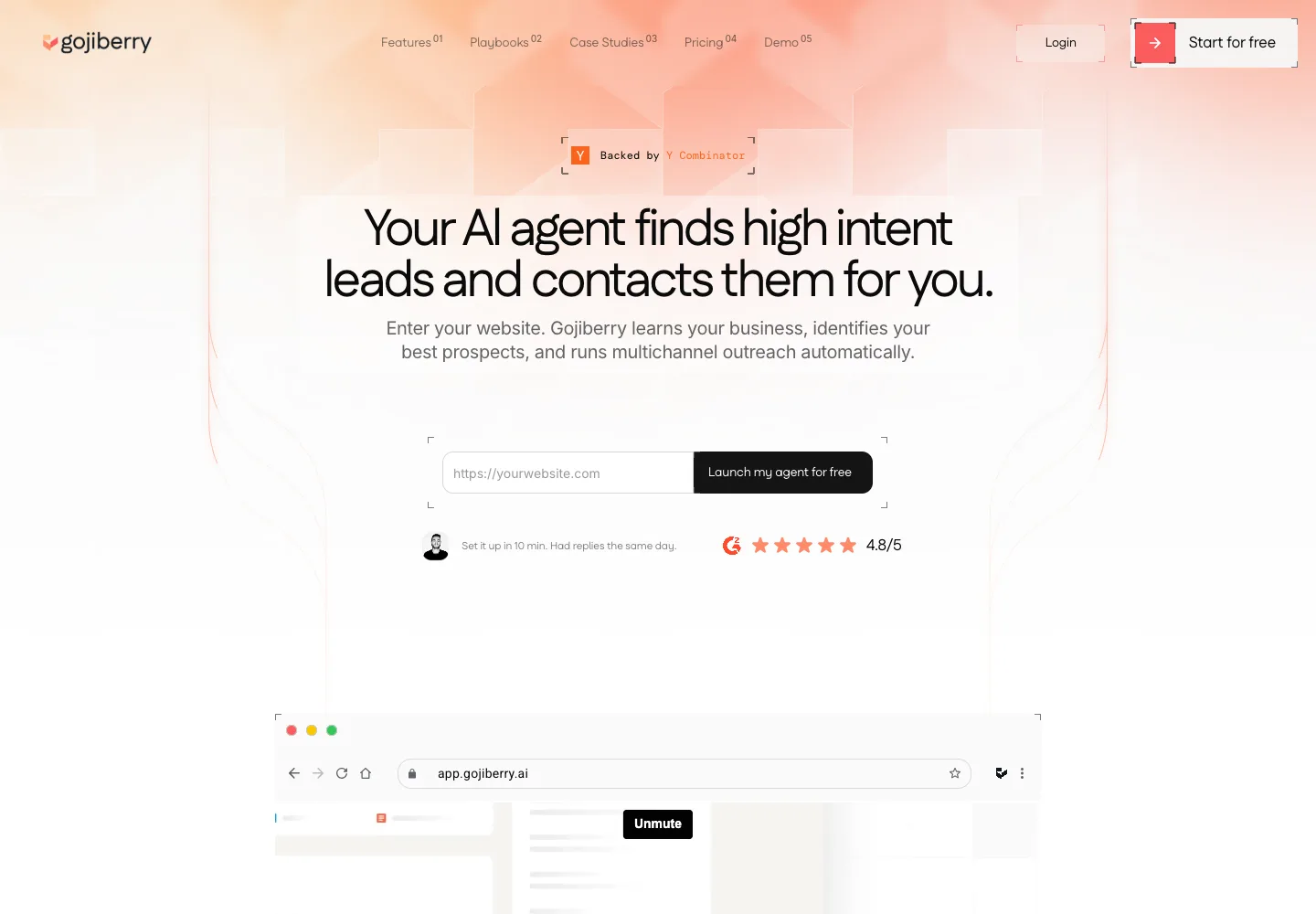
Gojiberry is, with Overloop, one of the two tools here that both detect signals and send the outreach, and the one that leans furthest into autonomy. You enter your website, the agent learns your business and ideal customer, detects buying and social signals, scores prospects against your ICP and contacts them over email and social channels. You can let it run fully autonomously or approve every message before it sends. The homepage shows a Y Combinator badge and a displayed G2 rating of 4.8 out of 5.
Pricing as read on September 14, 2026
The pricing section on the homepage lists one public plan. Pro is $99 a month with 2 AI agents prospecting around the clock, up to 1,800 prospects contacted a month with more available, automatic warm-lead sourcing from signals and lookalikes, a unified inbox, lead scoring, an AI copilot mode, email waterfall enrichment across 15+ data providers and CRM, API and MCP integrations. A Custom plan adds more agents, more prospects, more senders and a dedicated customer success manager. A free trial is advertised; the dedicated pricing page returned a 404 when we opened it, so we read the homepage.
Limits to check first
- You are buying an agent's judgment on who to contact and what to say. The approval mode exists for a reason; use it during the trial.
- 1,800 prospects a month is a ceiling on outreach, not on signals. Ask how signal volume is metered above that.
- Signal breadth is described in categories, not as a platform list the way Trigify's is. Confirm which sources matter for your buyers.
Fit: a small team that wants to replace both the listening tool and the sequencer with one agent. Not the fit: a team that needs raw signals delivered to its own stack via API.
3. Buska: social listening priced for lead generation
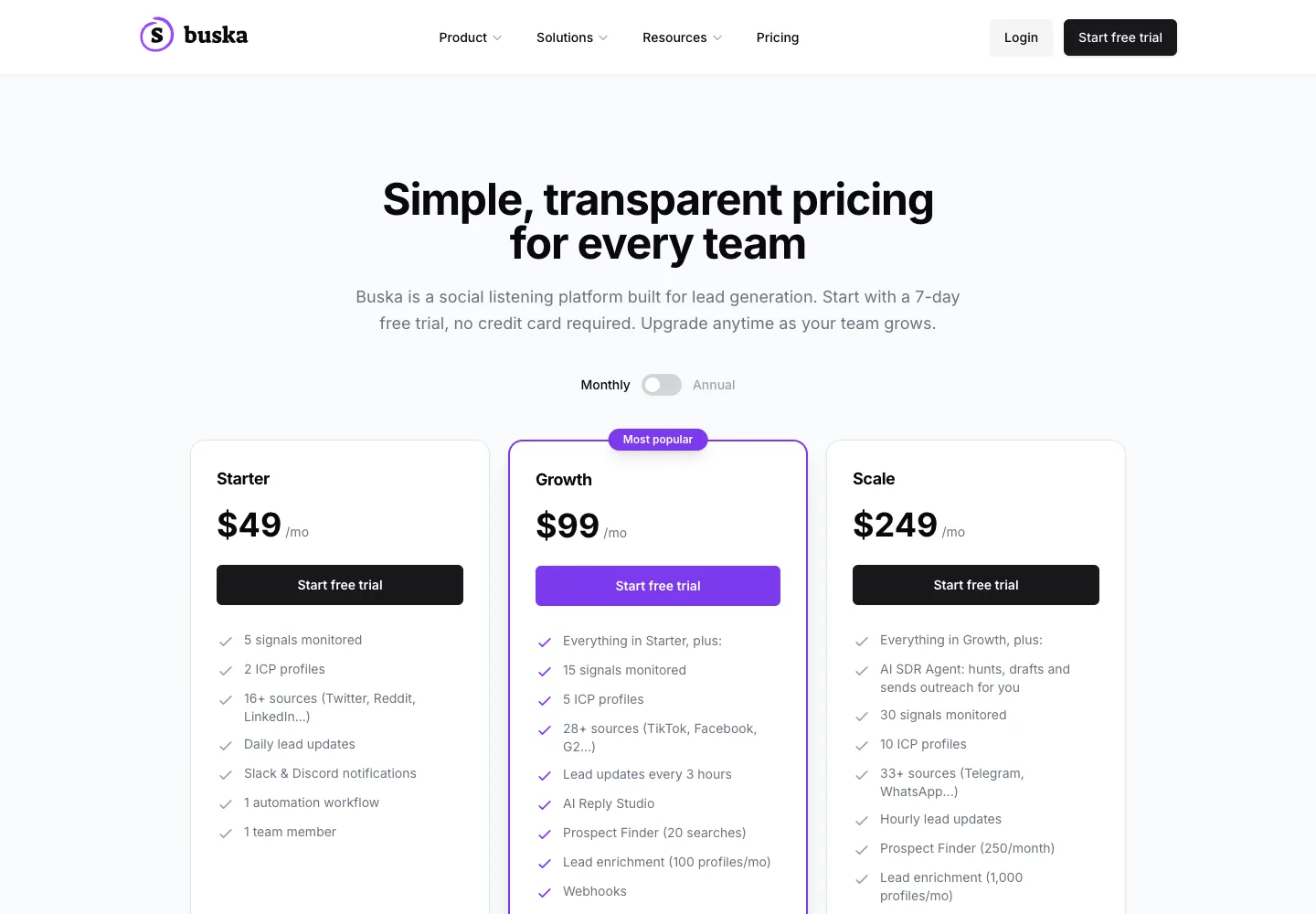
Buska is the closest listener to Trigify at a lower entry price. You define signals (keywords, competitors, pain phrases) and ICP profiles, Buska scans 16 to 33+ sources depending on plan, and every matching mention becomes a lead with notifications to Slack or Discord. On the Growth plan an AI Reply Studio drafts responses; on Scale an AI SDR agent hunts, drafts and sends the outreach for you.
Pricing as read on September 14, 2026
Starter is $49 a month: 5 monitored signals, 2 ICP profiles, 16+ sources including X, Reddit and LinkedIn, daily lead updates, one automation workflow, one team member. Growth is $99 a month: 15 signals, 5 ICP profiles, 28+ sources adding TikTok, Facebook and G2, lead updates every 3 hours, AI Reply Studio, Prospect Finder with 20 searches, enrichment of 100 profiles a month, webhooks, CSV export, API access at 500 requests a month, 5 workflows, 5 members. Scale is $249 a month: 30 signals, 10 ICP profiles, 33+ sources adding Telegram and WhatsApp, hourly updates, the AI SDR agent, 250 Prospect Finder searches, 1,000 enrichments, full API at 2,500 requests, unlimited automations and members, priority support. Agency is custom. The trial is 7 days with no card.
Limits to check first
- Signals are capped per plan, 5 on Starter. Trigify Starter allows 25 listening searches for $40. Count your searches before comparing the price.
- Account and people tracking of the ABM kind is not the product; Buska is mention-driven.
- The AI SDR agent is Scale only, so "listening plus sending" costs $249, not $49.
Fit: a founder or marketer who wants to catch recommendation requests and complaints across many platforms and reply fast. Not the fit: an ABM team tracking 50,000 named accounts.
4. Clay: build the signal pipeline yourself
Clay is a spreadsheet-shaped workflow builder with a marketplace of data providers. It does not listen to social platforms on its own, but it is where many teams assemble the pipeline Trigify sells pre-built: import a list of post engagers or job changers, run a waterfall of enrichment providers to find emails, score against your ICP with an AI column, and push to a sequencer or CRM. Trigify publishes a Clay integration, and Trigify's own homepage lists Clay as a customer, so for many buyers this is a "with", not an "instead of".
Pricing as read on September 14, 2026
The pricing page shows four tiers with a monthly and annual toggle. Free includes 6,000 actions and 1,200 data credits a year with tables capped at 200 rows. Launch is displayed at $167 a month, starting at 180,000 actions and 30,000 data credits a year, expandable in steps. Growth is displayed at $446 a month, starting at 480,000 actions and 72,000 data credits a year. Enterprise is custom with unlimited search and imports, SSO and role-based access. Annual billing advertises 10% off. Actions meter platform usage; data credits pay for third-party data from the marketplace.
Limits to check first
- Two meters. Actions and data credits run out at different speeds, and the enrichment providers you pick decide the credit burn.
- Clay is only as good as the operator. Budget for a GTM engineer or for your own time. Our GTM engineer guide puts numbers on that role.
- Sending still happens elsewhere. Clay pushes to Instantly, Smartlead, Overloop, HubSpot and others; the reply lives in that tool.
Fit: a team that wants control over every step and has someone to own it. Not the fit: a founder who wants signals to appear in Slack tomorrow morning. See our Clay alternatives comparison for the neighbours in that category.
5. PhantomBuster: scraping and automation recipes
PhantomBuster runs "Phantoms", single-purpose automations such as extracting the people who liked or commented on a LinkedIn post, scraping a search, enriching profiles with emails or pushing results to a CRM, and "Workflows", which chain them into recipes like "find people who engaged with a post, collect their profiles, export to your CRM". That post-engagement recipe is the closest thing PhantomBuster has to a social signal, and it is manual and scheduled rather than always-on listening.
Pricing as read on September 14, 2026
The pricing page geolocates. Read from Europe with annual billing selected, Start is €56 a month (€672 billed annually) with 5 automation slots, 20 hours of execution a month, 500 email credits, 10,000 AI credits and 1,000 URL finder credits. Grow is €128 a month (€1,536 a year) with 15 slots, 80 hours and 2,500 email credits. Scale is €352 a month (€4,224 a year) with 50 slots, 300 hours and 10,000 email credits. All plans list unlimited users and an MCP server for Claude and ChatGPT. The monthly toggle removes the advertised 20% saving. A free trial gives 2 hours of execution and exports capped at 10 rows.
Limits to check first
- Execution time is the real meter. Twenty hours a month is about 40 minutes a day of running automations.
- Most Phantoms run from your own LinkedIn session, so the account risk is yours.
- Scheduled scraping is not monitoring. If you need to know within the hour, this is the wrong shape.
Fit: ops-minded teams that want cheap, composable extraction with an MCP server for their agents. Not the fit: anyone who wants a signal feed without maintenance.
6. Common Room: enterprise buyer intelligence
Common Room aggregates signals from far more surfaces than a social listener: job changes, website visits, product usage, community activity and social engagement, resolved to people and accounts, with RoomieAI research and a Prospector for list building. It is the consolidation play. We compared it in depth in our Common Room alternatives guide.
Pricing as read on September 14, 2026
Essential is $2,500 a month billed annually with 5 seats, 100,000 contacts, 5,000 RoomieAI research credits, 2,500 Prospector credits, a shared customer success manager and select integrations. Advanced (15 seats, 250,000 contacts) and Enterprise (30 seats, 750,000 contacts) are custom. No free plan or trial is advertised; the page offers a demo.
Limits to check first
- $30,000 a year minimum. This is a different budget line from a $40 Trigify plan.
- The value is in breadth. If you only need social signals, you are paying for four surfaces to use one.
- Sending is through integrations, not native.
Fit: a revenue team with a data function that wants one system of record for intent. Not the fit: a five-person startup.
7. Letterdrop: competitor intent and LinkedIn engagement
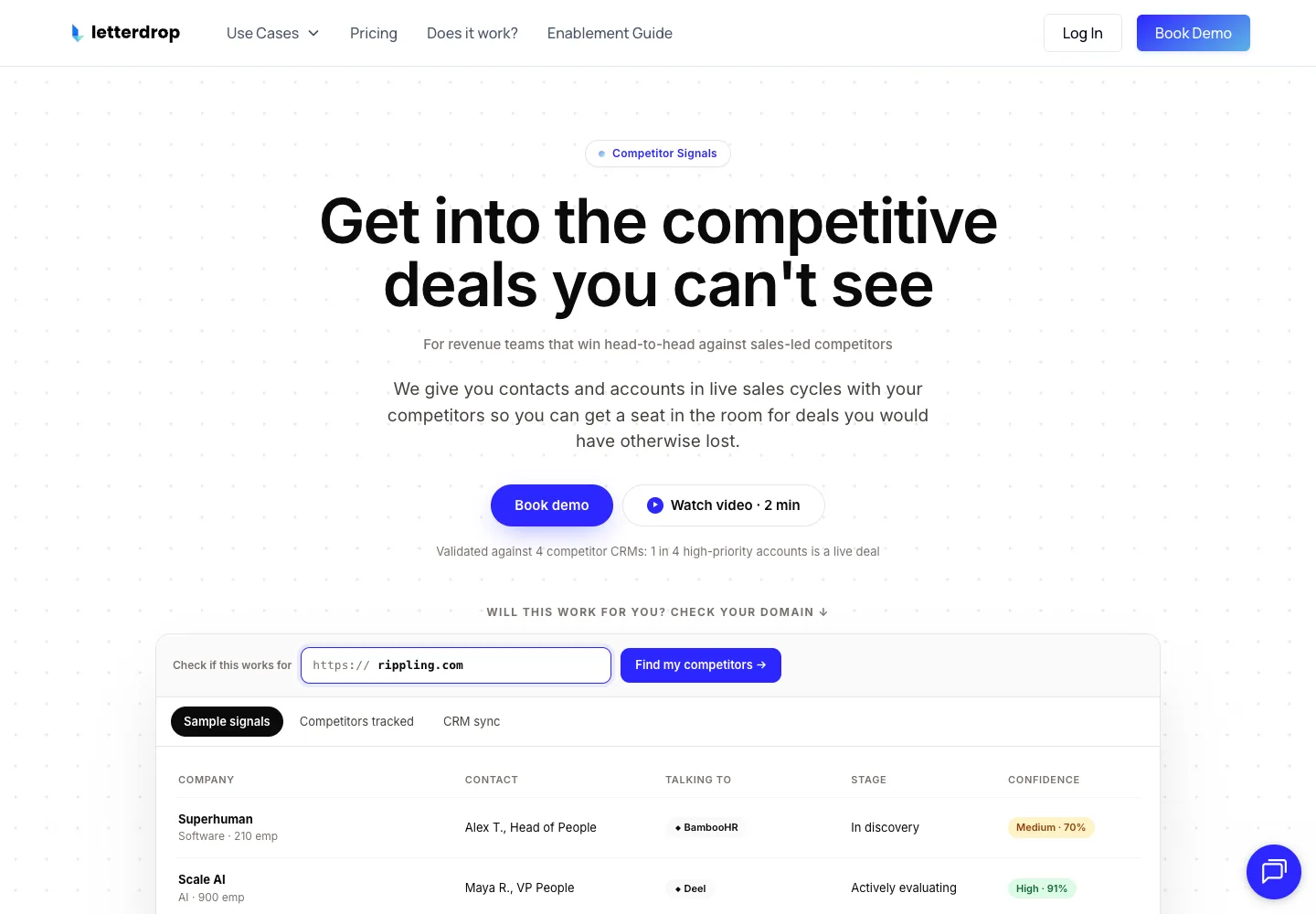
Letterdrop started as a LinkedIn content tool and now leads with competitor intent. Its homepage headline on September 14, 2026 reads "Get into the competitive deals you can't see": it surfaces contacts and accounts that are in live sales cycles with your competitors, claims validation against four competitor CRMs where one in four high-priority accounts was a live deal, and lets you check your own domain to see which competitors it tracks. The LinkedIn engagement signal that made it known, who engages with your posts and with competitors' content, feeds the same account list, and an AI outbound agent drafts with a human in the loop and syncs to Salesforce, HubSpot, Apollo and Outreach.
Pricing as read on September 14, 2026
The public pricing page did not display a price list when we read it; the visible path is a demo request. Third-party review sites quote plan prices, but we do not repeat numbers we could not read on the vendor's own page. Treat Letterdrop as demo-priced until you have a quote.
Limits to check first
- Narrow signal family. Competitor deal cycles and LinkedIn engagement are two signals; if your buyers ask for recommendations on Reddit or in Slack communities, this will miss them.
- Positioned for content and revenue teams, not solo operators.
- Get the billing unit in writing before comparing to seat- or credit-based tools.
Fit: a B2B team whose executives post regularly on LinkedIn and want that engagement worked as pipeline. Not the fit: a team with no LinkedIn content programme.
8. RB2B: website visitors, not social signals
RB2B answers a different question from Trigify: not "who is talking about my category" but "who is on my website right now". It identifies the company behind a visit on every plan and, on paid plans in the US, the person, then pushes to Slack, HubSpot, Salesforce, Clay, Apollo or a webhook. It belongs on this list because many teams evaluating Trigify realise their strongest intent signal is a pricing-page visit, not a LinkedIn like.
Pricing as read on September 14, 2026
Free gives 150 resolutions a month at company level with a Slack push and no person-level identification. Starter is $79 a month for 300 resolutions, pushing LinkedIn URLs to Slack or Teams, with no email addresses and no other integrations. Pro starts at $149 for 600 to 2,500 resolutions and adds business email addresses and all integrations. Pro+ starts at $199 with premium resolution and tiers from 600 to 2.5 million resolutions a month. Contact-level identification is US only, with 15% to 20% coverage stated for Starter and Pro and 35% to 45% for Pro+; company-level identification is global. A 7-day full-feature trial is advertised.
Limits to check first
- Person-level identification is US only. Outside the US you get the company, not the visitor.
- Coverage of 15% to 45% depending on plan means most visits stay anonymous; plan volume accordingly.
- No outreach. Pair it with a sequencer or an agent.
Fit: a US-market team with meaningful website traffic. Not the fit: a European team, or anyone whose buyers never visit the site before talking to sales.
9. UserGems: job changes and past champions at enterprise scale
UserGems tracks the people who matter to you as they move: past customers who change jobs, champions who land at target accounts, buying groups that reshuffle. It builds lists, captures those signals and drafts emails through what it calls AI data agents, then pushes to your sequencer. The signal category overlaps with Trigify's "changed role" signal, at a very different depth and price.
Pricing as read on September 14, 2026
Core is $40,000 a year ($3,333 a month) plus a $3,000 implementation fee. Advanced is $75,000 a year plus $5,000, Elite $150,000 a year plus $10,000, Enterprise on request. All plans advertise a money-back guarantee if you do not reach ROI in closed-won revenue.
Limits to check first
- The price. This is a Salesforce-scale procurement, not a card swipe.
- It is best when you have a large customer base to track; a two-year-old startup has few past champions.
- Social listening is not the product; it is a CRM-anchored job-change engine.
Fit: a mid-market or enterprise team with thousands of historical contacts. Not the fit: anyone comparing against a $40 plan.
When to keep Trigify
Before switching, check whether your gap is already covered. Trigify's Max plan tracks 50,000 accounts and people, keeps 12 months of search history, publishes an MCP server, a REST API and a CLI, and integrates with Instantly, Attio, Slack, Notion, Sheets and, through its documented integrations, Clay and HubSpot. If your team builds agents and wants the signal delivered as data, that combination is hard to beat at $199 a month. The honest reasons to leave are the sending gap (solved by pairing, or by Overloop which does both), a price mismatch at low search counts, or a buying committee that lives on your website rather than on social. Check the current plan limits before deciding.
Which tool fits your actual team?
One person, one inbox, replies matter more than volume
Overloop Starter covers the LinkedIn engagement, competitor and hiring signals and the sequence in one seat. Add Buska Starter if your buyers also talk on Reddit or X, or pick Gojiberry Pro if you would rather have an agent do the work and approve each message.
Three to ten reps, a CRM, a quota
Overloop Growth gives each rep the signal queue, email and LinkedIn steps and a HubSpot or Pipedrive handoff in one tool. Keep a dedicated signal layer (Trigify Max or Common Room) only if you need platforms beyond LinkedIn or an API feed for your own stack.
You want the signal as data
Trigify's MCP server and API, Clay tables, PhantomBuster recipes. Choose the system of record for the signal first, then let the sequencer be a downstream node.
Migration checklist if you are leaving Trigify
- Export your listening searches and workflow logic: topics, Boolean strings, tracked profiles, destinations. Search history is kept 7 days on Starter, so export before you cancel.
- Separate the listening gap from the sending gap: if Trigify finds the right people and you are unhappy with what happens next, add a sender instead of replacing the listener.
- Measure resolution, not signals: how many of last month's signals became a person with a reachable email or LinkedIn URL. Judge the replacement on the same number.
- Rebuild one search first: your highest-volume topic, in the new tool, for two weeks, before moving the rest.
- Define who owns the reply: the tool that sends the message owns the inbox, the pause logic and the CRM record.
- Count meetings, not mentions: a signal feed that produces no conversations is a dashboard, not a pipeline.
Watch the signal and send the sequence from one tool.
Overloop watches 21 public buying-signal types, filters them against your ICP, and turns the ones you accept into email and LinkedIn sequences with a human-reviewed first message. Configure three signals in the 7-day trial and count how many matches a rep would actually contact before you decide anything.
Try Overloop free- which three signals you will watch first
- how many people a month you will contact
- which channel goes first, email or LinkedIn
- who answers the reply
How we compared Trigify alternatives
This is a comparison of public product pages and published plans, read on . We distinguish what a vendor documents from our judgment about buyer fit. We did not run a controlled reply-rate, coverage or deliverability test, and we do not use "tested" or "vetted" language anywhere on this page.
Every price links to the vendor page it was read on. Nine pages were captured as 1440 by 1000 screenshots with a recorded URL, timestamp and file hash: the Trigify homepage and pricing page, the Gojiberry and Letterdrop homepages, and the pricing pages of Buska, PhantomBuster, Common Room, RB2B and UserGems. Clay's pricing page was read but not captured because its cookie dialog covered the plan cards.
Letterdrop's pricing page shows no price list to an anonymous visitor. Gojiberry's dedicated pricing URL returned a 404, so we read the pricing section on its homepage. PhantomBuster geolocates pricing, so we state the EU display. We did not repeat third-party numbers for any of these.
Signal to person resolution, freshness, what happens after the signal, billing unit, platform rules and agent access. List order is not a performance ranking.
We refresh this page when Trigify changes its plans or when a listed vendor changes a published price. If you spot a stale number, the vendor link next to it is the source of truth.
FAQ
How much does Trigify cost?
As read on September 14, 2026, Trigify Starter is $40 a month with 4,000 credits and 25 listening searches, Trigify Max is $199 a month with 40,000 credits, 100 searches and 50,000 tracked accounts and people, and Enterprise is custom. Overages are $0.012 a credit and every plan has a 14-day trial.
What is Trigify used for?
Trigify monitors social platforms for buying signals tied to specific people: posts about a tracked topic, engagement with competitor content, role changes, hiring and expansion. Workflows enrich each signal and push it to tools such as Instantly, Attio, Slack, Notion, Sheets, Clay and HubSpot, or to your own AI agents through an MCP server, REST API and CLI.
What is the best Trigify alternative?
Overloop for most teams: it watches 21 buying-signal types (LinkedIn engagement, competitor, hiring, growth, French public records), filters each match against your ICP and runs the email and LinkedIn sequence from $69 a user a month. Buska from $49 a month for keyword listening across Reddit, X and 30+ platforms. Gojiberry at $99 a month for a fully autonomous agent. Clay or PhantomBuster to build your own pipeline. Common Room or UserGems for enterprise consolidation.
Is there a free Trigify alternative?
Clay has a permanent free tier with 6,000 actions and 1,200 data credits a year, and RB2B has a free plan with 150 company-level website resolutions a month. Trigify, Buska, Gojiberry and Overloop offer free trials, not free plans.
Does Trigify send LinkedIn messages or emails?
No. Trigify detects and routes signals. Sending happens in a connected tool such as Instantly, a CRM or an agent you build. Overloop is the tool on this list that does both, watching the signals and running the email and LinkedIn sequence.
Can Overloop replace Trigify?
For LinkedIn engagement, competitor, hiring and growth signals, yes: Overloop watches those signal types, filters them against your ICP, queues them for review and runs the email and LinkedIn sequence that Trigify hands off to another tool. It does not replace Trigify if you need Reddit, X, YouTube or the other platforms in Trigify's 11+ list, or an MCP server and API feed for your own agents.
Trigify vs Common Room: what is the difference?
Trigify is a social signal layer priced from $40 a month for small teams and agent builders. Common Room is an enterprise buyer intelligence platform priced from $2,500 a month billed annually that aggregates job changes, website visits, product usage and social activity across many more surfaces. Trigify's own FAQ names Common Room and Clay as the tools it is most often compared with.
Trigify vs PhantomBuster: which one for LinkedIn signals?
Trigify is always-on monitoring with signals resolved to people and pushed by workflows. PhantomBuster is scheduled extraction: you run a Phantom to pull the people who engaged with a post, then enrich and export them. PhantomBuster is cheaper to start and more flexible; Trigify is closer to a live feed.
Which Trigify alternative should you choose?
Choose Overloop when your buyers are visible on LinkedIn and you want the signal, the ICP filter, the review queue and the email and LinkedIn sequence in one tool. Keep Trigify when you build with agents and want signals from 11+ platforms delivered as data. Choose Buska when you want keyword listening across Reddit, X and many platforms at the lowest entry price. Choose Gojiberry when one AI agent should find and contact prospects and you will approve its messages. Choose Clay or PhantomBuster when you want to own the pipeline, and Common Room or UserGems when the budget and the customer base are enterprise-sized.
Whatever you pick, run one real search and one real sequence during the trial, and count meetings. A signal is only worth what you do with it in the next hour. For the wider category, read our best AI tools for buying signals and best tools for buying signal outreach.